

Verdict
The Matter integration might be very basic and the remote quite cheap feeling, but overall the SwitchBot Standing Circulator Fan is excellent value, especially considering it has a built-in battery. If you want something a bit more sleek, then check out the guide to the best fans; if you want the most features for the best price, this fan is excellent.
-
Excellent value
-
Powerful
-
Integrated battery
-
Smart app control
-
Remote is a bit basic
-
Can need a nudge to get oscillation working
Key Features
Introduction
The SwitchBot Standing Circulator Fan is designed to be both a traditional fan, blowing air where you want it, and to help circulate air more evenly around a room, whether that’s to distribute heat from a radiator in winter or push warm air out in summer.
It’s very competitively priced, can be made smart via the SwitchBot app, and is even convertible between a desktop and a freestanding model. Should this be at the top of your list for a circulator fan? Read my full review to find out.
Design and features
- Desktop or pedestal mount
- Smart controls via app
- Basic remote control
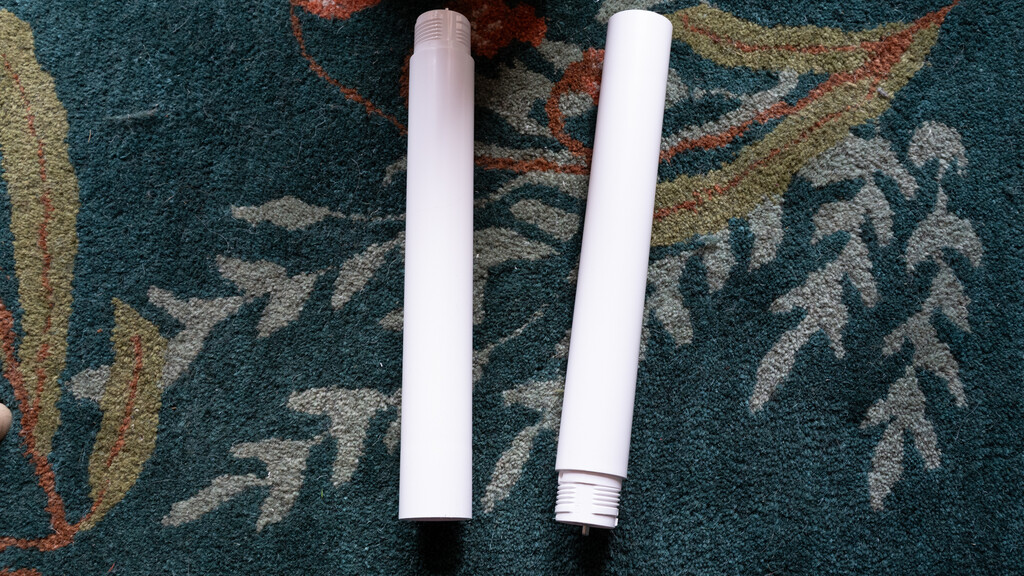
The SwitchBot Standing Circulator Fan comes in a box that looks far too small to hold a standing fan, but the reason soon becomes clear: the fan ships with a separate base, fan unit, and then two screw-in pole sections.
You can use all three pole sections for a full-height fan, one for a slightly shorter model, and none if you want this to be a desktop fan.

That’s a handy trick, although the screw-in element does mean that it’s not particularly quick to move from one mode to another, a similar issue with the similar MeacoFan Sefte 10 Pedestal Air Circulator.

The MeacoFan Sefte 10 feels better made, and there’s a bit of a lightweight budget feel to SwitchBot’s fan, although it does look nice and simple once built.
The base of the fan contains the power input plus a 5V USB-C input should you wish to use the fan this way. Or, once the internal battery has been charged, you can use the fan without a power cable for up to 28 hours.

Controls are all located on the fan’s base, too, with a button to cycle through the fan speeds (nine in total); one to change mode (Natural, which simulates a real breeze; Sleep, which slowly lowers the fan speed to setting one; and Baby, which runs the lowest fan); oscillation buttons (horizontal and vertical, separately); and a dual-button that turns the nightlight on and off (this can be operated while the fan’s off), or, with a long-press, enters the timer mode (one to nine hours, in one-hour increments).

There’s a remote control that sticks magnetically to the back of the fan. That’s neat, in that the remote doesn’t stick out when not in use.

This remote feels a bit cheap, and the buttons need a hard press. And because the IR receiver is on the fan’s base, it can be tricky to get the fan to respond to the controls.

You get all of the same controls on the remote as the fan, although the timer and light buttons are separated here, and you can increase or decrease fan speed (with the stand’s controls, you can only cycle through the fan speeds in order).
This being a SwitchBot product, the fan is compatible with the SwitchBot app. You get local control without a Hub; if you’ve got a Hub, then you can remote control the fan, plus add it to Matter compatible system.

For the latter, there’s not much point. I added my SwitchBot Standing Circulator Fan to Apple Home and only got on/off controls.
If you’ve got a SwitchBot Hub 3, you can add the fan to that and use the device’s controls to adjust the fan. That could be handy if you’ve got the fan in an office and want controls within reach.

Via the app, you get the same range of controls, plus there’s control over the oscillation range. For vertical, the fan moves -10° down, but there’s a choice of 30°, 60° or 90° of upward movement.

For horizontal, the fan can swing 30°, 60°, or 90°, with an even split between left and right rotation.
Finally, the app allows scheduling if you want to run it at specific times, or just have it shut down automatically at a set time. Alternatively, the Off delay time in the app gives more granularity, allowing everything from one minute to nine hours 59 minutes.
Performance
- Good battery life
- Powerful on its highest setting
- Quiet on its lower settings
While the light might not be to everyone’s taste, you can ignore it if you don’t want it. However, in a child’s bedroom, the soft light (particularly on the lowest setting) makes for a nice night light.

To see how well this fan performed, I tested it at multiple fan speeds. First, I started on the lowest setting. At 15cm I measured air speed at 0.9m/s, and at 1m my anemometer couldn’t pick anything up, although I could feel a gentle breeze. Sound came in at 35.9dB, which is basically background noise.
At fan speed four, I measured 3m/s at 15cm and a decent 2.1m/s at 1m. Sound increased to a still-low 44.8dB.
On maximum speed, air speed increased to 5.1m/s at 15cm and 3.8m/s at 1m. Sound, at 57.2dB is still pretty low.
General air flow is similar from this fan as with most models. There’s some buffeting, and there’s a definite sweet spot: move out of this and you don’t feel much air. In comparison, the Dyson Find+Follow Purifier Cool PC3, has lower air speed at any one point, but its air covers a wider area and feels more natural.
On high speed, on full oscillation, it’s worth being careful what you put near the SwitchBot Standing Circulator Fan, as it can blow loose papers around.
I also had an issue a couple of times where the oscillation mode wouldn’t work until I’d gently nudged the fan. The first time was when the fan was first assembled, and the second was after I’d moved the SwitchBot Standing Circulator Fan to a new room and had manually repositioned its fan assembly.
I’m not that convinced by the Natural mode, which switches between a few low fan speeds. I didn’t feel as though the air flow felt particularly natural, and the changing fan speeds also meant that sound changed, making the fan more noticeable.
Battery life is rated for up to 12 hours on the lowest setting, but increasing fan speed will drop that. On high, I got two hours with oscillation turned on. That’s still enough to cool you while you watch a film, for example.
I didn’t find the battery meter very accurate. This shows three bars for full power, and the fan stayed on this for almost an hour and a half, before dropping to two bars and then none at the two-hour mark.
Should you buy it?
You want a very flexible fan
Smart app controllable, powerful, vertical and horizontal oscillation and an integrated battery, this fan has it all.
You want heating or purification
If you want a fan that can heat in winter or purify your air all year around, then look elsewhere.
Final Thoughts
The Matter integration might be very basic and the remote quite cheap feeling, but overall, the SwitchBot Standing Circulator Fan is an excellent value, especially considering it has a built-in battery. If you want something a bit sleeker, check out the guide to the best fans; if you want the most features for the best price, this fan is excellent.
How We Test
We test every fan we review thoroughly over an extended period of time. We use industry standard tests to compare features properly. We’ll always tell you what we find. We never, ever, accept money to review a product.
Find out more about how we test in our ethics policy.
- Used as our main fan for the review period
- We measure the fan speed using an anemometer so that we can accurately compare performance between models
FAQs
Yes, but only if you have a SwitchBot Matter-compatible hub.
You can use the power cable or a USB-C input.
Test Data
| SwitchBot Standing Circulator Fan | |
|---|---|
| Sound (low) | 35.9 dB |
| Sound (medium) | 44.8 dB |
| Sound (high) | 57.2 dB |
| Air speed 15cm (low) | 0.9 m/s |
| Air speed 15cm (medium) | 3 m/s |
| Air speed 15cm (high) | 5.1 m/s |
| Air speed 1m (medium) | 2.1 |
| Air speed 1m (high) | 3.8 m/s |
Full Specs
| SwitchBot Standing Circulator Fan Review | |
|---|---|
| UK RRP | £99.99 |
| USA RRP | $99.99 |
| Manufacturer | SwitchBot |
| Size (Dimensions) | 335 x 290 x 1000 MM |
| Weight | 3.45 KG |
| Release Date | 2026 |
| First Reviewed Date | 11/06/2026 |
| Model Number | SwitchBot Standing Circulator Fan |
| Remote Control | Yes |
| App Control | Yes |
| Number of speeds | 9 |
| Fan Type | Battery/mains air circulator |
| Oscillation | Yes (Vertical -10° to 90°, Horizontal -45° to 45°) |
| Timer | Yes |
| Night Mode | Yes |

Stephan is the sports journalist for the Maple Grove Report.
