We may receive a commission on purchases made from links.
Concrete and asphalt driveways are supposed to last anywhere from 15 to 40 years when properly installed. However, when exposed to dirt, oil, and mildew, they can start to form cracks long before that. Cracks can ruin your home’s aesthetics and structural integrity, become tripping hazards, and, if left unchecked, put a big dent in your wallet. To keep your driveway looking its best and extend its lifespan, experts recommend that you keep it sparkling clean. To that end, you’ll want to deep clean your driveway regularly, so it looks new again, and that’s where the Ryobi pressure washer comes into play.
Ryobi offers an impressive lineup of pressure washers that are quite affordable, with entry-level models retailing at $99 and the most expensive at $599. A portable option like the Ryobi 40V HP Brushless Whisper Series 2000 PSI Pressure Washer, which retails for $399, is ideal for bringing back the look of your driveway. It’s easy to use, and, like other Ryobi power tools that make cleaning your home easier, this cordless washer comes with a three-year warranty and is compatible with any of the company’s 40V batteries.
How to protect your driveway from cracking using a Ryobi pressure washer
If you’re using a pressure washer for the first time (or the first time in a long time), you’ll want to proceed very cautiously and only after you’ve read the manual and done your research. A pressure washer is a dangerous machine, and guessing how to use it can easily lead to injury. Keeping this in mind, always wear the correct PPE. Put on safety glasses to keep dust and other debris from blowing back onto your eyes. Wear closed-toed or rubber-soled shoes, rubber gloves, and long pants and sleeves. You also want to ensure that pets and kids are out of the way for this project.
Once you’re ready, start by sweeping away any fallen leaves, seed pods, and other debris. This will help you inspect the whole driveway for damage and stains. Pressure washing without cleaners and detergents is entirely possible. For the best cleaning results, however, it’s best that you pre-treat your driveway.
To quickly and effectively remove stubborn oil stains from your driveway, you can cover the spill with kitty litter, baking soda, laundry detergent, or even WD-40. If you need something more industrial, look for degreasers like the LPS Shop Fast Degreaser, available on Amazon for $18.
Next, grab your pressure washer and test one area first before attacking the entire driveway. Be sure to clean your driveway from the highest point down. This way, you will prevent dirt and other contaminants from washing over areas you’ve already cleaned.
Everything you need to know before using a Ryobi pressure washer to clean your driveway
Virrage Images/Shutterstock
As important as power washing your concrete is, it’s worth noting that the process is not as easy as it seems. You’ll want to avoid is choosing the wrong pressure washing machine. To get the best results, you’ll want to use an electric pressure washer, which is ideal for smaller-scale washing jobs, or a gas-powered option, which works best for large areas. 18v battery-powered Ryobi pressure washers might seem convenient, but it’s best you skip them; they will not offer enough cleaning power to handle dirty driveways. However, 40V models will work just fine as they offer solid cleaning performance.
Aside from the type of machine, you’ll also want to choose the right nozzle for your pressure washer. A powerful nozzle might damage your driveway, while a weak one will not get the job done. Don’t forget to check the PSI (pounds per square inch) setting. You’ll want to start at the lower end, around 1,500 PSI, and if this setting isn’t lifting the stains or dirt effectively, gradually increase the pressure until you find the sweet spot, usually around 3,000 PSI for concrete driveways. If there are any visible cracks, avoid spraying them. Doing so could cause further damage. Don’t forget to reseal your driveway after pressure washing for long-term protection.
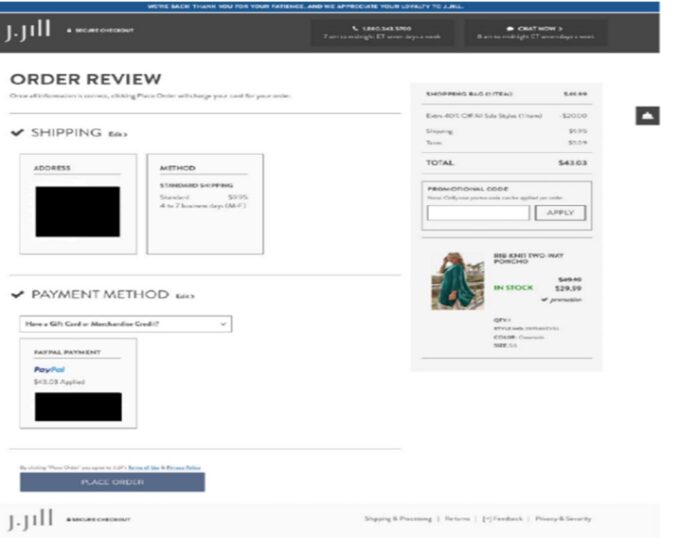
In Cody v. Jill Acquisition LLC, No. 25-937 (S.D. Cal. June 30, 2025), the Southern District of California declined to enforce a retail site’s terms of use and compel arbitration, holding that the plaintiff, who used guest checkout to place an online order at the retail clothing site, did not have adequate notice of the terms and the arbitration clause. This case should serve as a wake-up call for online entities to reexamine electronic contracting processes. It exemplifies how, even if a website’s visual design and its placement of the hyperlinked Terms of Use during user checkout are comparable to other presentations that have been deemed enforceable, a court could still decline to enforce online terms if the context of the transaction is not the typical e-commerce transaction between a registered customer and a retail site. In this case, the court found that by checking out as a guest without creating an account, the user was less likely to expect a continuing relationship and, therefore, the site’s notice and presentation of the terms below the “Place Order” button were not conspicuous enough in this instance to bind the plaintiff.
The plaintiff in Cody filed a putative class action complaint over the site’s pricing policies for alleged violations of the California Business and Professions Code and the Consumer Legal Remedies Act. The defendant moved to compel arbitration, arguing the plaintiff had agreed to the site’s terms of use that contained a “Binding Arbitration Agreement and Class Action Waiver” when plaintiff clicked the “Place Order” button and completed her purchase from the defendant’s website.
Generally speaking, a contract will be enforceable based on an inquiry notice if: (1) the website provides reasonably conspicuous notice of the terms; and (2) the consumer takes some action, such as clicking a button, that unambiguously manifests assent to those terms. When evaluating whether there was an agreement to arbitrate, the court in Cody first considered the visual design of the webpages and found that the visual aspect of the notice was satisfied by the defendant’s website layout. As the court stated, the relevant criteria for evaluating whether the visual elements provide conspicuous notice are whether the advisal is displayed prominently enough that the court can assume a reasonably prudent Internet user would have seen it. Elements such as a “clear and legible” notice on the order page and a hyperlink placed directly above or below an action button formatted in bright, contrasting color and readable font within a relatively uncluttered web page have been favorably cited by courts in past cases.
The court here found the visual design to be adequate because of factors such as the underlined blue hyperlink to the terms of use and its location directly below the “Place Order” button. [See below image from the court opinion of the final contracting screen ].
Although the court recognized that the “design of the website alone might support concluding that the notice would be reasonably conspicuous,” it went on to consider the full context of the guest checkout transaction at issue in Cody. Here, the court distinguished it from those types of transactions where a user might anticipate “some sort of continuing relationship.” The court emphasized that when considering the notice requirement, the visual design of the website must be examined within that context. As it stated: “This means that courts should expect that a reasonable internet user is more vigilant in looking for contractual terms when the context of the transaction reasonably implies a contractual relationship.” To the court, when a user “simply purchases goods or avails herself of a one-time discount offer,” there is less reason for her to expect a continued relationship beyond the purchase.
In the case at hand, the court considered plaintiff’s decision to check out as a guest as one where the user did not anticipate a continuing relationship, and compared it with other traditional e-commerce transactions involving registered users where the Ninth Circuit previously found that such context would put a user on inquiry notice that a purchase on the company’s website constituted an agreement to its terms.
“Generally speaking, courts are more likely to conclude that a user anticipating ‘some sort of continuing relationship’ would expect to be bound by terms, whereas a user ‘who simply purchases goods or avails herself of a one-time discount offer’ would be less likely to form such an expectation.”
“This context distinguishes this case from those in which the Ninth Circuit has found that the context of the transaction would put a user on inquiry notice that use of a company’s website or services constituted an agreement to its terms and conditions, including an arbitration provision.”
Thus, despite the adequacy of its visual aspects on the J. Jill site, the court found that proper notice was not sufficiently conspicuous in this case because of the guest checkout context of the transaction (“The context of the transaction therefore weighs against concluding that Plaintiff was sufficiently aware that, by placing an order through jjill.com, she would be entering into an agreement including an arbitration provision”).
In another recent case, Chabolla v. ClassPass, Inc., 129 F.3d 1147 (9th Cir. 2025), the Ninth Circuit affirmed a lower court’s ruling that declined to send a proposed class action to arbitration. In the ClassPass case, the plaintiff signed up for a trial period for ClassPass, a service that sells subscription packages for access to various gyms and fitness studios, but later took issue when subscription charges resumed after gyms reopened following the COVID-19 pandemic. The contracting process in this case involved several signup screens. [An image from the court opinion of the final screen appears below].
In this case, the court’s decision was a flip, of sorts, of the Cody case, with the Ninth Circuit finding the visual presentation of the terms lacking, even though the context of the transaction would seemingly put the user on notice of an ongoing relationship that would contemplate the user agreeing to site terms. The appeals court found that while a trial subscription opportunity may not indicate an anticipation of an ongoing relationship in all instances, the context neither weighs in favor of nor against the notice requirement. This is because, as the court noted, the other aspects of the context – such as how the purchase is described as a “plan” or a “membership” and how the benefit of ClassPass is to gain access to gyms and fitness studios – conjure the idea of a continuing relationship. Nonetheless, the court ultimately decided that a reasonably prudent internet user would not be deemed to have unambiguously manifested assent to the terms by working her way through ClassPass’s multi-page website checkout process.
Taken together, these two recent decisions show that courts – at least those within the Ninth Circuit – are considering the actual context in which these internet transactions occur when deciding whether an online entity’s contracting and checkout process binds the user to the terms. While visual presentation and web flow design remains important for e-commerce sites, the above two court decisions show that context also matters.
We have previously highlighted the importance of web design in determining if a service’s terms are deemed enforceable. Now, companies might take a second look at their own user registration and e-commerce purchase processes to ensure they offer reasonably conspicuous notice of the existence of contract terms and obtain the user’s manifestation of assent to those terms in all contexts and types of transactions, including those transactions where guest or expedited checkout is used.
Contexts that indicate transient relationships, such as guest checkout or a trial opportunity, may mean that even an ordinary presentation of terms in the form of a hyperlink to the terms located beneath a “Place Order” button – a presentation that is used regularly by many sites – might need to be bolstered, in some cases, to provide the user additional notice that he or she is entering into a transaction that mandates acceptance of contractual terms. As the Cody court commented: “[T]he onus must be on website owners to put users on notice of the terms to which they wish to bind consumers.” Ultimately, the above court decisions accentuate the need for counsel to be involved in the decisions underlying the design and wording of online contracting processes and presentation of terms so entities can attain adequate user notice and assent that would satisfy even the most exacting scrutiny for any type of transaction.
To provide the best experiences, we use technologies like cookies to store and/or access device information. Consenting to these technologies will allow us to process data such as browsing behavior or unique IDs on this site. Not consenting or withdrawing consent, may adversely affect certain features and functions.
Functional
Always active
The technical storage or access is strictly necessary for the legitimate purpose of enabling the use of a specific service explicitly requested by the subscriber or user, or for the sole purpose of carrying out the transmission of a communication over an electronic communications network.
Preferences
The technical storage or access is necessary for the legitimate purpose of storing preferences that are not requested by the subscriber or user.
Statistics
The technical storage or access that is used exclusively for statistical purposes.The technical storage or access that is used exclusively for anonymous statistical purposes. Without a subpoena, voluntary compliance on the part of your Internet Service Provider, or additional records from a third party, information stored or retrieved for this purpose alone cannot usually be used to identify you.
Marketing
The technical storage or access is required to create user profiles to send advertising, or to track the user on a website or across several websites for similar marketing purposes.