This free Windows tool shows exactly why my PC is slowing down (and it beats Task Manager)


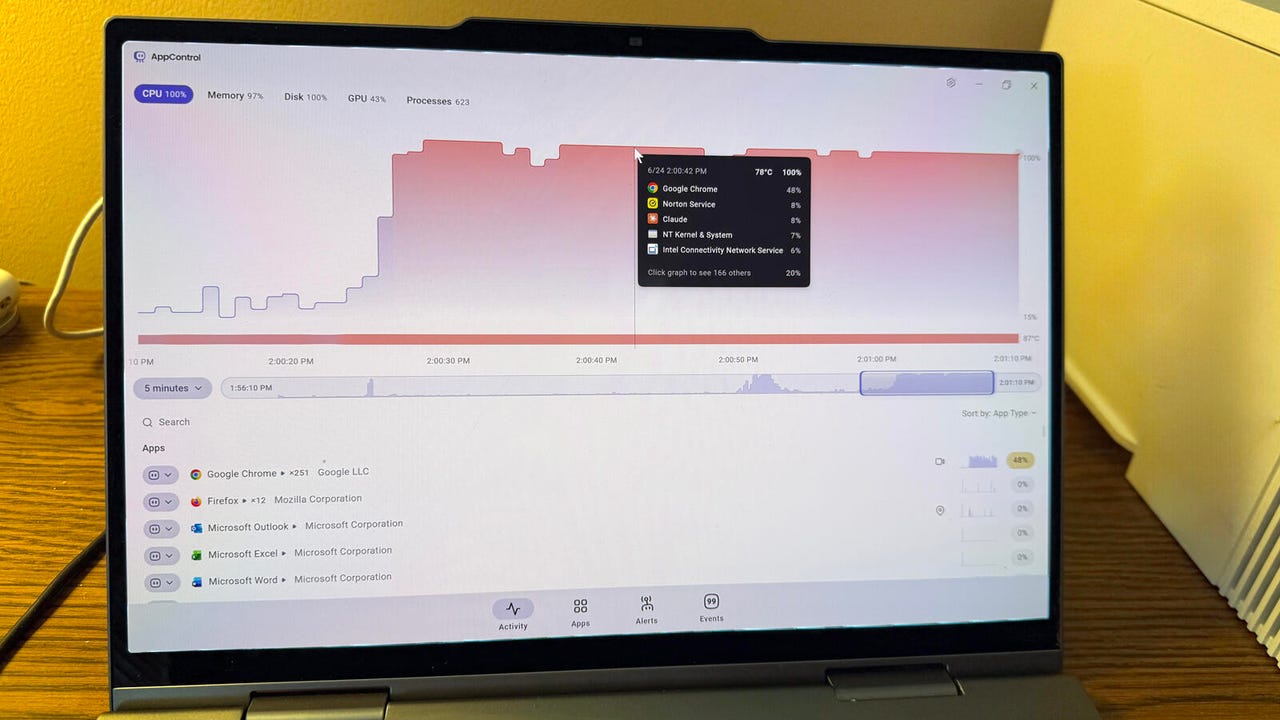
AppControl running on a Windows PC

Lance Whitney/ZDNET

Follow ZDNET: Add us as a preferred source on Google.


My Windows PC sometimes bogs down, running much slower than usual. Whatever activity I’m trying to accomplish stalls or freezes momentarily. Often, the only solution is to reboot. But that doesn’t fix the underlying problem. Instead, I’ve been using a free Windows utility that can pinpoint which apps and processes are hogging memory and system resources so I can deal with the culprits.

Known as AppControl, this tool displays a list of all running apps and processes and shows you how much CPU, memory, and other resources they’re using. At the main menu, you’re able to view details on an app or other file so you know what it does. From there, you can disable or kill a certain process to see if that jolts Windows back to life.

Also: After setting up Windows 11, these 9 steps are non-negotiable for me

If AppControl sounds like the built-in Windows Task Manager, that’s on purpose. Both tools will show you running apps and processes and allow you to shut down any that are chewing up resources. But AppControl offers a host of additional features and options.

While Task Manager can display only the current status of running apps and processes, AppControl keeps a running count as far back as the last three days. This means you’re able to view the recent history of a specific app or process to track its behavior over time.

The tool also clues you in to any software updates that run in the background and any new or unsigned applications that pop up. AppControl tracks CPU and GPU temperatures so you can tell if your PC is running too hot. And with a nod toward privacy, AppControl even tells you if any apps are accessing your webcam, microphone, or location.

Also: You can fix most Windows 11 issues by double checking these 4 settings first

Plus, AppControl is more than just a static tool. With the software itself residing in memory, you’re able to set up alerts to notify you of certain events, such as camera access, changes to a Windows service, or an unsigned app launching in the background.

As one more bit of icing on the cake, you can ask an AI assistant like Claude to analyze and answer questions about any behaviors captured by AppControl. Claude responds to your system-related requests by accessing data from AppControl in the background, so you don’t even have to directly interact with the tool when using AI this way.

How to use AppControl on your Windows PC

Here’s how AppControl works and how to use it if you bump into system slowdowns or related issues.

Install AppControl

Screenshot by Lance Whitney/ZDNET
Check out the stats

Screenshot by Lance Whitney/ZDNET
Change the view and order

Screenshot by Lance Whitney/ZDNET

Also, by default, the list of apps is sorted based on type, but you can change that as well. Click the drop-down box next to “Sort by” to switch the order to memory usage or publisher.

Change the view and order

Screenshot by Lance Whitney/ZDNET
View other information

Screenshot by Lance Whitney/ZDNET

Clicking the Alerts icon displays all events for which you’d receive an alert. You can add other alerts, including those for apps that get updates, apps that track your location, new apps, and new suspicious apps. You’re also able to turn alerts off and on or pause them for three hours.

View other information

Screenshot by Lance Whitney/ZDNET

Clicking the Events icon reveals a list of all tracked events that have occurred over the past three days. Selecting a particular event shows you more details about it.

View other information

Screenshot by Lance Whitney/ZDNET

Now, let’s say your PC is running much slower than usual. You’ve loaded a bunch of apps and want to see which one may be triggering the slowdown. With AppControl open, hover over any spikes in the activity graph to see which app is chewing up the most CPU and memory. Select that app in the list. You then have a few different options.

You can try to shut down the app normally to see if resources are freed up. If a browser is causing the slow performance, you can simply close a number of open tabs. If the app itself is frozen, or performance doesn’t significantly improve after you close it, return to AppControl. Make sure any work in the app is saved, and then click the Kill button. That should release all resources used by that app.

If the app has a history of causing trouble, you may want to click the Disable button to prevent it from starting until you’re able to investigate the issue.

Also: The 11 Microsoft apps I ditch on every new Windows install – and the 11 I keep


Show more

Deal with a problematic app

Screenshot by Lance Whitney/ZDNET

Finally, you can enlist the help of AI if you need to research a problem or simply have questions about any Windows activity, apps, and processes monitored by AppControl. The process for connecting Claude AI or another AI to AppControl is a bit complex, but you may find it worth the effort.

To set this up, head to the web page on “How to Connect Claude/AI (MCP) to AppControl” and follow the steps. After Claude and AppControl are linked, you can pose your question at the Claude prompt. Here’s an example prompt from AppControl:

“Using your AppControl tools, tell me the single most resource-hungry thing running on my PC right now — name it, explain what it actually does in plain English, and rate how surprised I should be that it’s using that much. Keep it to three sentences max. Then suggest five follow-up prompts I can try next, chosen only from the example prompts listed at https://www.appcontrol.com/mcp/ — pick the ones that would get more interesting the longer AppControl has been running, so I know what to look forward to.”

Claude should then identify any problematic app, detail the reasons why it’s causing trouble, and suggest follow-up prompts to further research the malady.

Also: Is turning off Windows Security a bad idea in 2026? A PC expert’s bottom line


Show more

Get help from AI

Screenshot by Lance Whitney/ZDNET

Overall, AppControl is an effective and helpful app. Though it throws a lot of data at you, the interface is well-designed and as user-friendly as possible. The next time Windows is suffering from performance issues, you may want to give AppControl a shot at helping you fix the problem.





Source link

Leave a Reply

Subscribe to Our Newsletter

Get our latest articles delivered straight to your inbox. No spam, we promise.

Recent Reviews


When evaluating the health of a small business, we typically focus on financial indicators: revenue, margins, expenses, and growth trajectory. But Xero’s Emotional Tax Return 2026 report highlights another critical metric – the psychological cost.

U.S. small business owners lose an average of 33 working days per year to stress. That’s more than a month of lost productivity, driven not only by market conditions but by the sustained mental load of managing cash flow, compliance, rising costs and daily financial decisions.

From a financial therapy perspective, this is not surprising. But what stands out most is how persistent this financial stress has become.

Why avoidance is common – and predictable

The report reveals a pattern many small business owners will recognize:

  • 73% have been caught off guard by a tax outcome
  • 34% fear making financial mistakes
  • Owners lose an average of eight hours per week to stress

Avoidance is often misunderstood as poor discipline. In reality, it is a common psychological response to perceived threat. When systems feel fragmented or unclear, financial tasks can trigger anxiety. Choosing to disengage reduces discomfort temporarily, but it allows the uncertainty to compound.

When financial visibility is low, stress increases. And when stress increases, decision-making quality declines. Reducing small business stress requires addressing that cycle directly. Stress, in this context, is not only a mental health issue. It is an operational constraint that affects small business productivity.

When financial stress becomes structural

According to the report:

  • 70% of owners say financial management is a major stressor
  • 81% say this fiscal year has been more stressful than previous years
  • 74% report stress negatively affects their professional performance

That strain shows up in missed opportunities (34%), slower decision-making (28%) and reduced creativity (30%).

In clinical practice, I often see how chronic financial stress narrows cognitive bandwidth. When uncertainty around cash flow, tax obligations or operating expenses becomes constant, the brain shifts into threat mode. Attention tightens. Working memory declines. Over time, this doesn’t just feel exhausting. It becomes limiting.

Financial visibility reduces perceived threat

One of the most effective stress-reduction strategies in financial therapy is increasing perceived control. Control does not mean eliminating uncertainty entirely. It means improving clarity within what can be managed.

This is where a platform like Xero plays a crucial role. Real-time dashboards, automated bank reconciliation, integrated reporting and digital receipt capture centralize financial data and reduce manual workload. Instead of chasing paperwork or reconciling transactions late at night, business owners can access up-to-date cash flow information in one place.

Eighty-seven percent of U.S. customers say Xero improves financial visibility. Ninety percent say it helps their business run more efficiently.

From a psychological standpoint, improved visibility reduces threat activation. When business owners can clearly see what’s coming in, what’s going out and what’s due, decision-making becomes proactive rather than reactive.

Bookkeeping automation protects mental bandwidth

The average small business owner spends 22 hours per month managing finances. That’s nearly three full workdays devoted to admin. Automation meaningfully reduces that burden. Businesses using Xero save an average of six hours per week on bill management alone.

Those hours add up. But more importantly, so does cognitive relief. Less manual data entry. Fewer surprises at tax time. Fewer last-minute reconciliations. The result is not just greater efficiency, but stronger cash flow management and better long-term planning.

When administrative friction decreases, small business productivity improves – and so does wellbeing.

Collaboration reduces isolation

Despite the documented impact of financial stress, only 9% of small business owners seek advice from an accountant or advisor as a coping strategy.

Isolation intensifies pressure. Collaboration diffuses it.

Real-time collaboration features allow business owners and advisors to work from the same live financial data. That reduces errors, improves forecasting and increases confidence. For the 34% who fear making financial mistakes, shared visibility offers both technical accuracy and emotional reassurance.

In my experience, financial clarity combined with trusted guidance is one of the most powerful antidotes to chronic financial stress. It transforms financial management from a solitary burden into a supported system.

Turning emotional tax into resilience

Forty percent of small business owners report having considered giving up their business. That statistic underscores the broader economic implications of sustained financial stress.

Entrepreneurship will always involve risk. But persistent, preventable financial stress does not need to be part of the model.

Reducing the Emotional Tax starts with structural shifts:

  1. Improve real-time financial visibility
  2. Automate repetitive bookkeeping and admin
  3. Collaborate proactively with financial advisors

When business owners can clearly see their numbers, anticipate obligations, and reduce manual workload, they regain more than time. They regain perspective.

The Emotional Tax is measurable. But so is the return when clarity replaces uncertainty.

And when clarity returns, confidence follows – not just in the numbers, but in the long-term health of the business itself.

Was this article helpful?

YesNo


Source link