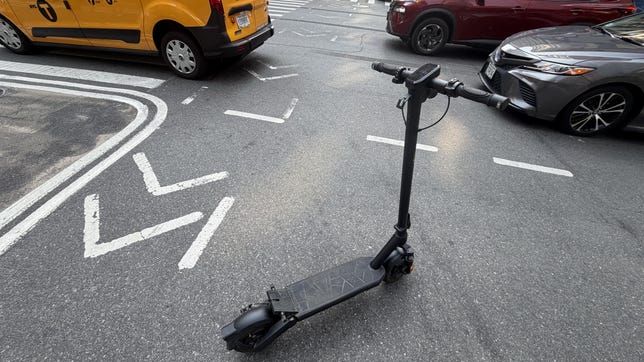

My Take
The VMAX VX2 Hub is one of those scooters that doesn’t necessarily jump off the page with outrageous specs, but once you start riding it, you realize just how well-rounded it is.
I’ve tested/ridden plenty of scooters that either focus on speed or prioritize portability, and the VX2 Hub lands somewhere in the middle. It’s fast enough to make commuting enjoyable, comfortable enough for longer rides, and practical enough that I’d actually want to use it every day.
One surprising thing about the VX2 Hub is just how powerful it feels for its size, though I didn’t find it difficult to control. I did double-check the spec sheet, however, because the acceleration feels like that of a much larger scooter. Most riders probably haven’t experienced this kind of power in what is a relatively compact and manageable chassis.
While the VX2 Hub won’t win any awards for having the flashiest design, it more than makes up for its understated appearance once you hit the throttle. This scooter lets its performance take the spotlight, and after a few rides, that’s what you’ll remember most.

VMAX VX2 Hub Electric Scooter
Like
Good acceleration for a single-motor scooter Solid suspension setup Integrated turn signals Large UL Certified battery with impressive range Stable ride at higher speeds Bright TFT display Fast charging for its battery size
Don’t like
Mechanical rear brake instead of hydraulic The range drops considerably when riding at top speed (which is common with all electric scooters)
Power comes from a proprietary rear hub motor capable of producing up to 1,900 watts of peak output. Acceleration is smooth and predictable without feeling twitchy. The scooter tops out at around 33 mph, which is more than enough for most bike lanes and urban riding. I was able to easily achieve this top speed despite being a larger rider.
The VMAX VX2 Hub is built to handle more than just flat city streets. It can tackle inclines of up to 35% while supporting riders weighing up to 287 pounds. Despite packing plenty of performance, the scooter tips the scales at a manageable 57 pounds. The 17.95-inch-long by 7.40-inch-wide footboard provided more than enough room for my size 12 shoes, allowing me to comfortably adjust my stance during longer rides. The handlebars measure just under 40 inches wide, giving the VX2 Hub a planted, stable feel and plenty of leverage when maneuvering through traffic or carving through turns.
What impressed me most was the ride quality. The combination of the front oil-damped suspension, rear elastomer suspension and 10-inch tubeless tires does a great job of soaking up the bumps from rough pavement, expansion joints and potholes. New York City streets aren’t exactly known for being smooth, and the VX2 Hub handled them better than many scooters of this size I’ve tested.
Flashy lights and eye-catching paint jobs are nice, but let’s be honest: Most of us buy scooters to get from point A to point B as quickly and safely as possible. That’s where the VX2 Hub shines. It strikes a good balance between stability and portability. While I wouldn’t want to carry it up several flights of stairs every day, it’s manageable enough for those of us living in walk-ups, and light enough to load into an SUV or bring into an office when needed. I personally keep it in my three-flight walk-up apartment, while my heavier rides are in storage.
Unlike some scooter brands that force you to download an app just to access basic functions, the VX2 Hub works perfectly fine right out of the box. That said, the VMAX E-Scooter app adds several useful features for riders who want to dig a little deeper. Through the app, you can view real-time riding data, monitor battery status and remaining range, record trips and review ride history. It also includes route planning, turn-by-turn navigation, range predictions based on your riding habits and conditions and even the ability to map out custom routes before you leave home. I appreciate that VMAX treats the app as an enhancement rather than a requirement, allowing riders to decide how connected they want their experience to be.
Battery and Range
VMAX rates the VX2 Hub for up to 56 miles of range from its UL Certified Lithium Ion 48-volt, 874-Wh battery.
As always, range numbers depend heavily on rider weight, terrain, weather conditions and speed. Most riders won’t cover the full 56 miles unless they ride conservatively. Based on my real-world use, I think most riders can expect 25-40 miles per charge, which is still enough for several days of commuting without needing to reach for the charger. The battery also recharges surprisingly fast. From zero, it takes a little over 4 hours, which is impressive given the battery’s size.
Safety Features
VMAX did a nice job equipping the VX2 Hub with the features riders actually use. Integrated turn signals make lane changes safer, while the bright front and rear lighting enhance visibility during early-morning and evening rides. A front drum brake, a rear mechanical disc brake and a regenerative braking system provide braking.
The scooter is also rated IPX6, meaning it can handle wet roads and light rain without issue, though I’d still avoid riding through standing water whenever possible.
Final Thoughts
The VMAX VX2 Hub is one of the best commuter scooters I’ve ridden this year. It offers a stable ride, plenty of power, useful safety features and battery capacity to handle most riders’ weekly commuting needs without worrying about charging. If you’re in the market for a premium commuter scooter that balances performance, comfort and practicality, the VX2 Hub deserves serious consideration.
Beast Mode
For anyone who owns a VMAX VX2 Hub and is wondering how I was hitting 30+ mph, the scooter doesn’t ship with its full top speed unlocked. You’ll need to enable Beast Mode, but only if you’re comfortable and confident riding at higher speeds.
How to unlock Beast Mode:
Turn the scooter on.
Make sure it’s in Zero Start mode (able to accelerate from a complete stop).
Quickly press the Power/On button five times.
Once enabled, the standard 20 mph speed limit is removed, allowing the VX2 Hub to reach speeds of 34+ mph where legally permitted.
Ride responsibly, wear a helmet and always obey your local laws and speed regulations.

Stephan is the sports journalist for the Maple Grove Report.