What Does D/S Mean On An Automatic Gear Shift?


Depending on the make of the car you are in, “D” and “S” are typically marked separately, but they bring one of two things to mind. “D” stands for Drive, while “S” stands for Sport. That said, there are a few cars where D and S are actually marked together on the gear selector, or sometimes as a dedicated button near the center console. It’s one of those things that doesn’t really explain itself, especially considering what S means on a gear shift can vary depending on what you drive. As you may have guessed, the letters do break down to Drive and Sport, but the way they actually behave behind the scenes varies quite a bit from brand to brand.

Again, most cars have the two modes marked separately. But you’ll spot them paired up on Honda and Acura models, plus cars from the VW Group (including Volkswagen, Audi, and a handful of other stablemates). It works a little differently across both brands, too.

What D/S does on Hondas and Acuras

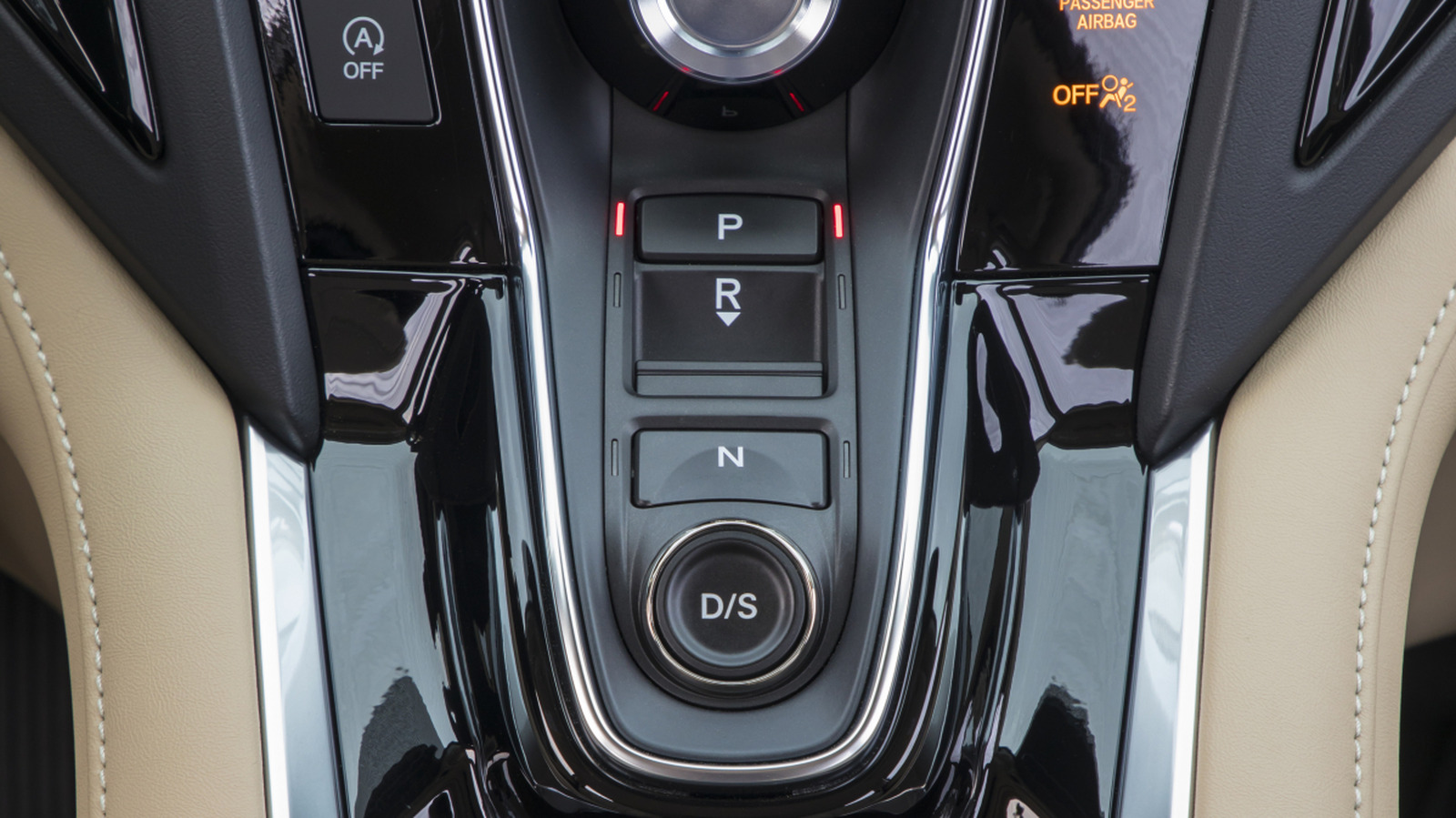
Let’s start with the Hondas first. On Honda and Acura models with 10-speed automatic gearboxes, the S typically points towards a sequential mode that hands you a more involved experience for improved paddle shifting, which some cars feature. Take the 2019 Acura RDX, for example. This luxury SUV runs a 10-speed automatic transmission and lets you shift between modes manually using push buttons. One of these buttons is labeled D/S, and it works like a toggle. Push it once, and you’re cruising in regular Drive. In that mode, you get early upshifts and low engine speeds, which is great for relaxed runs on the motorway. Hit it a second time, and S kicks in, which is officially known as Sequential SportShift.

Sequential SportShift is a special mode built around paddle-shift driving, though it works just fine even if you don’t touch the paddles. The whole point is to give the car a sportier feel, with the transmission holding onto lower gears for longer. Leave the paddles alone and the car still shifts itself, just more aggressively, to favor performance. Pull a paddle, though, and you drop into the automatic car’s manual mode – that’s when you’ll spot an “M” lighting up next to the gear number. Only then do automatic upshifts stop completely, although the car will still drop down a gear if you come to a stop, just so the engine doesn’t stall.

How VW cars handle D/S shifting

On the VW side of things, the setup is a little different. D/S still works like a toggle, except the S behaves much like the Sport mode you’d find on other cars. It also takes a different form physically. Rather than sitting as a separate button like on the Honda, it lives on the selector lever itself. On the 2020 Audi A6, for instance, the gear sequence goes P, R, N, D/S. To swap between D and S, all you have to do is give the lever a quick tug rearward. The mode switches and then clicks back into place. The same goes for other cars like the VW Golf. As for the drive itself, S keeps revs higher, sharpens throttle response, and delays upshifts.

No matter the model, all you have to keep in mind is that D is the arguably boring default, while S helps keep the car a bit keener. And regardless of whether S stands for sequential or sport, D/S works similarly across Honda and Volkswagen Group cars. The only real split shows up when you reach for a paddle, if it’s available. From that point on, Honda hands you manual control, while VW keeps doing its own thing automatically.


Source link

Leave a Reply

Subscribe to Our Newsletter

Get our latest articles delivered straight to your inbox. No spam, we promise.

Recent Reviews


The start of a new year always brings a fresh burst of energy. Whether you’re looking to scale your operations or reclaim your weekends, January is the perfect time to audit the “manual” work you’re putting in and replace it with the “meaningful”.

We’ve heard from our customers that connecting apps to Xero is a critical piece of the puzzle when looking to save time, grow their business or simply make day-to-day work life easier. We know that as many as 78% of Xero customers have already gained efficiencies thanks to apps. 

That’s why we’ve launched our 2026 Xero App Store Power Lists. We’ve done the heavy lifting to bring you 10 collections of the most popular apps across a diverse range of categories to help you power up your new year. Thousands of your peers are already using these tools to drive to their success – it’s time to join them.

Meet the Xero App Store Power Lists

Select the statement below that most applies to you and your business to find the right list to start with. 

I am not sure where to start with apps

Check out some of the tools that are the most popular overall among Xero customers, and those that have been recognised for their stand-out features. 

  • The Standard Setters: Explore the most popular apps overall, used by thousands of Xero customers to deliver automation across payments, reporting, and payroll.
  • The Trophy Cabinet: See the winners of the Xero Global App Awards, recognised for excellence in design, functionality and customer satisfaction.

I have a specific problem to solve

If you’ve already identified a key time drain or challenge in your business, explore these lists of popular apps catered for some of the top business needs. 

  • The Spend Streamliners: Eliminate manual data entry for receipts and bills using AI-powered automation.
  • The Team Timekeepers: Swap spreadsheets for reliable software to ensure easy timesheets, accurate payroll and simple project costing.
  • The Job Flow Favourites: Automate quoting, billing and project tracking for stronger cash flow and smoother projects. 

I want to know what my peers are using

Is your efficiency on par with your peers? Check out the most popular apps that others in your industry are using to ensure you have the right tools for your unique trade:

  • The Retailer’s Top Shelf: Manage multi-channel sales and automate inventory with tools like A2X and Cin7 Core.
  • The Trades Toolkit: Simplify construction and trades job management and on-site invoicing with favourites like ServiceM8 and Tradify.
  • The Pure Professionals: Streamline invoicing, client management and more at your agency or firm with apps like GoCardless and Paidnice.
  • The Advisor’s Arsenal: Practice management software like Ignition and ContentSnare can help drive your accounting firm’s efficiency.

I want to know what’s new

  • The Rising Stars: Check out the top new and noteworthy apps to find modern software like generative AI business companions and real-time predictive analytics.

How to choose your 2026 toolkit

You don’t need to adopt 10 apps at once. To find the right fit, start with these three steps:

  1. Identify your biggest headache: Is it chasing late payments? Manually entering receipts? Pick one pain point to solve first.
  2. Look for the “Aha!” moment: Choose apps that provide insights, not just data. For example, use cash flow forecasting to plan for project gaps.
  3. Talk to your advisor: Your accountant or bookkeeper knows your business and can give you tailored advice.

Why your app stack is your competitive edge in 2026

In 2026, the most successful businesses aren’t just working harder; they’re working smarter by using automation to predict needs before they even arise.

Connecting the right apps to Xero doesn’t just save time on data entry – it transforms your business into a high-performing powerhouse, with benefits flowing on to your employees, customers and bottom line. 

Ready to power up?

Don’t let manual busywork slow down your momentum this year. Whether you’re automating your first quote or building an AI-powered workflow, the Xero App Store is here to help you make 2026 your most efficient year yet.

Explore all Power Lists in the Xero App Store

Was this article helpful?

YesNo


Source link