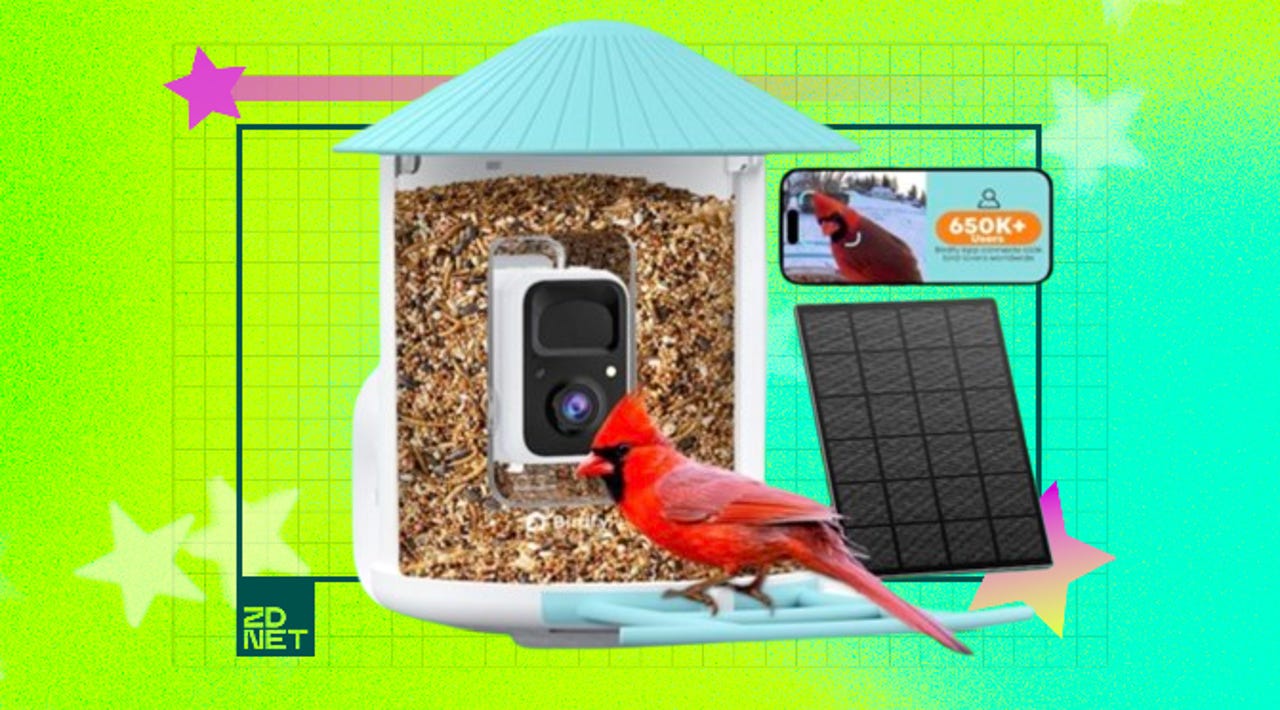
Yes, you need a smart bird feeder in your life – and this one’s on sale for Memorial Day


birdfy smart bird feeder

Birdfy/ZDNET

Follow ZDNET: Add us as a preferred source on Google.


One thing I’ve learned about homeownership over the past three years is that you will become very invested in birdwatching when you purchase a home. I get excited now when I spot a red-breasted nuthatch or a blue jay in the front yard. 

Also: My favorite Memorial Day deals: Save big on laptops, tablets, and more

Over one in three adults in the U.S. enjoys birdwatching, otherwise known as birding. And while getting your binoculars out to see birds is one way to do it, there’s an even more high-tech way for birding these days. 

The Birdfy Smart Bird Feedercaptures all birds on camera and alerts you when one stops by. Right now, you can get the Birdfy feeder with AI features for $67 off during Memorial Day sales.

The built-in AI technology can identify more than 6,000 bird species, including telling you whether a male or female is at your feeder. When a bird stops by your feeder, you’ll get notified through the app that there’s a visitor, so you can tune in live to the video. You can also give others guest access to the video feed if your friends and family are also bird enthusiasts. 

Expect impressive camera quality with 1080p FHD video and 8X digital zoom. Plus, there’s full-color night vision in case a nocturnal bird like an owl visits at night.

Also: 5 gadgets I’m buying this spring to grow my green thumb

The device comes with unlimited lifetime free cloud storage and 30-day video retention, but it also supports SD cards up to 128GB, so you can store even more videos and photos directly on the device.

I gifted this to my mom this past Christmas, and she hasn’t stopped talking about it since. The video quality is actually really good, and she’s been able to spot rare birds like a purple martin. 

If birding is on your to-do list this summer, you need the Birdfy Smart Bird Feeder

How I rated this deal 

According to ZDNET’s deal-rating system, this 35% off deal is a 4/5 deal. On Amazon, it has an average rating of 4.5 out of more than 1,400 customer reviews. 

Deals are subject to sell out or expire at any time, though ZDNET remains committed to finding, sharing, and updating the best product deals for you to score the best savings. Our team of experts regularly checks in on the deals we share to ensure they are still live and obtainable. We’re sorry if you’ve missed out on this deal, but don’t fret — we’re constantly finding new chances to save and sharing them with you at ZDNET.com


Show more

We aim to deliver the most accurate advice to help you shop smarter. ZDNET offers 33 years of experience, 30 hands-on product reviewers, and 10,000 square feet of lab space to ensure we bring you the best of tech. 

Last year, we refined our approach to deals, developing a measurable system for sharing savings with readers like you. Our editor’s deal rating badges are affixed to most of our deal content, making it easy to interpret our expertise to help you make the best purchase decision.

At the core of this approach is a percentage-off-based system to classify savings offered on top-tech products, combined with a sliding-scale system based on our team members’ expertise and several factors like frequency, brand or product recognition, and more. The result? Hand-crafted deals chosen specifically for ZDNET readers like you, fully backed by our experts. 

Also: How we rate deals at ZDNET in 2026


Show more


Source link

Leave a Reply

Subscribe to Our Newsletter

Get our latest articles delivered straight to your inbox. No spam, we promise.

Recent Reviews


Google Gemini

Lance Whitney/ZDNET

Follow ZDNET: Add us as a preferred source on Google.


ZDNET’s key takeaways

  • Google is downloading a 4GB file to the PCs of many Chrome users.
  • The file is harmless and is used for the Gemini Nano on-device LLM.
  • You’ll see it if you’ve opted into the on-device AI setting in Chrome.

Google is silently saving a Chrome-related file to many computers. That’s nothing earth-shaking. But this file is a hefty 4GB in size, which has caught the attention of some Google watchers. What is the file, why is it being installed, and how can you check for it?

Also: I let Chrome’s AI agent shop, research, and email for me – here’s how it went

In a new blog post, computer scientist Alexander Hanff, aka the Privacy Guy, pulled back the curtain on this mysterious file. Named weights.bin, the file is being downloaded deep within the user data folder of many Chrome users. The file itself is related to Gemini Nano, which Google is using as the on-device AI model for Chrome users.

If you delete the file, it comes back

Though there’s nothing risky or dangerous about the file, Hanff and others have expressed concerns that it’s being downloaded without users’ knowledge or permission. And if you delete the file, it eventually comes back, Hanff said. That by itself is hardly alarming; that’s part of any software update. Rather, some of the criticism centers on the file’s size. If you have ample hard disk space, then 4GB is likely not a big deal. But if you’re running low, that big a file might chew up space you can’t spare.

Traditionally, AI models like Gemini use the cloud to interact with you. Submit a request, ask a question, or kick off a conversation, and the AI taps into its online data and resources to respond. But that method can be slow and naturally requires that you be connected. By traveling between your device and the cloud, your data can also be exposed.

A trend has emerged in which companies are experimenting with locally stored LLMs (large language models). That not only speeds up the process, but it also means you can use the AI offline and more securely. Gemini Nano has already been in play on Google’s own Pixel phones.

That explains why the file is so large; it has to pack in a lot of data. In this case, a weights file contains numbers that measure the level of importance an AI model assigns to your input. The AI uses these values to determine what should come next. For example, let’s say you start typing the phrase “Why did my new phone cost me an arm and a…” at the prompt. The AI assigns weights to your input to help it predict that the next word would be “leg.”

Also: This powerful Gemini setting made my AI results way more personal and accurate

How can you tell if the file has been downloaded to your PC? First, open Chrome, go to Settings, and select System. On the System screen, check whether the On-device AI option is turned on. If so, then you probably have the file or will soon get it.

To double-check, you’ll have to navigate to the user folder on your PC. That location varies based on your operating system. On my Windows 11 PC, I ran a search in File Explorer for weights.bin. The search took a long journey through the following path: C:\Users\lance\AppData\Local\Google\Chrome\User Data\OptGuideOnDeviceModel\2025.8.8.1141. At that final location, the weights.bin file appeared, measuring 4GB.

Since the file is downloaded again if you simply delete it, you’ll have to take an extra step to get rid of it permanently. After you delete the file, go back to Settings in Chrome and select System. Then  turn off the switch for On-device AI.

But as long as you have enough disk space (and if you can’t spare 4GB, then it’s time to clean up your drive), the file is little cause for concern. Just forget about it, especially if you’re keen to try on-device AI, and we’ll see what the future holds for Gemini Nano.


Source link