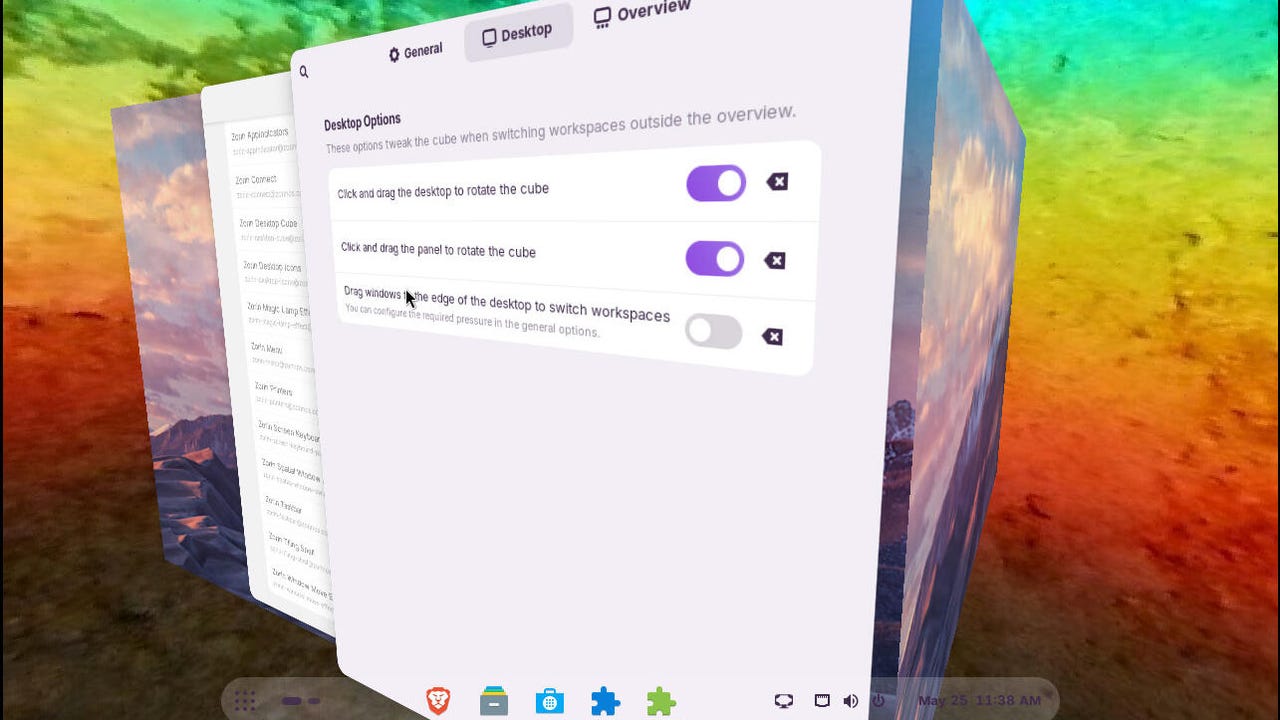

The Zorin OS desktop cube in action.
Screenshot by Jack Wallen/ZDNET
Follow ZDNET: Add us as a preferred source on Google.
ZDNET key takeaways
- Zorin OS is a flexible desktop OS.
- You can make the desktop anything you want.
- Pay for the Pro version for even more options.
Since the demise of Windows 10, Zorin OS has been one hot property. Within six months of its release, Zorin OS 18.1 has been downloaded over 3.3 million times. I even proclaimed Zorin OS 18.1 to be one of the best operating systems on the market. The OS is gorgeous, user-friendly, fast, and customizable to the point where you can make it look and feel however you want.
Do you prefer a Windows-like UI? Zorin OS has you covered. MacOS? Yep. Linux? Of course. Zorin OS gives you so many options to make the desktop look the way you like it.
Also: Linux Mint vs. Zorin OS: I’ve tried both Windows alternatives, and here’s my winner
So, how do you customize everything? The answer starts with Zorin Appearance.
Customizing Zorin OS
Zorin Appearance is a tool that allows you to quickly switch between layouts, change themes, enable/disable animations, change the desktop switcher, enable/disable desktop icons, customize window placement and advanced tiling, switch the titlebar buttons (from right to left), set mouse button actions and window focus, set various interface options, and change the fonts.
The Layout option is what you want to focus on. In this section of the tool, you have four layouts to choose from: two different Windows-like layouts, a GNOME/panel layout, and a GNOME layout with a top bar.
You get four default layouts with the free version of Zorin OS.
Screenshot by Jack Wallen/ZDNET
If you opt to pay for the Pro version ($47.99), you get four more layouts, including those that resemble MacOS, Windows 11, Ubuntu, and KDE Plasma.
Even if you don’t opt to pay for the Pro version, you can further customize the desktop. For example, if you go with a layout that offers only a top bar, you can customize it from within an extension (more on that option in a bit).
Also: 5 ways I make Zorin OS faster and better than it already is
In other words, each layout can be tweaked to look and feel exactly how you want. I’ve spent probably more time than I should getting the Zorin OS desktop to look exactly how I want it. But then again, I’ve been customizing Linux desktops for decades, so this tweaking is nothing new.
It took me no time to transform one of the Windows-like layouts into something more to my liking, including changing the panel’s corner radius, length, and opacity.
I’ve always preferred hover focus and auto-raise.
Screenshot by Jack Wallen/ZDNET
Finally, in the Zorin Appearance app, I enabled Jelly Mode, Spatial Windows Switcher, Focus on Hover, and Raise Windows When Focused. Try those options; I think you’ll like them.
Extensions
Beyond the Appearance app, there’s the Extensions app, where you can add GNOME extensions to customize the desktop. For instance, I added/enabled the following extensions:
- Custom Hot Corners – Extended: Defines hot-corner actions for each corner of the desktop.
- Zorin Taskbar: Gives you more customization options for the taskbar.
- Zorin Tiling Shell: Adds tiling options for the window manager.
- Zorin Window Move Effect: Allows you to customize various aspects of window movements. This can be really cool in combination with Jelly Mode.
- Zorin Desktop Cube: Brings back the old-school desktop cube effect when switching workspaces.
The Extensions Manager is another way to customize your desktop.
Screenshot by Jack Wallen/ZDNET
With the above changes, I had a Zorin OS desktop that was unique and exciting.
Make it yours
The great thing about Zorin OS is that you can really make it yours, such that your version is nothing like any other Zorin OS desktop. Depending on how much fun you have, you can spend a couple of minutes or a couple of hours tweaking the desktop. In the end, there’s a good chance you’ll be more than happy with the results. If not, undo what you did and start over.
Also: I’m a Linux power user, and this distro made me rethink what an operating system can be
Don’t forget: if you opt for the Pro version, you’ll have even more options to tinker with.