Your Next Pair Of AirPods Could Come With Cameras, And Not For Taking Photos


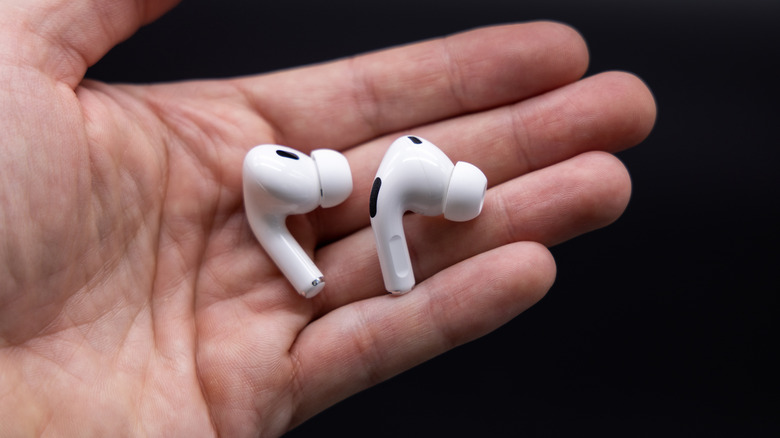
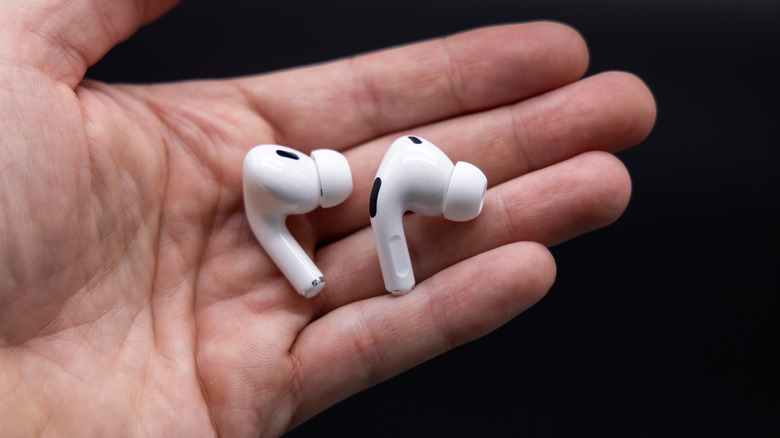
Every Apple upgrade comes with its fair share of wild rumors, many of which come and go without ever actually materializing. But here’s one that’s been persistently lingering above one of the company’s most iconic products: According to Wired, Apple may be testing earbuds equipped with cameras to help the devices better understand your surroundings in real time. The potential new feature was first mentioned back in 2024, but is now said to be in advanced testing.

The cameras would essentially act as sensors, giving Siri visual inputs to help interpret the context of your environment and respond more intelligently to your spoken requests. According to reports, Apple already has these camera-equipped AirPods developed as part of a broader push into AI-powered hardware. The cameras would likely be housed in slightly larger stems where they would gather low-resolution visual information. If Apple pulls it off, it could mean Siri helping you identify landmarks while walking, find foods the shelf while grocery shopping, and generally provide more accurate location awareness than just GPS.

The feature could have several advantages

The concept of camera-enabled AirPods likely came out of the much larger trend going on among technology companies in the AI space. In an effort to make AI assistants more useful, developers are seeing how the AI responds when given the chance to observe and understand the physical world. The appeal goes beyond navigation and shopping assistance, too. Per Wired, experts believe visual information could unlock entirely new experiences across Apple’s ecosystem.

For example, when paired with an Apple Watch, Siri could theoretically pick up on your movement stats as well as your environmental cues and use that to make smarter decisions. Wired’s example goes like this: Say you were running through a train station trying not to miss your train. Using the visuals along with your biometrics, Siri could pause nonessential notifications or calls to keep from stressing you out even further.

There’s also the accessibility side to consider. Siri could help visually impaired wearers by using the video data to describe their surroundings, letting them know about any objects or other environmental hurdles in their way. There’s also the potential for infrared sensors that could support more gesture-based interactions, as well. We’ll see if these end up happening or not (especially considering the built-in privacy issues that’d come with such a technology), but it certainly seems to be something Apple’s seriously trying to make happen for the future.


Source link

Leave a Reply

Subscribe to Our Newsletter

Get our latest articles delivered straight to your inbox. No spam, we promise.

Recent Reviews


Testing desks is something of a subjective game. Much like office chairs, the tests are based on comfort, reliability and ease of setup rather than things you can test in electronics such as wattage and battery usage. I still tested each one rigorously and will continue to test them for longevity in the coming months.

I tested these desks by asking three people to try each one. Each of them used the desk for at least 16 hours and then gave me their impressions. The three people were 6 feet, 1 inch tall; 5 feet, 8 inches tall; and 5 feet, 4 inches tall respectively, to give me a good cross-section of average user height.

A busted up box containing a desk

James Bricknell/CNET

Setup time and package quality

Building desks can often be difficult and time-consuming. For each desk, I timed how long it took to unpack and assemble, and I noted whether the manual was easy to follow. I followed the instructions as closely as possible so that each build was performed as if I had never built one before. I also thoroughly checked the packaging, to make sure it wasn’t damaged, and if it was secure enough to carry the desk it had in it. Any damage was noted, and images were sent to the manufacturers for review.

Structural integrity

Modern desks need to be able to hold a good amount of weight. If you’re at a writing desk you might only have a small laptop, but if you’re using a gaming desk, it likely has two monitors and a giant gaming PC as well. For each desk, I checked the maximum load specification, and I tried to match that with the materials we actually use on our desks.

I used:

  • A heavy gaming PC tower
  • Two 27-inch gaming monitors on a dual monitor arm
  • A MacBook Pro
  • Two different keyboards and assorted mice and trackpads
  • My Oculus Quest 2
  • My phone stand and USB hub
  • A podcasting mic and headphones

Depending on the length and weight capacity of the desk, I mix and match these items, then check for any bowing of the top or inconsistencies in how the desk felt as I worked.

Giant black standing desk with rainbow lights

James Bricknell/CNET

The wibble-wobbles

This is a bit of a throwback from when my dad used to make furniture. Anything my dad built would be critiqued by my mum, and if it didn’t pass muster, she would say, “It’s a bit wibbly-wobbly, isn’t it, dear?” Once I’ve built each desk and loaded it for normal use, I would check it for the wibble-wobbles. This means rocking it from side to side and forward and backward to check that all the screws, bolts and fixtures kept everything rigid.


Source link