Self-driving company Waymo added four more cities where it will service riders: Denver, San Diego, Las Vegas and Tampa. Waymo’s parent company, Alphabet, announced the expansion on Wednesday.
Waymo’s robotaxi service is currently available in big US cities such as San Francisco, San Antonio, Orlando, Phoenix and many others. Since rolling out Waymo’s self-driving cars, Alphabet has relied on electronic vehicles that use AI to detect objects under distinct weather conditions. Its fleet is predominantly the fully electric Jaguar I-Pace, though it recently added the roomier Ojai, a modified Zeekr vehicle.
Waymo’s newest vehicle, the Hyundai Ioniq 5, will be available with a specialist behind the wheel to validate the hardware and software before unleashing a rider-only rollout to the public.
Waymo stated in a blog post that the robotaxis being added in the new cities will initially be available only to Alphabet employees, but will be open to other riders soon. The self-driving company has made headlines since 2020 for introducing autonomous taxis to the public, but not always positively.
In recent months, nearly 4,000 Waymos were affected by a recall by the National Highway Traffic Safety administration after the robotaxis drove into construction zones on the highway in Phoenix, Arizona and San Francisco. The NHTSA report states that the cars incorrectly prioritized other highway hazards and failed to recognize the construction zones. Additionally, in May, another recall affected Waymo after it was reported that the vehicles were driving into flooded roadways.
Despite this debacle, Waymo is actively preparing to launch in New York, Chicago, London and Tokyo. Waymo also faces competition from Zoox, another robotaxi company owned by Amazon, which has continued to expand its operations across cities.
A Waymo representative was not available for comment.
When a website tells you to “copy this command to fix the issue,” you may not know it, but the command in question could be malicious. These are called ClickFix attacks, as my ZDNET colleague Charlie Osborne explains.
This social engineering technique can be adapted to various access scenarios, but in general, ClickFix aims to take advantage of human problem-solving. Fake error messages, for example, could request users to fix a minor technical problem by copying and pasting code or launching commands on their system.
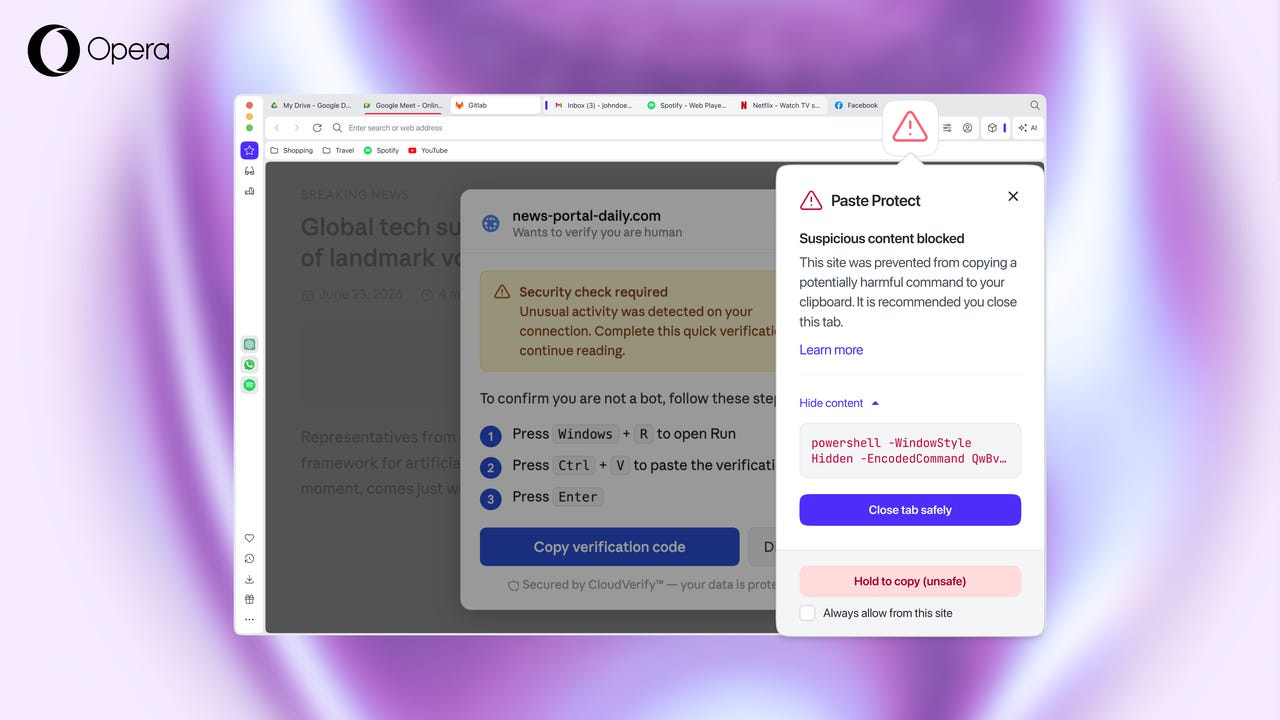
To solve that problem, the developers at Opera have created Paste Protect, which detects and blocks malicious clipboard content before you can paste it into a terminal or command prompt. According to Opera, “A ClickFix attack usually starts with something small and ordinary…a video that won’t play, or a CAPTCHA that won’t quite verify you’re human. Next, the page offers a fix for the problem by way of a short command to be pasted into the computer’s terminal. Once that command is run, the computer is compromised.”
According to Opera, over half of malware-loading cyber attacks in 2025 were of the ClickFix type. In fact, fake CAPTCHA attacks spiked by 563% last year.
Why ClickFix attacks dodge most defenses
ClickFix attacks sidestep nearly all existing defenses, including antivirus and email filters. The reason: Those systems are designed to check for threats from external sources, not for commands typed or pasted by the user.
“ClickFix attacks succeed because they turn the user into the weapon,” said Pawel Kurzelewski, head of security at Opera. “The clipboard is the last point before a malicious command is run, so that’s where we built our defense. With Paste Protect, we’re stopping these attacks at the exact moment they would normally succeed.”
You might recall that back in 2021, Opera released a feature of the same name. I reached out to Varsha Chowdhury (who does PR for Opera), and she had this to say:
The earlier Paste Protection feature prevented external applications from hijacking something you’d already copied and silently replacing it with something harmful, such as a malicious URL, bank account number, or crypto wallet address.
Paste Protect builds on that existing protection by adding a new Injection Protection layer. This detects and blocks malicious commands that are copied from a website—or otherwise injected into your clipboard—before they’re pasted into Terminal or Command Prompt. That’s the new capability designed to protect against ClickFix-style attacks.
So, in short:
Paste Protection = protects against clipboard hijacking by external applications.
Paste Protect = includes the existing Paste Protection plus the new Injection Protection, giving users protection against both clipboard hijacking and ClickFix-style clipboard injection attacks.
Opera’s new feature monitors clipboard activity in real time for malicious commands that are either copied by the user or placed in the clipboard by a website. The detection technique used by Opera is tailored for Linux, MacOS, and Windows to spot specific patterns associated with known malicious scripts. If one is detected, a warning pops up, explaining to the user what happened, along with a red icon in the address bar. Users will only be able to see the first 120 characters of the blocked content.
With this new feature, Opera is being proactive against one of the fastest-rising threats to users. Although extensions can help prevent such attacks, Opera is the first browser to have the functionality built in. This unified clipboard safety system is activated by default and allows users to whitelist trusted websites.
Even with Paste Protect enabled and active, you should always be wary of copying and pasting commands into your computer’s terminal — unless you trust the source explicitly.
To provide the best experiences, we use technologies like cookies to store and/or access device information. Consenting to these technologies will allow us to process data such as browsing behavior or unique IDs on this site. Not consenting or withdrawing consent, may adversely affect certain features and functions.
Functional
Always active
The technical storage or access is strictly necessary for the legitimate purpose of enabling the use of a specific service explicitly requested by the subscriber or user, or for the sole purpose of carrying out the transmission of a communication over an electronic communications network.
Preferences
The technical storage or access is necessary for the legitimate purpose of storing preferences that are not requested by the subscriber or user.
Statistics
The technical storage or access that is used exclusively for statistical purposes.The technical storage or access that is used exclusively for anonymous statistical purposes. Without a subpoena, voluntary compliance on the part of your Internet Service Provider, or additional records from a third party, information stored or retrieved for this purpose alone cannot usually be used to identify you.
Marketing
The technical storage or access is required to create user profiles to send advertising, or to track the user on a website or across several websites for similar marketing purposes.