
Verdict
Super bright and capable of producing a rich and detailed image, the JMGO N3 Ultimate is a brilliant smart projector. With lens shift and optical zoom built-in, too, it can get a clean, square picture without using lossy digital adjustments. It’s certainly not cheap, but if you don’t want a traditional projector, this is a brilliant, smart alternative
-
Very high brightness
-
Lens shift
-
Excellent contrast and colours
Key Features
Introduction
After years of being stuck with digital corrections for image correction, Trusted Reviews is now onto its second smart projector to feature optical zoom and lens shift, the JMGO N3 Ultimate.
It’s also the first JMGO projector to support Dolby Vision, removing one of the minor annoyances that I had with the previous model. All this means a much bigger device, so does the loss or portability matter, or is the ultimate do-all projector? Read my full review to find out.
Design
- Comes with a carry case
- Integrated gimbal
- Bluetooth voice remote
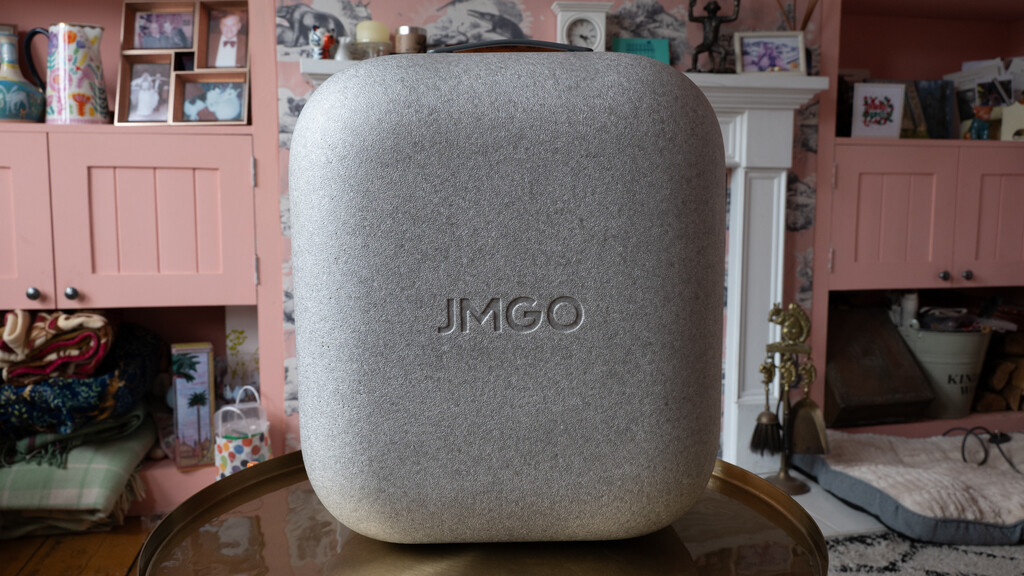
If you’ve seen previous projectors from the company, such as the JMGO N1S Ultimate 4K, then the JMGO N3 Ultimate will look familiar, only considerably bigger. It comes pre-attached to its gimbal mount and ships in a hard carry case, so there’s no need to dispose of any packaging.

I’m a big fan of these cases, as they offer protection when the projector’s not in use and do make it a bit easier to carry the JMGO N3 Ultimate around. I say a bit easier, as this projector weighs 6.95kg, making it quite a lump to move around.
Externally, the layout is very similar to other JMGO projectors, and the projector is mounted into a gimbal stand, which offers pan and tilt.

There are two HDMI 2.1 inputs (one of which supports eARC), and a USB port located on the base of the stand, which is also where the power connects.

Power is via the provided laptop-style brick, which connects to the inlet at the back of the projector.

There’s a power button on the front, but that’s it for physical controls.

For everything else, you’ll need to use the bundled remote control. It’s similar to other remotes for Google TV-powered projectors, with just the bare number of controls you need to navigate the interface and adjust volume.

I do like the backlighting, which makes the remote easier to use at night. And it’s nice to have a customisable shortcut button joining the preset ones for Amazon Prime Video, Netflix and YouTube.
It’s a Bluetooth remote, so there’s a built-in microphone for use with the Google Assistant.
Features
- Google TV
- Lens shift and optical zoom
- Automatic picture adjustment
It’ll be no surprise to find that the JMGO N3 Ultimate runs Google TV. It’s a generally good choice, as the interface is simple and bold, and all of the major apps are supported. Well, bar BBC iPlayer here. Between Google and the BBC there’s some kind of issue. If you want to stream that content, you’ll need to plug a separate media stick in.

Pretty much every smart projector has some kind of integrated automatic setup routine, with automatic keystone adjustment, screen fitting and obstacle avoidance now common. All of these tend to be digital adjustments, which eat into the available resolution.
The JMGO N3 Ultimate is better than that, and has two lossless adjustment options: lens shift and optical zoom. That makes it the second smart projector to have these options, after the Xgimi Horizon 20 Max.

For lens shift, you need to get the projector straight on to the projection surface, and then the picture can be moved +/-130% vertically and +/-53% horizontally (that’s more than the Xgimi Horizon 20 Max offers with its +/-120% vertical and +/-45% horizontal). Control of this can be done my using the dedicated button on the remote and waving it around, using the accelerometer inside to move the image; or there’s an option in the menus, controlled using the cursor keys.
In addition, there’s optical zoom, which gives a throw ratio between 0.88 and 1.7:1. That means you can get a 100-inch picture from between 1.95 and 3.76m away. In many scenarios, you won’t need to go near any other settings.
If you still can’t quite get the image lined up the way you want, the gimbal stand allows pan and tilt, either manually by physically moving the stand, or by using its built-in motors and the remote control to adjust it. I quite like the latter, as everything can be adjusted via the remote from the comfort of your seat.
Finally, if needed, there’s all the aforementioned automated goodies: screen fit, keystone correction and obstacle avoidance. And, there’s wall-colour compensation, so you can project onto a non-white surface without losing colour accuracy.

Image modes are all selectable via the Display menu, with presets for Vivid, AI-Enhanced, Standard, Soft and Movie. HDR modes get their own presets, with Dolby Vision getting two options: Bright or Dark.
For standard content, there are two additional modes to choose from. Dynamic seems completely pointless. It ramps the projector up the maximum brightness, turns the fans to super-noisy and makes everything look green.

CineTuner Master is a potentially more useful option. It has some preset options for the type of content you’re watching, such as action movie. But, you can import another user’s settings, which might help you find the right options more easily.

Basic settings include brightness, saturation, and hue controls, plus there’s a Dark Detail Enhancement option, AI Dynamic Black Level, and a full colour tuner and 11-point white balance correction.

Picture Quality
- Super bright
- Black levels could be darker
- Excellent contrast
You won’t be surprised to know that this projector uses a 0.47-inch 1080p DMD, using XPR to shift the DLP chip four times per second to build up a 4K image. It works very well, and even small text is sharp and easy to read.
Rated at a maximum of 5800 ISO Lumens the JMGO N3 Ultimate is incredibly bright, with its tri-laser backlight able to show a watchable picture in pretty much any room, blinds open or closed. Optimal viewing conditions require a dark room, but it’s nice to have the flexibility to watch anywhere.
With the level of brightness on offer, HDR footage can really shine in super-bright scenes that many projectors struggle with. Fire up Deadpool vs Wolverine, and the ‘flame on’ scene almost sears the eyes, although there’s still plenty of detail in the picture (a 20,000:1 contrast ratio helps).

Dark detail control can help with very dark scenes, but it’s important to use it sparingly. Go too far and scenes can lose atmosphere. With the Running Wheel scene in Guardians of the Galaxy Vol. 3, for example, the room should be dark and moody, highlighting the wheel. With Dark detail up, it looks like a brightly lit room.
Get the balance right, and you get the right combination with plenty of detail but overall moodiness resolved.

You can see that detail at work in the opening scene of Kingdom of the Planet of the Apes, with the baby ape’s face coming to life.

When the funeral pyre is lit, you get the bright orange of the flames, but you can see the hoard of apes as the camera pans back.

If anything, the black level isn’t quite as deep as with the Valerion VisionMaster Pro 2, with a little bit of greying in the darker parts of the image, and the Xgimi Horizon 20 Max may be just ahead here, too.
For my money, the JMGO N3 Ultimate isn’t quite as sharp in fine detail as the AWOL Vision Aetherion Max. For example, in the funeral scene in apes, the Aetherion Max does a better job with the fire’s embers.

That’s being very picky, as what the JMGO N3 Ultimate is still an exceptional projector. Its colours are bright, rich and vibrant and overall brightness is better than the competition can manage.
And, contrast really is very good. With Spider Noir, for example, watching in black and white, you get detail through the frame and the full moodiness that the show deserves. Black and white footage can be terrible for the DLP rainbow effect, but it’s not particularly pronounced on this projector.

It helps with high-quality content and having Dolby Vision present. With Dolby Vision, each scene has its own metadata; HDR10 has one set of data for the entire film or TV show, so some detail can be clipped, such as the detail in the car in the Amazon Prime Video version of Mad Max Fury Road.

Throw something sub-standard through the projector, such as early episodes of Poirot (SD, 4:3), and the JMGO N3 Ultimate upscales neatly and does a pleasant job with the limited image detail.

Motion handling is very good. Standard 4K footage plays at 60Hz, due to the way that the sensor has to be shifted around. For that reason, I recommend leaving motion compensation turned on, just to smooth out any potential mismatches between source frame rates and the 60Hz output.
Watching something fast-paced, such as Ultra HD Football via Sky Q, and the super-bright image and smooth video work well.

For gaming, Variable Refresh Rate is supported up to 240Hz, although you have drop to a resolution of 1080p to do that.
Sound Quality
- Dual 12.5W speakers
- Dolby Sound Processing
Dual 12.5W speakers are present for 25W of output power in total. There’s Dolby Sound Processing available, too.

Similar to a lot of smart projectors, the built in audio is good enough if you don’t want the hassle of using external speakers or a soundbar. I found the projector loud, clear and there’s enough semblance of bass to make the most of music or sound effects, such as explosions or bullets.
There’s no real stereo separation and, while sound fills the room, there’s no clear positioning of sound. The bridge fight in Wakanda Forever, for example, should have a gunshot to the back right, but here it just sounds like it’s coming from in front.
To be fair, that’s an issue with all projectors bar the Anker Soundcore Nebula X1 Pro, which has wireless surround and front speakers.
Should you buy it?
You want a portable projector without limitation
High brightness, Dolby Vision and lens shift all make this a brilliant projector for the living room, the garden and beyond.
You want something smaller
This is a big projector and if your primary goal is to get a model you can take everywhere, you’ll want something smaller.
Final Thoughts
A clear step up in image quality and brightness from JMGO’s previous models, the JMGO N3 Ultimate distinguishes itself with lens shift and optical zoom. For those who care about getting the best picture without resorting to digital adjustments, these features are invaluable and this a brilliant smart projector.
But, the extra features do make it very large: larger even than the Xgimi Horizon 20 Max, which itself is not a small and light projector. But the JMGO has more flexibility with its lens shift and zoom, and its motorised gimbal is a nice touch.
It’s not cheap, but if you like the all-in-one nature of a smart projector and want a super-bright, clean image, the JMGO N3 Ultimate is excellent. If you want something smaller or cheaper, read the guide to the best portable projectors.
How We Test
We test every projector we review thoroughly over an extended period of time. We use industry standard tests to compare features properly. We’ll always tell you what we find. We never, ever, accept money to review a product.
Find out more about how we test in our ethics policy.
- Tested for more than a week<br><br>Tested with real-world use
FAQs
Lens shift allows the image to be moved vertically and horizontally without the need for digital adjustment, preserving image quality.
Test Data
Full Specs
| JMGO N3 Ultimate Review | |
|---|---|
| Manufacturer | JMGO |
| Size (Dimensions) | 229 x 308 x 274 MM |
| Weight | 6.95 KG |
| Release Date | 2026 |
| First Reviewed Date | 18/06/2026 |
| Model Number | JMGO N3 Ultimate |
| Resolution | 3840 x 2160 |
| Brightness Lumens | 5800 |
| Lamp Life | 20,000 hours |
| Contrast Ratio | 20,000:1 |
| Max Image Size | 300 inches |
| HDR | Yes |
| Types of HDR | Dolby Vision, HDR10 |
| Refresh Rate | 60 Hz |
| Ports | 2x HDMI 2.1 (one with eARC), USB |
| Audio (Power output) | 25 W |
| Display Technology | DLP |
| Projector Display Technology | 3Channel laser |
| Throw Ratio | 0.88-1.71:1 |
| 3D | Yes |

Stephan is the sports journalist for the Maple Grove Report.