I Was Shocked by How Good These Budget TVs Were


The Fire TV remote in front of the Amazon 4-Series TV (2024)

The Fire TV remote in front of the Amazon 4-Series TV (2024)

Ty Pendlebury/CNET

When setting up these TVs, I was impressed to see Filmmaker Mode on two of these TVs (Samsung and Hisense). As the closest thing the industry gets to standardization, this mode helps ensure some consistency when watching TV and movies. By comparison, the Fire TV only has a choice of Movie Dark and Movie Bright (lit rooms) while Roku has its own Movie mode.

I tested the TVs by streaming movies, using Fandango at Home, including It and Spider-Man: Into the Spider-Verse. These two movies are tests for any TV — the ability to display either moody, high-contrast scenes (It) or the vivid colors of a comic book (Spider-Man.) In general, I found that the Hisense had the best contrast and best color saturation, while the Fire TV and Roku are brighter in movie modes.

Using the opening scenes of It, as Georgie descends the stairs, I found that the Roku had the poorest shadow detail of the four, with the details of intricate woodwork and wall under the stairs crushed into a blue/black. 

Meanwhile, it was the Hisense that had the best shadow detail — with more of the under-stairs area visible over these few frames. The Hisense had a solidity to its image that the other TVs lacked. As Georgie moves into the basement the room looked real, whereas the other TVs devolved into gray fog with disembodied furniture  In addition, black areas of the picture — even on the black bars at top and bottom — were truly black and not dark blue or gray as with the Samsung and Fire TV.

Four TVs lined up side by side in the CNET lab

Side-by-side picture comparisons (from left): Roku Select, Fire TV 4-Series, Samsung U8000 and Hisense QD7.

Ty Pendlebury/CNET

As with last year’s Samsung TV — red areas of the U8000’s picture are a little desaturated, and this was most obvious during Spider-Man: Into the Spider-Verse. At 32.48, during the memorial service for the old Spider-Man, Spidey’s suit looked a little more bedraggled on this TV as opposed to both the Fire TVs which had vibrant reds. Lastly, the Roku looked vibrant in its rendering of Spiderman’s red and blue, but the picture looked a little 2D and flat. The Roku did pick up a little during the blazingly-bright collider sequence, with the brightest picture of the four, but the Hisense had the best contrast.

I did find one when testing the Roku, in that its off-axis response was quite poor. Even when I was sitting dead-center of the screen at a distance of six feet I was never on-axis to all of the screen — there was always a part that’s just off axis. 

As far as bright-room performance is concerned, they all had some level of reflectivity, although some were better at rejecting direct light sources than others. I shone my cell-phone flash on each of the TVs in turn and found the Hisense was the best here, with a bright center but reduced corona. The next three were similar to each other, although the Fire TV’s reflections were dullest, then the Roku and the Samsung had the brightest reflections.

Light output in movie mode (lumens)

Brightness
Hisense QD7 618
Samsung U800 291
Fire TV 4-series 300
Roku Select 355


Source link

Leave a Reply

Subscribe to Our Newsletter

Get our latest articles delivered straight to your inbox. No spam, we promise.

Recent Reviews


How to get Siri AI - join the waitlist today

Apple / Elyse Betters Picaro / ZDNET

Follow ZDNET: Add us as a preferred source on Google.


ZDNET’s key takeaways

  • Siri AI requires the iOS 27 developer beta and a waitlist.
  • A free Apple Developer account is enough to install the beta.
  • Apple says Siri AI will launch in beta later this year.

Apple finally gave Siri the major update everyone has wanted for years, moving it from the voice assistant era to the intelligent AI era.

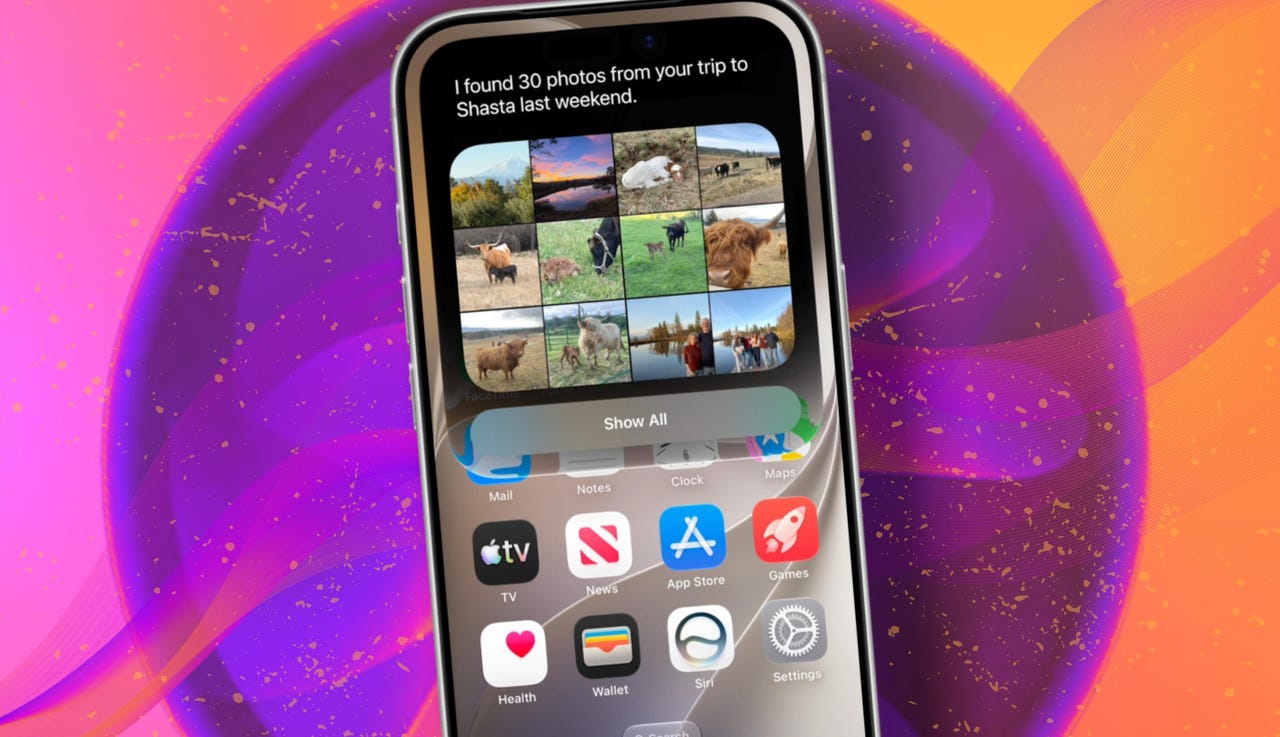
At WWDC 2026 in June, the company introduced Siri AI, a new version of Siri “powered by Apple Intelligence.” Apple said Siri AI is more conversational, understands personal context, can answer broader questions, and can take action across apps. It can also use my information from messages, emails, photos, notes, and the screen itself to get more done on my behalf.

Also: The two biggest iOS 27 features at WWDC for me had nothing to do with Siri AI

The catch? (There’s always one, right?) The iOS 27 developer beta needs to be installed first, and even then, there is a waitlist.

How to get Siri AI

What you’ll need: An iPhone 15 Pro or Pro Max, any iPhone 16 model, or any iPhone 17 model running the iOS 27 developer beta.

Install the iOS 27 developer beta on a secondary device, but be sure to back it up first. Remember, developer betas are unfinished software. Apps can crash or glitch, battery life can drain, and features can disappear.

The good news is Apple no longer requires a $99-a-year Apple Developer Program membership just to get access to beta software. A free Apple Developer account is enough. To join, if you haven’t before, simply go to Apple’s Developer website or use the Apple Developer app, sign in, and agree to the developer terms.

Also: 3 new MacOS 27 features make it worth upgrading right away for me – Siri included

Once that’s done, any new developer beta will automatically appear for the iPhone associated with that Apple Account. To check for iOS 27 and install it now, open Settings > General > Software Update > Beta Updates. From there, select iOS 27 Developer Beta, go back to the Software Update screen, and install the update.

Need help? Check out ZDNET’s guide on installing the iOS 27 developer beta.


Show more

Install the iOS 27 developer beta

Elyse Betters Picaro / ZDNET

After the iOS 27 developer beta is installed, the iPhone will reboot, but Siri AI will not automatically be available to try. Apple is using a waitlist. To join it, open the Settings app, go to Apple Intelligence and Siri, and select “Try New Siri.” Follow the prompts to opt in. Once a spot opens, a notification will appear saying New Siri is available.

Also: Getting real about WWDC and Siri AI – Video

Apple has not confirmed how long the wait will take, but it has said Siri AI will be available in beta “later this year.”


Show more

Join the Siri AI waitlist

Elyse Betters Picaro / ZDNET

Should you wait to try Siri AI?

Maybe. The iOS 27 developer beta is the only route to Siri AI right now. But it’s meant for developers testing apps and APIs, not for most people who need a stable daily phone. Only install it on an iPhone that’s not used every day, or wait for the iOS 27 public beta. That’s expected in July and is easy for anyone to try. An official release for the general public isn’t expected until this fall.

Also: How Data Can Improve Your Health and Wellness

As for me? I joined. I have a spare iPhone running the iOS 27 developer beta right now, and the first thing I did was get on the waitlist to try Siri AI. But that’s because I’m usually excited to try AI tools, and I want to play with the new Siri and be able to write about it. 

Should you join Siri Ai waitlist?

Elyse Betters Picaro / ZDNET

What can Siri AI do?

Apple said the new Siri AI is “a dramatically more capable and conversational assistant” that can help you “find information and get things done throughout the day.” That’s nice, but what, specifically, can it do? According to Apple, the new Siri AI can:

Also: Will your iPhone support Siri AI? The answer is complicated

  • Access “broad world knowledge for up-to-date answers” on any topic.
  • Provide “detailed responses” and “natural back-and-forth conversation.”
  • Use “personal context” in messages, emails, and photos to help find what you need.
  • Find details like restaurant tips, hotel confirmations, and trip photos.
  • Understand what’s on screen and answer questions about it.
  • Use “Visual Intelligence” in Camera and screenshots.
  • Take actions across apps, including drafting emails and editing or sharing photos.
  • Let you ask about images, files, and text from context menus.
  • Generate, rewrite, and proofread text systemwide.
  • Match punctuation and tone in Mail and Messages based on how you usually write.
  • Save “conversation history” in a dedicated Siri app.
  • Offer more expressive voices and better dictation.
  • Help split bills with Apple Cash.
  • Run across iPhone, iPad, Mac, Apple Watch, CarPlay, AirPods, and Vision Pro.
  • Work from Spotlight on iPad and Mac.

When will Siri AI be available?

Apple said it will be available in beta “later this year,” starting in English.

Which iPhone models support Siri AI?

The answer is complicated, but here’s my best guess:

  • iPhone 15 Pro and iPhone 15 Pro Max
  • All iPhone 16 models
  • Any later iPhone models

Apple hasn’t provided a supported device list, but its iOS 27 page shows Siri AI requires “an Apple Intelligence-enabled device.” Apple’s support page for Apple Intelligence also lists “iPhone 15 Pro models, and iPhone 16 models or later.” Apple’s iOS page uses similar wording for Apple Intelligence in iOS 27, as well: “all iPhone 16 models and later, iPhone 15 Pro, iPhone 15 Pro Max.”

There are also regional limits. Apple said Siri AI will “not initially” be available in the EU on iPhone and iPad.


Show more


Source link