Best TV Antenna for Cord-Cutters in 2026


Top antennas testing results

Price No. of channels (NYC) No. of channels (LA) No. watchable test channels (out of 14)
Antennas Direct Clearstream Eclipse 40 104 70 11
Btfdreem Smart TV Antenna — Amplified 29 81 104 11
Channel Master Flatenna 29 98 86 11
Gesobyte Amplified HD Digital TV Antenna — Low 30 92 116 13
Mohu Gateway 35 104 128 11
Mohu Leaf 35 102 131 12
Ultra Vizion HD Digital TV Antenna 44 104 69 10

We’ve tested dozens of antennas in the past 10 years with a view to finding the best performance and ease of installation for the least amount of money. Compared to a live TV streaming service, OTA TV does have some restrictions, namely, it is usually confined to a single television, and the broadcast signal from an OTA TV antenna won’t work on phones or other devices. Thankfully, you can kick it up a notch with an OTA DVR with networking capabilities and dedicated apps. Our favorite right now is the Tablo 4th Gen.

When you’re buying a TV antenna the two things you desire most are: the most number of channels available, and the best reception or picture quality. In our tests, we wanted to find the antennas that were able to pull in more channels than the others, and that also delivered stronger, clearer TV signals, even on “problem” channels. Using the TiVo Edge as our test machine, we hooked up each antenna in turn and tested how many total channels we could receive in our LA and New York locations. The Edge lists the signal strength of each channel, and while a signal strength reading of 70% usually means it’s watchable we watched all of the predetermined test channels (below) to determine the signal quality. In deciding a winner, we tried to find the antenna that had the best performance with both line of sight and without.

tivo-test-1.jpg

Testing an antenna by searching for channels using the TiVo Edge

Ty Pendlebury

With that in mind, we tested seven indoor antennas with prices ranging from $29 to $50 (all much less than the most basic cable TV service). Here are the seven TV antennas we looked at:

While most of the antennas were made by “name” manufacturers, the Gesobyte and the Btfdreem were chosen specifically because they were two of the highest-selling antennas on Amazon, although the latter is currently unavailable.

View of the Empire State Building from Upper Manhattan

In my test site in Upper Manhattan, I have a direct line of sight to the broadcast tower located in the Empire State Building.

Ty Pendlebury

Much like real estate, how well a TV antenna works is based on location, location, location. We tested the antennas in two main places: in uptown Manhattan, New York with a line of sight to the broadcast tower six miles away, and in Reseda, California, at least 10 miles from the closest tower (though no line of sight). Depending on your own location, for instance, you might receive broadcasts from multiple antennas. In addition, hills or large buildings in the way will affect the frequency range and reception of TV channels.

We situated each antenna in the same spot each time and connected it to the TiVo Edge, which gives signal strength data as well as a total channel count. We used two metrics to determine which TV antenna performed best. The first was a raw measure of the number of channels the antenna could detect, while the second involved several predetermined “problem channels.” For these, we consulted a list of channels culled from various forums, for both testing areas, and gauged how well the antennas pulled in each channel.

tivo-edge-05

The TiVo Edge is a now-discontinued OTA recorder for cord-cutters.

Joshua Goldman/CNET

Our list of “problem” channels in Manhattan was WABC 7.1 (ABC), WNET 13.1 (PBS), WPIX 11.1 (CW — Manhattan only) and WNJB 58.1 (PBS — New Jersey only). In addition, we added popular channels CBS 2.1, WNBC 4 (NBC), and WNYW 5 (Fox). Meanwhile, we compiled a list of channels in LA including KCBS 2.1 (CBS), KNBC 4.1 (NBC), KTLA 5.1 (CW), KABC 7.1 (ABC), KTTV 11.1 (FOX), KCOP 13.1 (MyNetwork) and KCET 28.1 (PBS).

While the outcome will vary depending on where you live and how far you are from TV towers, in our tests the best-performing models received the greatest number of popular channels as well as local channels, radio broadcasts and Spanish-language stations.

Most of the TV antennas were based on the same rectangular design, but there was one important consideration: the cable. Did the antenna have a long, high-performance coaxial cable or, even better, a detachable one? You’ll be sticking one of these in your window, which could be a long way from your TV, so longer is better.

It’s worth noting that some of these antennas — the Btfdreem, Gesobyte and the Ultra Vizion Plus — included gain-boosting amplifiers. Based on our experiences in several locations over the years, amplifiers can affect signal strength in wildly unpredictable ways. The Ultra Vizion wouldn’t work at all with the amp attached, while the others did. The numbers printed above are the best results with or without amplification. If you can’t get TV reception with an indoor antenna, a gain amp may not actually help you, and in other cases, it could make your reception worse by overloading channels that already have a strong signal.

antennas-08.jpg

Several antennas in our list include a powered amplifier, but use thoughtfully, as these may actually make a strong signal worse.

Sarah Tew/CNET


Source link

Leave a Reply

Subscribe to Our Newsletter

Get our latest articles delivered straight to your inbox. No spam, we promise.

Recent Reviews


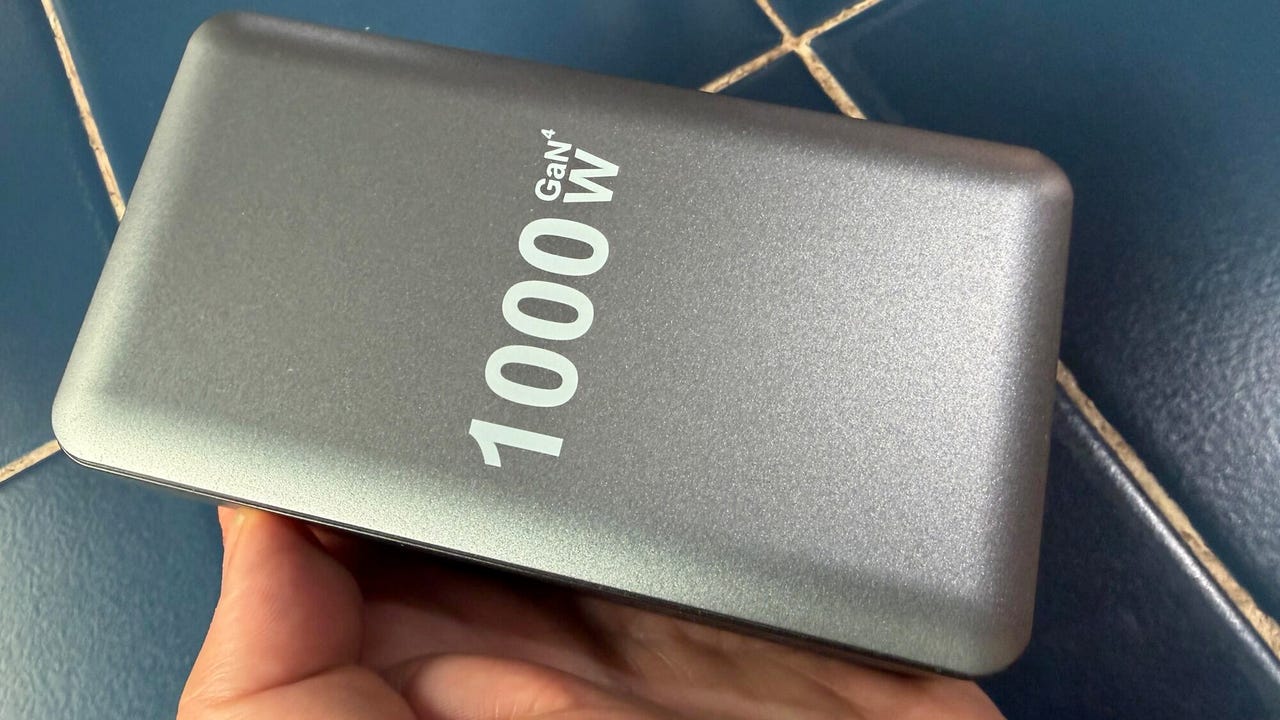
1,000W, 10-port charger for $45... predictably disappointing.

1,000W, 10-port charger for $45… predictably disappointing. 

Adrian Kingsley-Hughes/ZDNET

Follow ZDNET: Add us as a preferred source on Google.


ZDNET’s key takeaways

  • Things that look “too good to be true” invariable are just that.
  • This example got dangerously hot in a short period of time before dying. 
  • There’s no legitimate charger that comes close to delivering on the 1,000W promise.

Being a tech reviewer for a living means that I get offered some very interesting things. Not interesting as in Bugatti supercars or jewel-encrusted Fabergé eggs, but interesting as in “this thing could easily be a fire hazard — want to take a look?”

Also: The best GaN chargers of 2026: Expert tested

Submissively, I often say yes. And I’m glad I did with the most recent pitch, because it was very interesting indeed.

Meet the “interesting” charger

This time around, the thing of interest was a charger that claimed to deliver an incredible 1,000W through its ten ports — four 140W USB-C ports, four 100W USB-C ports, and two 20W USB-A ports. 

The person who bought this charger told me that they’d plugged it in, used it to charge their phone for “a few minutes,” got worried when it became “a little hot,” and unplugged it.

That's a lot of promise... but (spoilers), they don't deliver!

That’s a lot of promise… but (spoilers), they don’t deliver!

Adrian Kingsley-Hughes/ZDNET

The unit was suspiciously light and plasticky, especially given its built-in power supply. Compare this to Ugreen’s Nexode 500W charger, which weighs a hair under 5 lb.

There was also a slight whiff of melty plastic, which made me think that this had been a bit more than a little hot. 

Also: This $4 router reboot timer is the cheap internet fix I didn’t know I needed – and it works reliably

Color me suspicious, but I had a gut feeling that the only way this charger would be able to push out 1,000W would be if it caught fire. 

Turns out I wasn’t far wrong.

How long would it last? Answer: Minutes

Talk is cheap. It was time to test the charger. 

So I plugged it in, turned it on, and started using it. Within a couple of minutes of starting to use it, I noticed a few things:

  • No matter what I tried, I couldn’t persuade the charger to deliver more than about 60W from any of the ports. 
  • As for peak output, I managed to get close to 250W.
  • The power output was very uneven and noisy, fluctuating wildly. The more ports I used, the worse it got.
  • The unit got very hot to the touch very quickly, even under light loads. 
  • But… before I could get the thermal camera out to check how hot it got, there was a pop and the unmistakable smell of “Magic Smoke.” The charger had been sent to Silicon Heaven within minutes.

Annnnd… POP! This is the moment the charger gave up the ghost.

Adrian Kingsley-Hughes/ZDNET

Diagnosis time

Time to take it apart and have a look inside. For an item that plugged into the mains power, this unit was shockingly easy to take apart. 

A thin sheet of easily removable plastic is a that separates curious hands from live AC power.

A thin sheet of easily removable plastic is a that separates curious hands from live AC power.

Adrian Kingsley-Hughes/ZDNET

And even unplugged and broken, it was capable of delivering zaps! If the case came off while this was plugged into an outlet, it could very easily be deadly.

There’s charge still in some of the capacitors, and these could deliver quite a zap despite the unit being broken and unplugged!

Adrian Kingsley-Hughes/ZDNET

After getting inside, the unit was filled with a grey goo that I’d seen in a previous disappointing charger I’d taken apart. This is a thermal paste that’s used to try to dissipate the heat generated by the components. 

It’s not really going to work because it’s sealed in a plastic box with no effective heatsink. It’s a token gesture at best. At worst, it creates a mass that’ll slowly heat up and hold temperature because it’s got no way to get rid of it.

Behold the grey goo!

Adrian Kingsley-Hughes/ZDNET

Next to this goo was a bank of capacitors — the black cylinders in the photo — which were the cause of the failure. They’d clearly overheated, with three of them showing signs of bulging.

The problem!

Adrian Kingsley-Hughes/ZDNET

Well there’s the problem!

I also noticed that two of the components — bridge rectifiers that are used to turn AC mains into DC — have been fixed on an angle to make the touch a metal heatsink. It’s not really an effective way to cool down components.

The bottom line

Another “too good to be true” device bites the dust. It’s not the first one I’ve come across, and it won’t be the last.

Moral of the story here is that manufactures are using big number marketing — in this case 1,000W and masses of ports — to scalewash poor quality products. 

This might be a half-decent product if it was built to deliver 100W, but there’s no end of competition at that end of the market. Silkscreen “1,000W” on the outside, sprinkle in a few reviews that feel scripted and fake, and all of a sudden it’s interesting and exciting… right up until it blows up. 

Also: My top 7 laptop-bag essentials now, after decades of remote work

I know of no 1,000W charger. In fact, the 500W Ugreen Nexode is the highest-power charger that I’ve tested that’s legit. And the price is also legit — $250. 

But it’s built to deliver on what it promises and is packed with safety features, including “tip-over protection,” which cuts the output when the unit tips over and prevents it from falling on its side, where it can’t dissipate heat effectively. Now that’s an attention to safety that I like to see in a product that handles that much power. 

But if you want 1,000W of output, you’ll have to buy two and duct tape them together.


Source link