When he renegotiated NAFTA, President Trump called the new trade deal USMCA. Meanwhile Canada calls it CUSMA and in Mexico, it’s ACEUM. For all of us though, the agreement lets goods and service move freely among the three countries.
North American Free Trade
Displaying the travels of a piston, this graphic is an example of how its production is optimized:
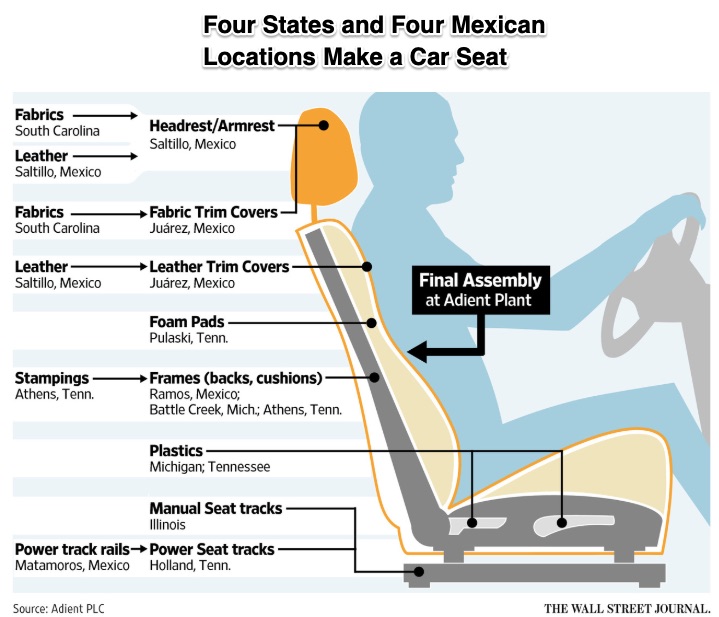
Similarly, we can look at a car seat’s assembly to see how multiple locations cooperate:
For the capacitor, we start with Asia and then see the path it follows through Colorado, Texas, Ontario, and Mexico before it winds up in the above car seat:
Our Bottom Line: Comparative Advantage
As the first economist to explain comparative advantage, David Ricardo (1772-1823) understood the synergies of trade. He told us that it does not matter if you are not the best at making something. To maximize productivity, you just should produce whatever requires the least sacrifice and then trade. If it’s 5 widgets or 10 gadgets with the same resources, then make those gadgets and export them to someone who can make widgets with fewer resources.
Here, the USMCA, CUSMA, and ACEUM enter the picture. A bigger market through which people, goods, and services move can more easily facilitate wealth creation. That bigger market–at $2 trillion annually–feeds the economies of scale, specialization, and comparative advantage that David Ricardo described. It is why the United States, Canada, and Mexico need each other for auto seats, pistons, and capacitors, and countless other goods and services.
It is why our free trade deals need to be preserved.
My sources and more: Thanks to WSJ for inspiring today’s post. Next, always handy for economists’ biographies and their ideas, econlib is perfect for reading more about David Ricardo and comparative advantage. Then, keeping the economics in mind, do go to WSJ’s transmission story. And finally, I suggest returning to our past car seat post.
Please note that several of today’s sentences were in a past econlife post.
The update comes on the heels of a larger Android 17 update that Google unveiled last month, which bakes AI even deeper into the operating system. Called Gemini Intelligence, it’s designed to turn AI agents into true assistants that proactively lend a hand without needing to be asked.
This month’s Android updates are a bit less flashy but arguably more practical — especially as scam calls become more sophisticated. Here’s what’s in store.
Fake call detection
Android’s fake call detection feature, which is baked into the Phone app, will alert you if it appears someone is impersonating one of your contacts. For instance, if you get a call from “Mom” and the system flags it as a scam, you’ll see an alert reading, “This may not be Mom. Someone may be pretending to call from your contact’s number.” This can be an especially handy feature as AI makes it easier to replicate the voices of friends and family members, leading to more sophisticated — and detrimental — scams.
Fake call detection works by conducting a real-time check of both phones to gauge whether the caller is who they say they are. When your actual mom is calling, for instance, her verified device will send an end-to-end encrypted private confirmation signal over RCS. But when the scammer impersonating your mom calls — likely using an internet spoofing dialer and an AI voice cloner — their device won’t have that confirmation signal. Your phone will then check with your mom’s phone to confirm she didn’t place the call. You’ll get the alert and a prompt to hang up.
The feature is rolling out globally this month in Phone by Google on devices with Android 12 and higher, starting with Pixel devices. Both the contact and the person receiving the call need to be using Google’s Phone app. Fake call detection also requires RCS capability in Google Messages.
Watch this: Android’s Biggest AI Update: Everything to Know About Gemini Intelligence
Book Insights in Google Play Books
Another new feature called Book Insights helps you refresh your memory or dig up information about what you’re reading on Google Play Books. You can tap “Catch me up” to get a recap of where you left off (similar to the Story So Far feature on Amazon’s newer Kindle models). You can also highlight a passage to ask questions or dig deeper into specific themes or characters. Book Insights is rolling out in the Google Play Books app and is available on certain titles in English.
AirDrop across more Android devices
Perhaps one of the most anticipated features to arrive in recent months is support for Apple’s AirDrop in Quick Share. Finally, it’s easy to seamlessly share photos, videos and other media across iPhones and Android phones with a few taps.
Google’s Circle to Search feature quickly pulls up details about what’s on your device’s screen. It got a fashion-forward boost earlier this year with the addition of Find the Look, which, as the name suggests, helps you find an entire outfit from a photo or screenshot. You can also see how that outfit might look on you using an AI-powered virtual try-on feature. Find the Look is now available on all devices that support Android 14 and up with Circle to Search.
Sift through your own wardrobe in Google Photos
Another outfit-oriented feature lets you mix and match pieces you own and try them on virtually. Called Google Photos Wardrobe, it’ll catalog what you’re wearing throughout your photo library and turn those outfits into images you can sift through to piece together your next look. This is rolling out next week to certain users in the US, India and Brazil with Android 10 and up.
Kids can tap into Personal Safety app features
New safety features are arriving soon for kids under 13. They’ll be able to access features in the Personal Safety app such as displaying medical information and featuring emergency contacts on their lock screen. They can also turn on car crash detection, which automatically contacts emergency services and texts emergency contacts if there’s an accident. The Personal Safety app is available globally.
Cook up some fun emoji combos
And lastly, you’ll be able to combine emoji to better match what you’re feeling. Emoji Kitchen in Gboard includes new sticker combinations, like a mouse with a pink heart, that you can send to your friends for a more creative and whimsical touch.
To provide the best experiences, we use technologies like cookies to store and/or access device information. Consenting to these technologies will allow us to process data such as browsing behavior or unique IDs on this site. Not consenting or withdrawing consent, may adversely affect certain features and functions.
Functional
Always active
The technical storage or access is strictly necessary for the legitimate purpose of enabling the use of a specific service explicitly requested by the subscriber or user, or for the sole purpose of carrying out the transmission of a communication over an electronic communications network.
Preferences
The technical storage or access is necessary for the legitimate purpose of storing preferences that are not requested by the subscriber or user.
Statistics
The technical storage or access that is used exclusively for statistical purposes.The technical storage or access that is used exclusively for anonymous statistical purposes. Without a subpoena, voluntary compliance on the part of your Internet Service Provider, or additional records from a third party, information stored or retrieved for this purpose alone cannot usually be used to identify you.
Marketing
The technical storage or access is required to create user profiles to send advertising, or to track the user on a website or across several websites for similar marketing purposes.