Co-op Game Orbitals Is a Split Fiction-Like Delight, an ‘Anime You Can Play’


With couch co-op games so rare, it’s been lovely to see more debut at this year’s Summer Game Fest. It’s an even greater treat when they’ve got a unique art style that immerses you in a fun world. Publisher Kepler Interactive’s upcoming game Orbitals, launching Sept. 3, soars ahead of its contemporaries with a delightfully retro ’80s anime look — and my short preview with the game had me eager for more.

Nestling in a beanbag chair in a corner of Nintendo’s preview area on the SGF 2026 grounds, I fired up the demo of Orbitals on the Nintendo Switch 2 alongside another games journalist and was dropped right into the action. Our spaceship was in rough shape, and we needed to team up to get it out of the docking bay and on to our adventure. 

Kepler Interactive had shrewdly decorated its preview space to look like a kid’s bedroom, complete with a bunk bed and toys, to make it feel like we were in the middle of a teen sleepover. It reminded me of when I’d crash with friends and watch anime like Dragon Ball Z and Gundam Wing, which was the point — Orbitals is “one of the most authentic recreations” of Japanese anime from the late ’80s and ’90s brought to life as a co-op adventure game, Kepler Interactive PR director Jack Kennedy told me.

“It’s an anime you can play,” he said.

If you aren’t a millennial who grew up watching that particular era of anime, the game is designed to appeal to fans of co-op games such as Hazelight Studios’ Split Fiction or It Takes Two, Kennedy said. That proved true. As my co-player and I roamed the halls of the starship, we grabbed equipment backpacks and took on tasks that required coordination — I used a remote claw to hold a hatch open while my partner sprayed it with water, for instance.

And, like Hazelight’s co-op games, the tasks we handled escalated in complexity but never quite reached the point of frustration. It helped that we were next to each other for this couch (er, bean bag) co-op experience. One sequence had our characters in front of a computer terminal, each of us pressing our particular buttons in alternating turns, with my partner and me calling out “me, then you, then me, you, me, you!” What a thrill.

In any other visual style, this would’ve been fun, but the ’80s anime look feels so distinct and yet familiar to me, like a warm blanket made of memories. I realize I’m a total mark for Orbitals’ look, but it’s not just the animation that developer Shapefarm somehow made to model that hand-drawn look of DBZ or Sailor Moon. The characters and environment look like they come from that era’s vision of a spaceborne future, with chunky analog tech and baggy space suits.

A gameplay screen split in half vertically, showing characters in a spaceship performing tasks.

Orbitals has split-screen gameplay for players to each perform tasks in tandem. In this shot, one player uses a laser to superheat steel while the other bends it. Teamwork!

Kepler Interactive

Orbitals’ visual identity is an intentional homage. The game’s art director, Marcos Ramos, grew up in Argentina watching anime and brought it to life for the game, Kennedy said. The backgrounds have a hand-painted watercolor kind of look, while foreground elements that can be picked up are thickly outlined to make them stand out. 

Most of the animations are set to either the standard 24 frames per second or down to 12, mimicking the anime practice of saving costs by drawing only half the frames — a charming effect seen in animated films like Into the Spider-Verse.

Choosing to animate effectively half the frames isn’t something a lot of other anime-styled games can do, Kennedy pointed out. Many of them are fighting or high-paced action games where split-second timing is key, and players rely on counting exact frames to make precise moves. Orbitals, a more relaxed adventure, can be more playful with its visuals.

“It’s just the right genre, this is the right team working on it — it just makes it that hyperauthentic feel,” Kennedy said.

People sit in beanbag chairs in front of a screen showing a game with anime-styled characters.

At Summer Game Fest, press got to try out Orbitals in a space decorated like a teen sleepover.

David Lumb/CNET

My Orbitals preview lasted a scant 20 minutes of my partner and me rambling around solving puzzles to get our ship moving, so I didn’t get any sense of what the game’s broader story would be. Kennedy couldn’t speak to it, but described its overall vibe as a light-hearted family-friendly adventure, “kind of like a Saturday morning cartoon.” 

Remember when shows would have an episode that would be super important with high stakes and then the next they’d be off to the beach to hang out? That’s Orbitals’ story, Kennedy said — a mix of serious and silly.

“Ultimately, the real experience is the people playing it on the couch together and laughing and pointing at things you can do,” Kennedy said. “That’s an extension of what the game’s story is trying to achieve.”


Source link

Leave a Reply

Subscribe to Our Newsletter

Get our latest articles delivered straight to your inbox. No spam, we promise.

Recent Reviews


How to get Siri AI - join the waitlist today

Apple / Elyse Betters Picaro / ZDNET

Follow ZDNET: Add us as a preferred source on Google.


ZDNET’s key takeaways

  • Siri AI requires the iOS 27 developer beta and a waitlist.
  • A free Apple Developer account is enough to install the beta.
  • Apple says Siri AI will launch in beta later this year.

Apple finally gave Siri the major update everyone has wanted for years, moving it from the voice assistant era to the intelligent AI era.

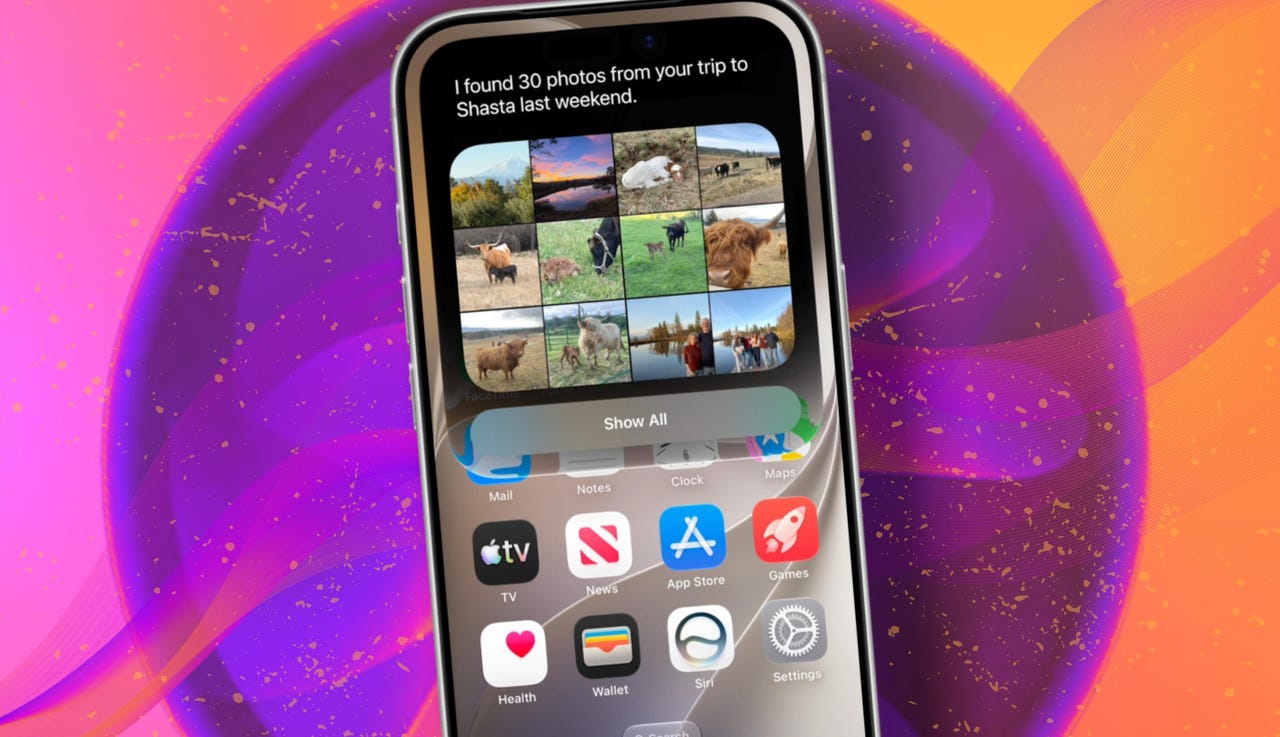
At WWDC 2026 in June, the company introduced Siri AI, a new version of Siri “powered by Apple Intelligence.” Apple said Siri AI is more conversational, understands personal context, can answer broader questions, and can take action across apps. It can also use my information from messages, emails, photos, notes, and the screen itself to get more done on my behalf.

Also: The two biggest iOS 27 features at WWDC for me had nothing to do with Siri AI

The catch? (There’s always one, right?) The iOS 27 developer beta needs to be installed first, and even then, there is a waitlist.

How to get Siri AI

What you’ll need: An iPhone 15 Pro or Pro Max, any iPhone 16 model, or any iPhone 17 model running the iOS 27 developer beta.

Install the iOS 27 developer beta on a secondary device, but be sure to back it up first. Remember, developer betas are unfinished software. Apps can crash or glitch, battery life can drain, and features can disappear.

The good news is Apple no longer requires a $99-a-year Apple Developer Program membership just to get access to beta software. A free Apple Developer account is enough. To join, if you haven’t before, simply go to Apple’s Developer website or use the Apple Developer app, sign in, and agree to the developer terms.

Also: 3 new MacOS 27 features make it worth upgrading right away for me – Siri included

Once that’s done, any new developer beta will automatically appear for the iPhone associated with that Apple Account. To check for iOS 27 and install it now, open Settings > General > Software Update > Beta Updates. From there, select iOS 27 Developer Beta, go back to the Software Update screen, and install the update.

Need help? Check out ZDNET’s guide on installing the iOS 27 developer beta.


Show more

Install the iOS 27 developer beta

Elyse Betters Picaro / ZDNET

After the iOS 27 developer beta is installed, the iPhone will reboot, but Siri AI will not automatically be available to try. Apple is using a waitlist. To join it, open the Settings app, go to Apple Intelligence and Siri, and select “Try New Siri.” Follow the prompts to opt in. Once a spot opens, a notification will appear saying New Siri is available.

Also: Getting real about WWDC and Siri AI – Video

Apple has not confirmed how long the wait will take, but it has said Siri AI will be available in beta “later this year.”


Show more

Join the Siri AI waitlist

Elyse Betters Picaro / ZDNET

Should you wait to try Siri AI?

Maybe. The iOS 27 developer beta is the only route to Siri AI right now. But it’s meant for developers testing apps and APIs, not for most people who need a stable daily phone. Only install it on an iPhone that’s not used every day, or wait for the iOS 27 public beta. That’s expected in July and is easy for anyone to try. An official release for the general public isn’t expected until this fall.

Also: How Data Can Improve Your Health and Wellness

As for me? I joined. I have a spare iPhone running the iOS 27 developer beta right now, and the first thing I did was get on the waitlist to try Siri AI. But that’s because I’m usually excited to try AI tools, and I want to play with the new Siri and be able to write about it. 

Should you join Siri Ai waitlist?

Elyse Betters Picaro / ZDNET

What can Siri AI do?

Apple said the new Siri AI is “a dramatically more capable and conversational assistant” that can help you “find information and get things done throughout the day.” That’s nice, but what, specifically, can it do? According to Apple, the new Siri AI can:

Also: Will your iPhone support Siri AI? The answer is complicated

  • Access “broad world knowledge for up-to-date answers” on any topic.
  • Provide “detailed responses” and “natural back-and-forth conversation.”
  • Use “personal context” in messages, emails, and photos to help find what you need.
  • Find details like restaurant tips, hotel confirmations, and trip photos.
  • Understand what’s on screen and answer questions about it.
  • Use “Visual Intelligence” in Camera and screenshots.
  • Take actions across apps, including drafting emails and editing or sharing photos.
  • Let you ask about images, files, and text from context menus.
  • Generate, rewrite, and proofread text systemwide.
  • Match punctuation and tone in Mail and Messages based on how you usually write.
  • Save “conversation history” in a dedicated Siri app.
  • Offer more expressive voices and better dictation.
  • Help split bills with Apple Cash.
  • Run across iPhone, iPad, Mac, Apple Watch, CarPlay, AirPods, and Vision Pro.
  • Work from Spotlight on iPad and Mac.

When will Siri AI be available?

Apple said it will be available in beta “later this year,” starting in English.

Which iPhone models support Siri AI?

The answer is complicated, but here’s my best guess:

  • iPhone 15 Pro and iPhone 15 Pro Max
  • All iPhone 16 models
  • Any later iPhone models

Apple hasn’t provided a supported device list, but its iOS 27 page shows Siri AI requires “an Apple Intelligence-enabled device.” Apple’s support page for Apple Intelligence also lists “iPhone 15 Pro models, and iPhone 16 models or later.” Apple’s iOS page uses similar wording for Apple Intelligence in iOS 27, as well: “all iPhone 16 models and later, iPhone 15 Pro, iPhone 15 Pro Max.”

There are also regional limits. Apple said Siri AI will “not initially” be available in the EU on iPhone and iPad.


Show more


Source link