In a recent post, we asked, “How Harvard Could Cure Grade Inflation.” Yesterday, a faculty vote provided some answers.

Harvard’s Inflation Solution

The Decision

Through a faculty vote of 458 to 201, starting during the Fall of 2027, Harvard will limit the number of A’s that instructors can give students. Applying only to undergraduates, the number of A’s per course was capped at 20%. However, smaller sections could add an extra 4.

Responding, the Dean of Undergraduate Education and students don’t agree. The Dean said, “This vote is an important step toward ensuring that our grading system better serves its central purposes: giving students meaningful feedback, recognizing genuine distinction, and sustaining the academic mission of the College.” By contrast, polled students said the decision would elevate stress and reduce exploration.

The Impact

As a popular elective, Harvard’s Principles of Economics typically enrolls close to 800 students. I assume that means 600 will not get an A. But they can get A-‘s.

Our Bottom Line: Curing U.S. Inflation

Inflation caps don’t always work.

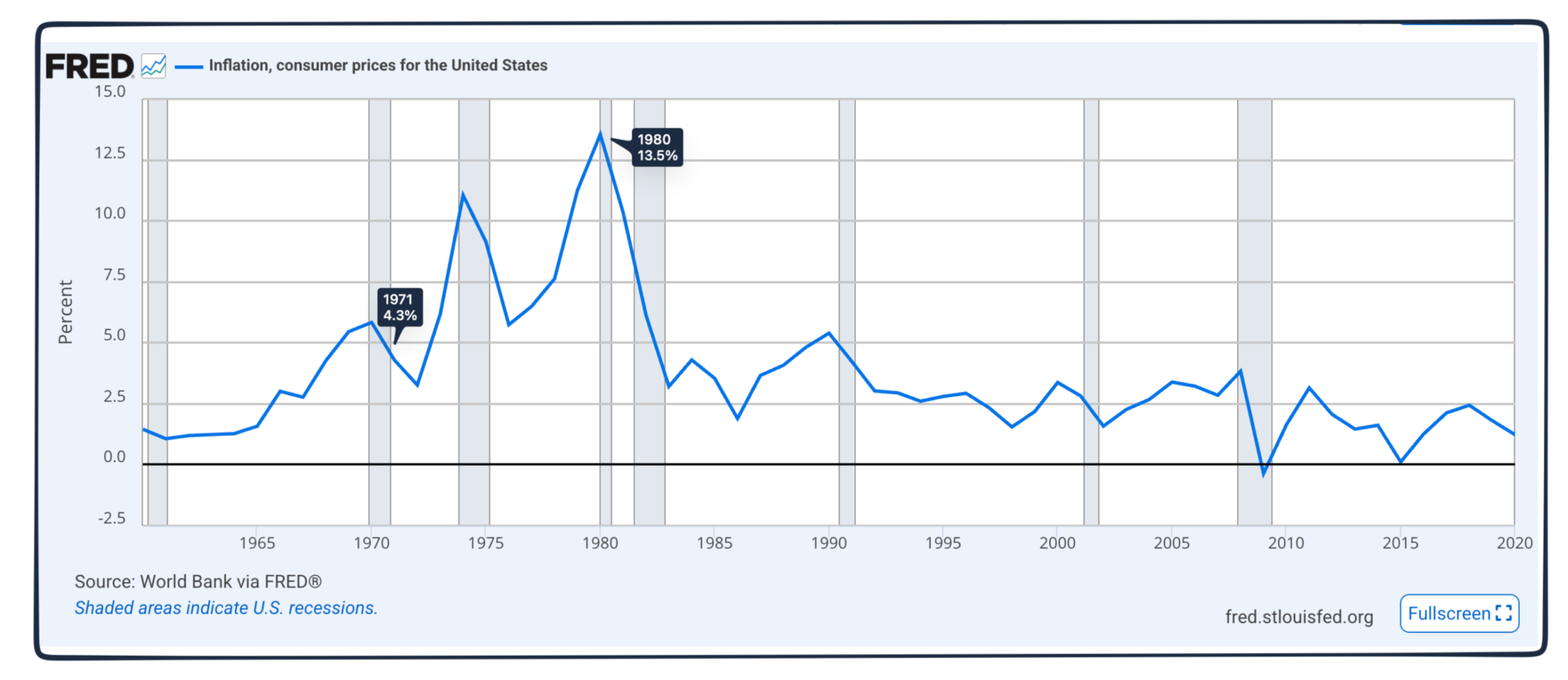
Concerned that the inflation rate had reached 5.8% in 1970, President Richard Nixon imposed wage and price controls. Beginning with a temporary freeze in 1971, the program selectively lifted and then reimposed controls until 1974. Described as a catastrophe by one historian, “Ranchers stopped shipping their cattle to the market, farmers drowned their chickens, and consumers emptied the shelves of supermarkets.”

And it never cured inflation.

Like a pressure cooker, inflation dropped during the controls and then skyrocketed to 11 percent when the lid was lifted. By 1980, it touched a high of 13.5%:
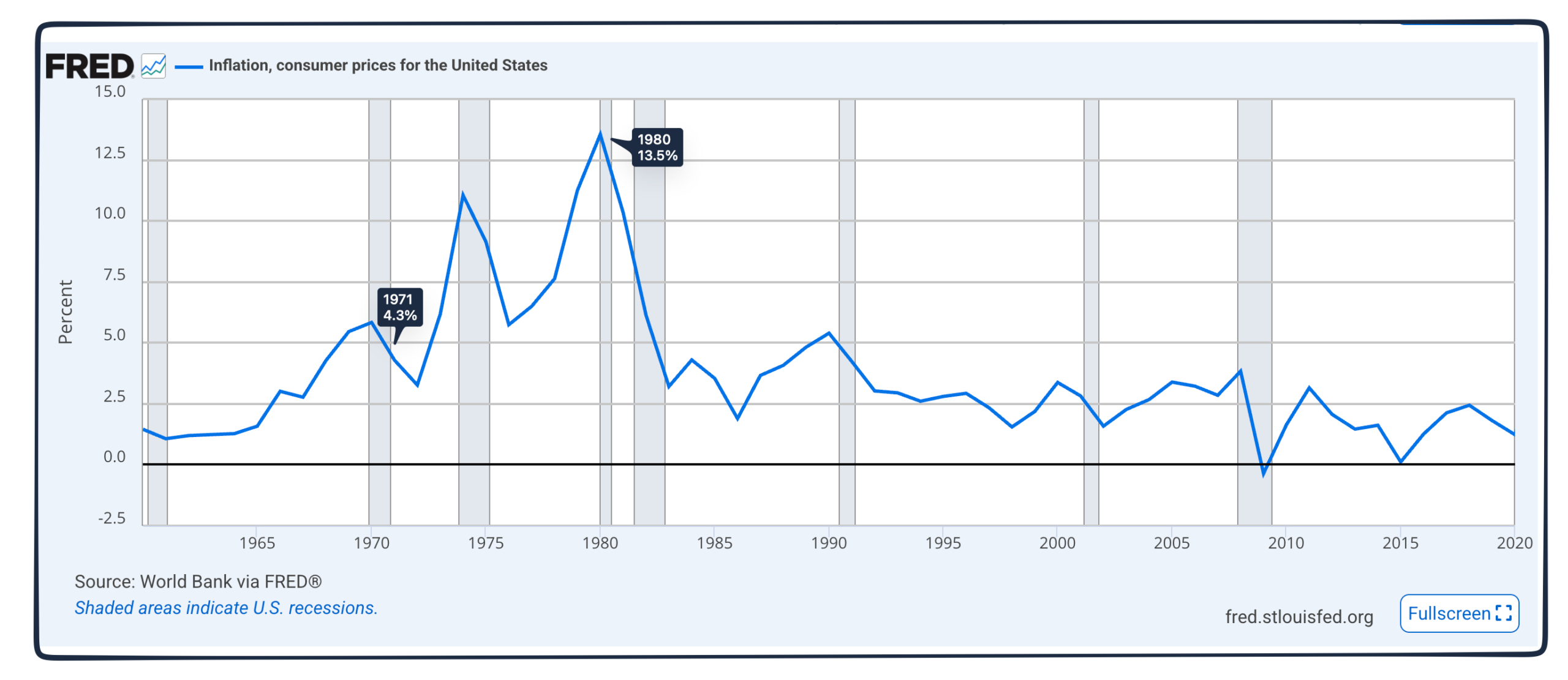
inflation history
Rather than caps, it took soaring interest rates to control inflation. Rising to 21.5% at the end of 1980, the prime touched an historic high:
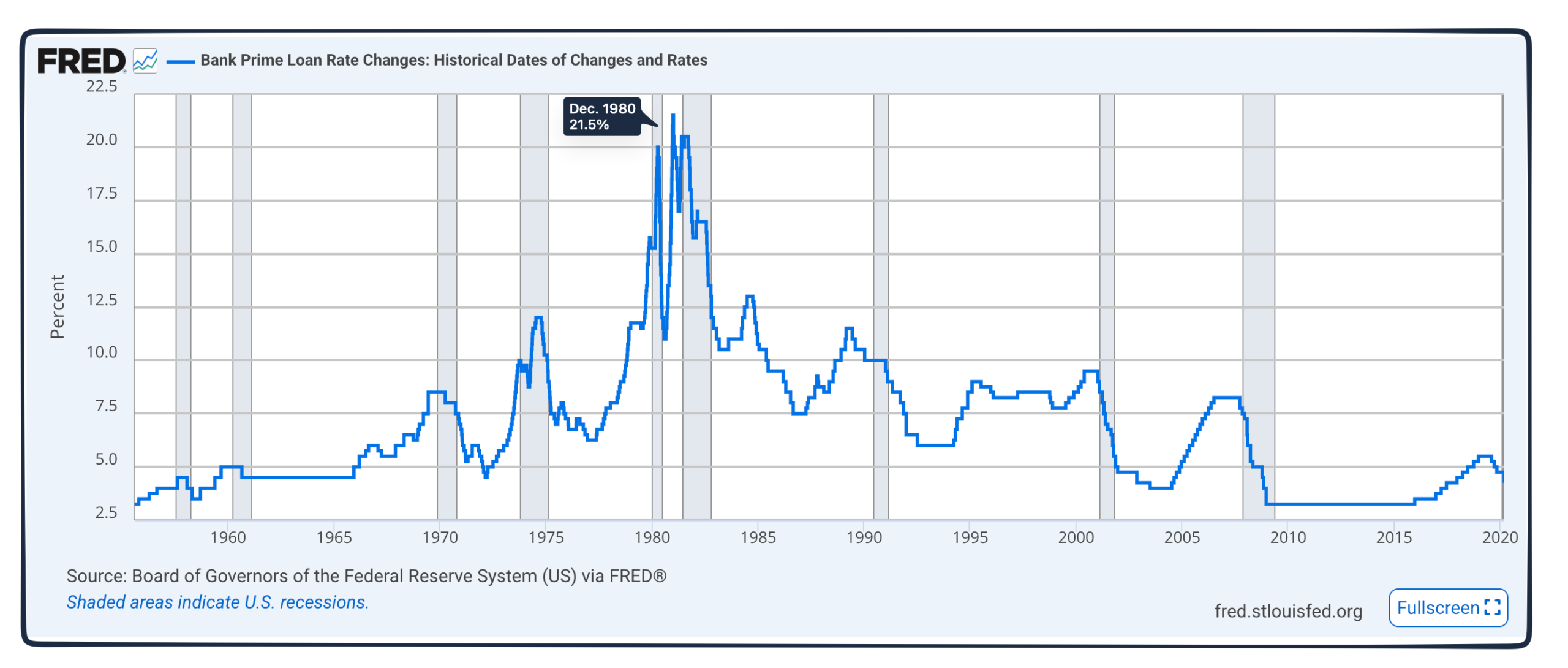
prime rate history

Students say that, like President Nixon’s policies, the cap is treating the symptoms. Instead, a real cure needs a new diagnosis. According to a recent report from the University of California, AI could be one cause.

My sources and more: Yesterday, WSJ explained how Harvard will reduce grade inflation while this Harvard Magazine had more detail. From there, we looked at this study from UC Berkeley that says AI is one cause of grade inflation.


Source link

Leave a Reply

Subscribe to Our Newsletter

Get our latest articles delivered straight to your inbox. No spam, we promise.

Recent Reviews


Google is experimenting with a new policy restricting the amount of free storage provided to some accounts. New Google accounts (including new Gmail accounts) created in certain regions will be limited to 5GB of free storage when they’re first set up. That’s only one-third of the amount of storage that has been typically offered. There is a way of increasing the amount of free storage you get when setting up a new account, though: you can unlock it by linking your phone number.

When approached for comment by Android Authority, a Google spokesperson confirmed that the new policy was being tested to “help us continue to provide a high-quality storage service to our users, while encouraging users to improve their account security and data recovery.” The statement didn’t clarify which regions the policy is being tested in, nor for how long the testing period will last.

Notably, a Google One Help support page about account storage has been updated to state that each Google account contains “up to 15 GB of storage”, as noted by 9to5Google. Previously, the page didn’t say “up to”; it simply stated that accounts come with 15 GB of storage. So far, the experiment doesn’t appear to stretch to pre-existing accounts.

Per a screenshot shared by Reddit user Sungusungu on R/DeGoogle (a subreddit dedicated to finding alternatives to Google services and products) Google is collecting phone numbers to make sure that the full 15 GB of storage is only redeemed once per person. Of course, that’s easily evaded by using a burner phone to set up multiple accounts, should you want to. The pop-up directs users to a webpage to learn more about storage management. However, at the time of writing, the link redirects to the help center landing page instead.

How to link your Google account with a phone number

If you’re in the process of setting up a new Google account in an impacted region, then you might be prompted with the option of unlocking an extra 10 GB of storage using your phone number via a simple pop-up menu. If so, you can go ahead and follow those steps. However, if you want to link your phone number with a pre-existing Google account, then here’s what you need to do. Using your computer, you need to:

  1. Open your browser and head to myaccount.google.com, then navigate to “Security and sign in” on the left-hand toolbar. This should open a list of security options.

  2. Select “Use your phone to sign in” and then “Set it up”. 

  3. Add a phone number using the “Recovery phone” option.

  4. Follow the on-screen steps to verify your number and finish linking it to your account.

Your options might look a little different if you already have a recovery number set up with your account.

Alternatively, you can connect a phone number to your Google account from your Android device, iPhone, or iPad. Much like on a computer, you connect your number by adding it as a recovery phone. First, head over to myaccount.google.com. Then select “Personal info”, followed by “Phone”. From there, you should be able to add or edit your phone number by navigating to the “Recovery phone” section.


Source link