Celebrate Father’s Day at The Manila Hotel: Refined Dining and Thoughtful Treats


This June, The Manila Hotel celebrates fathers with a variety of dining options and heartfelt treats tailored to please refined tastes and encourage meaningful family reunions. Visitors can enjoy sumptuous buffet spreads, intimate fine dining, hearty family-style meals, or take home delicious treats—all aimed at creating memorable moments in honor of Dad.
Father's Day Feast at Cafe Ilang-Ilang

Father’s Day Feast at Cafe Ilang-Ilang

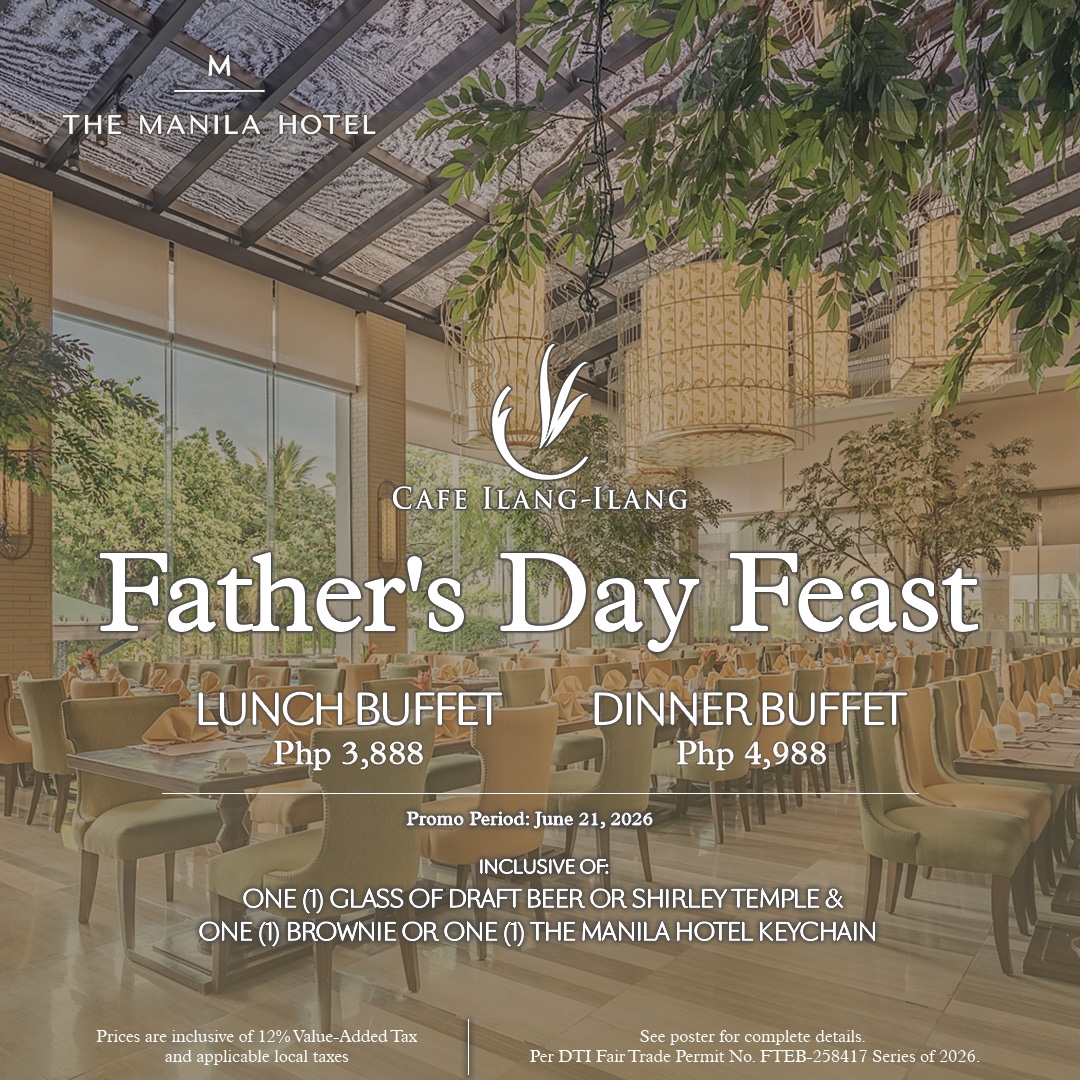
At Café Ilang-Ilang, Father’s Day is celebrated on June 21, 2026, featuring the popular international buffet. Guests can enjoy lunch for Php 3,888 net per person and dinner for Php 4,988 net per person. As a special treat, diners will get a free glass of draft beer or a Shirley Temple, along with a choice of a brownie or a keepsake Willy the Bear keychain.

Champagne Room Manila Hotel

For a more exclusive celebration, Champagne Room presents a luxurious Father’s Day set menu available for lunch and dinner from June 19 to 21, 2026. Priced at Php 6,888 net per person, the menu features sophisticated European dishes served in the country’s most romantic dining space. It includes a choice of Tartare of Fresh Norwegian Salmon or Parmesan Panna Cotta with Parma Ham, followed by Beef Oxtail Consommé or Three Onion Soup. Guests can also enjoy Pan-Fried Garlic Prawns or Spinach Ricotta Ravioli, ending with a refreshing Blackberry Sorbet.

Guests can choose between Roast U.S. Beef Tenderloin or Oven-Roasted Gindara Fillet Marinated in Miso for the entrée. The meal ends with a Caramel Hazelnut Praline Torte or a selection of French artisan cheeses, accompanied by macarons and coffee or tea. This set is paired with a glass of sparkling wine and the Manila Hotel tumbler.

Red Jade
Red Jade

Throughout June, Red Jade invites families to enjoy a special à la carte menu that showcases the rich flavors of Chinese cuisine. The menu features highlights like Golden Egg Prawns with Butter Oatmeal, Honey-Glazed Fish Fillet with Zhenjiang Sauce, Shredded Chicken with Lemon Sauce, and Seafood Fried Rice with Seaweed, along with other traditional favorites prepared with a modern touch. Available for both lunch and dinner, this limited-time menu offers a delicious and memorable way to celebrate Dad, with dishes meant for sharing and family-style enjoyment.

The celebration continues with a laid-back treat at the Delicatessen, where guests can purchase a Tropical Harmony Cake, bundled with an insulated bag, at a special price of Php 2,240 from June 8 to 21, 2026—ideal for extending the festivities at home.

“At The Manila Hotel, we recognize the enduring presence of fathers in every family. These offerings are our way of expressing gratitude and creating meaningful moments that families can share and remember,” shares Marvin Kim Tan, vice president for sales and marketing of The Manila Hotel.

Remaining true to its legacy of genuine Filipino hospitality, The Manila Hotel keeps crafting memorable moments that unite families and transform special occasions into enduring memories.

Father's Day Feast at Cafe Ilang-Ilang Terms and Conditions
Father’s Day Feast at Cafe Ilang-Ilang Terms and Conditions

For inquiries and reservations, call +632 8527 0011, +632 5301 5500, or +63998 950 1912, email restaurantrsvn@themanilahotel.com, or visit www.manila-hotel.com.ph.

Follow and subscribe to OutofTownBlog.com on Facebook , Twitter, Instagram, Pinterest, and YouTube for more Travel-related updates.

Read:


Source link

Leave a Reply

Subscribe to Our Newsletter

Get our latest articles delivered straight to your inbox. No spam, we promise.

Recent Reviews


Google is experimenting with a new policy restricting the amount of free storage provided to some accounts. New Google accounts (including new Gmail accounts) created in certain regions will be limited to 5GB of free storage when they’re first set up. That’s only one-third of the amount of storage that has been typically offered. There is a way of increasing the amount of free storage you get when setting up a new account, though: you can unlock it by linking your phone number.

When approached for comment by Android Authority, a Google spokesperson confirmed that the new policy was being tested to “help us continue to provide a high-quality storage service to our users, while encouraging users to improve their account security and data recovery.” The statement didn’t clarify which regions the policy is being tested in, nor for how long the testing period will last.

Notably, a Google One Help support page about account storage has been updated to state that each Google account contains “up to 15 GB of storage”, as noted by 9to5Google. Previously, the page didn’t say “up to”; it simply stated that accounts come with 15 GB of storage. So far, the experiment doesn’t appear to stretch to pre-existing accounts.

Per a screenshot shared by Reddit user Sungusungu on R/DeGoogle (a subreddit dedicated to finding alternatives to Google services and products) Google is collecting phone numbers to make sure that the full 15 GB of storage is only redeemed once per person. Of course, that’s easily evaded by using a burner phone to set up multiple accounts, should you want to. The pop-up directs users to a webpage to learn more about storage management. However, at the time of writing, the link redirects to the help center landing page instead.

How to link your Google account with a phone number

If you’re in the process of setting up a new Google account in an impacted region, then you might be prompted with the option of unlocking an extra 10 GB of storage using your phone number via a simple pop-up menu. If so, you can go ahead and follow those steps. However, if you want to link your phone number with a pre-existing Google account, then here’s what you need to do. Using your computer, you need to:

  1. Open your browser and head to myaccount.google.com, then navigate to “Security and sign in” on the left-hand toolbar. This should open a list of security options.

  2. Select “Use your phone to sign in” and then “Set it up”. 

  3. Add a phone number using the “Recovery phone” option.

  4. Follow the on-screen steps to verify your number and finish linking it to your account.

Your options might look a little different if you already have a recovery number set up with your account.

Alternatively, you can connect a phone number to your Google account from your Android device, iPhone, or iPad. Much like on a computer, you connect your number by adding it as a recovery phone. First, head over to myaccount.google.com. Then select “Personal info”, followed by “Phone”. From there, you should be able to add or edit your phone number by navigating to the “Recovery phone” section.


Source link