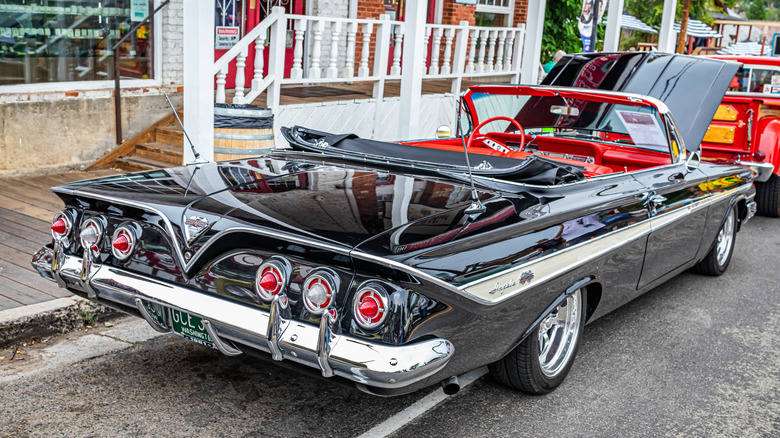
Back before the era of serious muscle cars began, there was a vehicle that combined Chevrolet’s largest new engine with the most luxurious version of its popular full-sized car, the Impala. The 409 cubic-inch V8 engine had been released during the cold winter months of 1961, some time after the new 1961 Chevrolets were available to the public. But this car would cause a sensation that presaged the rise of the American muscle cars later in the 1960s.
This new Chevrolet 409 V8 engine was special and rare. It sat atop the Impala SS lineup, along with three lesser-powered 348 cubic-inch mills. It produced 360 horsepower, thanks to its Carter AFB four-barrel carb, aluminum intake manifold, hi-pro camshaft, and an 11:25:1 compression ratio. You had a choice of a three-speed or four-speed manual transmission when you picked the 409. You could equip any Impala except the station wagon with the SS 409 package. This included the convertible, the pillarless two-door Sport Coupe and four-door Sport Sedan, and the pillar-equipped two-door Sedan and four-door Sedan. SS buyers also got power brakes, a heavy-duty suspension, a column-mounted tach, and SS emblems featuring crossed flags and a prancing impala on top.
All of this power, performance, and sheer style meant that the Impala was one of the most underappreciated Chevrolet muscle cars. And performance was indeed the name of the game when you had a 409 under the hood of your Impala SS. Car and Driver tested a stock 1961 409-equipped Impala SS with a four-speed manual and got it to do 0-60 mph in 6.7 seconds, with a quarter-mile time of 15.2 seconds at 94 mph.
What else you should know about the 1961 Chevrolet Impala SS 409
Gestalt Imagery/Shutterstock
The 409 in the Impala SS achieved its own place in music history when the Beach Boys released “409,” which was on the B-side of their single “Surfin’ Safari” in June of 1962. The Impala SS 409 was the favorite car of Gary Usher, who collaborated with the Beach Boys, and the song “409” immortalized the connection between young people and their cars with its roaring engine, burning rubber, and its memorable lyrics: “Nothing can catch her, nothing can touch my 409.”
But regardless of how well-known the 409 became as a result of the Beach Boys song about it, the 1961 version is a very rare item. Only 142 1961 Impala SS models equipped with the 409 engine were ever built, which makes those that survived even harder to find. As far as current values of 409-equipped 1961 Impala SS cars, according to Classic.com, there have been only two in original condition sold between 2021 and 2026. The more recent Impala SS 409 sale was in 2023 and the car went for $66,000, while the one from 2021 fetched $137,500. Both were “bubble tops”, as the two-door pillarless sports coupes are known.
The 1961 Impala SS with the 409 cubic-inch engine became a legend on the street and at the drag strip, particularly in the Stock Eliminator class. This was during the early days of Chevrolet big block engines, years before the displacements would grow to 427 and then 454 cubic inches, with added horsepower to match. Good times.
Microsoft is making the Insider Program less complicated.
Beta channel will be a more reliable preview of the next retail release.
Other changes will allow testers to quickly enable/disable new features.
Last month, Microsoft took official notice of its customers’ many complaints about Windows 11. Pavan Davaluri, the executive vice president who runs the Windows and Devices group, promised sweeping changes to Windows 11. Today, the company announced the first of those changes in a post authored by Alec Oot, who’s been the principal group product manager for the Windows Insider Program since January 2024.
Those changes will streamline the Insider program, which has lost sight of its original goals in the past few years. (For a brief history of the program and what had gone wrong, see my post from last November: “The Windows Insider Program is a confusing mess.”)
If you’re currently participating in the Windows Insider Program, these are meaningful changes. Here’s what you can expect.
Simplifying the Insider channel lineup
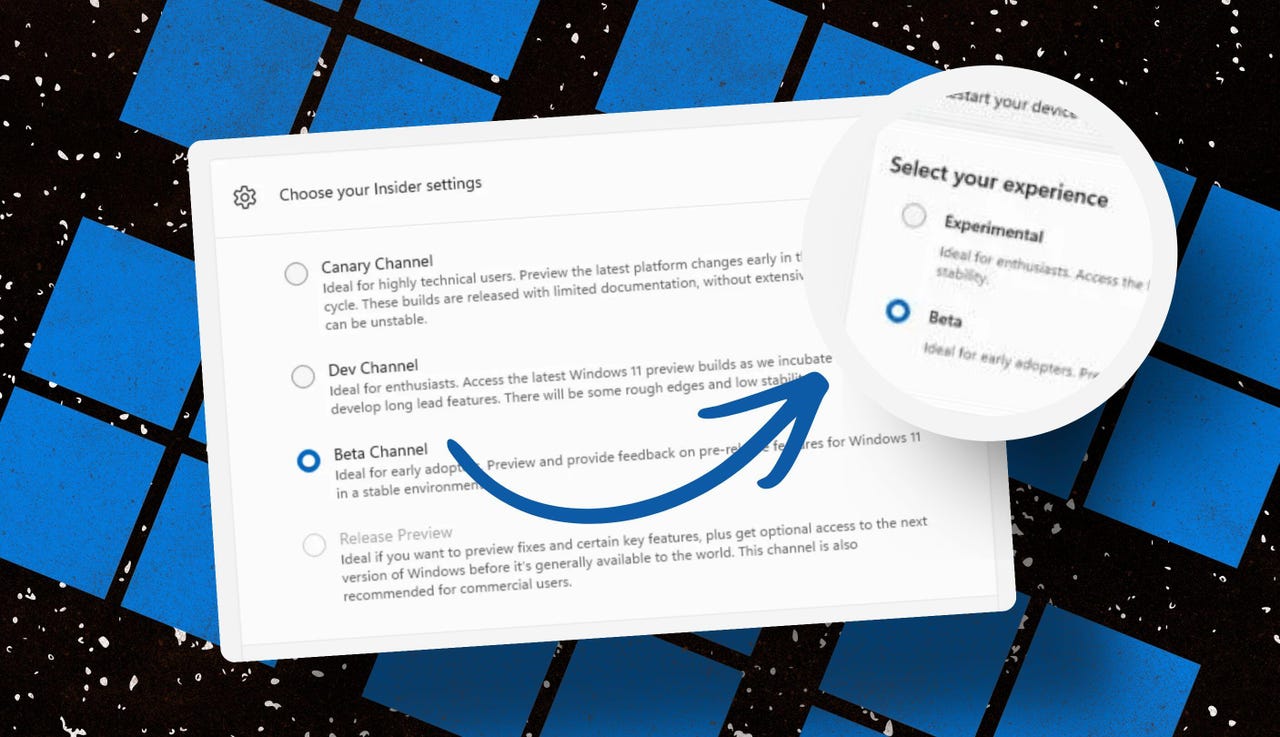
Throughout the Windows 11 era, signing up for the Insider program has required choosing one of four channels using a dialog in Windows Settings. Here’s what those options look like today on one of my test PCs.
The current Insider channel lineup is confusing, to say the least.
Screenshot by Ed Bott/ZDNET
Which channel should you choose? As the company admitted in today’s post, “the channel structure became confusing. It was not clear what channel to pick based on what you wanted to get out of the program.”
The new lineup consists of two primary channels: Experimental and Beta. The Release Preview channel will still be available, primarily for the benefit of corporate customers who want early access to production builds a few days before their official release. That option will be available under the Advanced Options section.
This simplified lineup is easier to follow. Beta is the upcoming retail release, Experimental is for the adventurous.
Screenshot courtesy of Microsoft
Here’s Microsoft’s official description of what’s in each channel now, with the company’s emphasis retained:
Experimental replaces what were previously the Dev and Canary channels. The name is deliberate: you’re getting early access to features under active development, with the understanding that what you see may change, get delayed, or not ship at all. We’ve heard your feedback that you want to access and contribute to features early in development and this is the channel to do that.
Beta is a refresh of the previous Beta Channel and previews what we plan to ship in the coming weeks. The big change: we’re ending gradual feature rollouts in Beta. When we announce a feature in a Beta update and you take that update, you will have that feature. You may occasionally see small differences within a feature as we test variations, but the feature itself will always be on your device.
These changes will apply to the Windows Insider Program for Business as well.
Offering a choice of platforms
For those testers who want to tinker with the bleeding edge of Windows development, a few additional options will be available in the Experimental channel. These advanced options will allow you to choose from a platform that’s aligned to a currently supported retail build. Currently, that’s Windows 11 version 25H2 or 26H1, with the latter being exclusively for new hardware arriving soon with Snapdragon X2 Arm chips.
There will also be a Future Platforms option, which represents a preview build that is not aligned to a retail version of Windows. According to today’s announcement, this option is “aimed at users who are looking to be at the forefront of platform development. Insiders looking for the earliest access to features should remain on a version aligned to a retail build.”
The Future Platforms option is the equivalent of the current Canary channel
Screenshot courtesy of Microsoft
Minimizing the chaos of Controlled Feature Rollout
Last month, I urged Microsoft to stop using its Controlled Feature Rollout technology, especially for builds in the Beta channel. Apparently, someone in Redmond was listening.
One of the most common questions we receive from Insiders is “why don’t I have access to a feature that’s been announced in a WIP blog?” This is usually due to a technology called Controlled Feature Rollout (CFR), a gradual process of rolling out new features to ensure quality before releasing to wider audiences. These gradual rollouts are an industry standard that help us measure impact before releasing more broadly. But they also make your experience unpredictable and often mean you don’t get the new features that motivated many of you to join the Insider program to begin with.
Moving forward, Insider builds in the Beta channel will no longer suffer from this gradual rollout of features. Meanwhile, the company says, “Insiders in the Experimental channel will have a new ability to enable or disable specific features via the new Feature Flags page on the Windows Insider Program settings page.”
Builds in the Experimental channel will include the option to turn new features on or off.
Screenshot courtesy of Microsoft
Not every feature will be available from this list, but the intent is to add those flags for “visible new features” that are announced as part of a new Insider build.
Making it easier to change channels
The final change announced today is one I didn’t see coming. Historically, leaving the Windows Insider Program or downgrading a channel (from Dev to Beta, for example) has required a full wipe and reinstall. That’s a major hurdle and a big impediment to anyone who doesn’t have the time or technical skills to do that sort of migration.
Beginning with the new channel lineup, it should be easier to change channels or leave the program without jumping through a bunch of hoops.
To make this a more streamlined and consistent experience, we’re making some behind the scenes changes to enable Insider builds to use an in-place upgrade (IPU) to hop between versions. This will allow in most cases Insiders to move between Experimental, Beta, and Release Preview on the same Windows core version, or leave the program without a clean install. An IPU takes a bit more time than your normal update but migrates your apps, settings, and data in-place.
If you’ve chosen one of the future platforms from the Experimental channel, those options don’t apply. To move back to a supported retail platform, you’ll need to do a clean install.
The upshot of all these changes should make things a lot clearer for anyone trying to figure out what’s coming in the next big feature update. Beta channel updates, for example, should offer a more accurate preview of what’s coming in the next big feature update, so over the next month or two we should get a better picture of what’s coming in the 26H2 release, due in October.
When can we start to see those changes rolling out to the general public? Stay tuned.
To provide the best experiences, we use technologies like cookies to store and/or access device information. Consenting to these technologies will allow us to process data such as browsing behavior or unique IDs on this site. Not consenting or withdrawing consent, may adversely affect certain features and functions.
Functional
Always active
The technical storage or access is strictly necessary for the legitimate purpose of enabling the use of a specific service explicitly requested by the subscriber or user, or for the sole purpose of carrying out the transmission of a communication over an electronic communications network.
Preferences
The technical storage or access is necessary for the legitimate purpose of storing preferences that are not requested by the subscriber or user.
Statistics
The technical storage or access that is used exclusively for statistical purposes.The technical storage or access that is used exclusively for anonymous statistical purposes. Without a subpoena, voluntary compliance on the part of your Internet Service Provider, or additional records from a third party, information stored or retrieved for this purpose alone cannot usually be used to identify you.
Marketing
The technical storage or access is required to create user profiles to send advertising, or to track the user on a website or across several websites for similar marketing purposes.