
Verdict
Considering its raw power, the Hoover HF6 TurboSense is quite a bargain, costing far less than its flagship rivals. Cleaning performance is generally very good, although edge performance was a bit behind the competition. It’s a little bulky in the hand, but this vacuum isn’t too heavy, and it does stand up by itself, which is a useful trick when you need to temporarily pause cleaning. Overall, if you want a lot of power but don’t want to pay a huge amount of money, this vacuum is great value.
-
Good battery life
-
Can stand up by itself
-
Lots of power
-
Good cleaning for the price
-
Weight not that well balanced
-
Edge cleaning could be better
Key Features
Introduction
The more recent Hoover vacuum cleaners have been good, but straightforward mid-range models. With the HF6 TurboSense, the company has a cordless cleaner that’s quite a bit more powerful than its others, with some clever tech built in, including automatic floor detection.
Despite the advance, the HF6 remains excellent value. So, should you go for this over one of the big rivals? Read on to find out.
Design and features
- Stands up by itself
- A little fiddly to empty
- Detects the floor type automatically
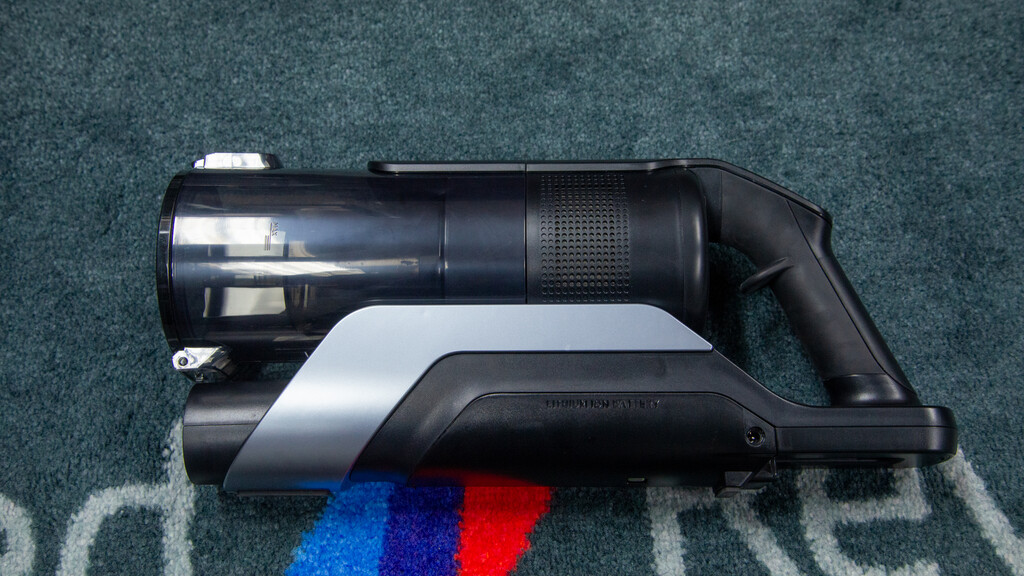
An all-black finish gives the Hoover HF6 TurboSense an air of quality and makes it look like the high-end vacuum cleaner that it is. It’s a very sleek vacuum cleaner, with the handheld unit streamlined with few bits sticking out.

It comes with a wand that plugs into the handheld unit, and then into the accessories or the floor head.
At 4kg, the Hoover HF6 TurboSense isn’t too heavy, although it does come in above the Shark PowerDetect Speed Pet Pro Clean & Empty IA3241UKT by a few hundred grams.
For me, weight is often as much about balance as it is about how much something actually weighs. Due to the way that the weight is distributed, the Hoover HF6 TurboSense naturally wants to point down. That’s good when you’re using the floor head or are vacuuming around the floor using the crevice tool; if you do want to clean higher up, say snagging cobwebs, then that’s a bit harder.
Lifting the Hoover HF6 TurboSense up with one hand, I found it hard to hold it steady, and needed a second hand to stabilise it. For most jobs this isn’t an issue, but there are rivals that have better balance for handheld use.

However, part of the reason the weight is positioned as it is is that the Hoover HF6 TurboSense can temporarily stand upright on its own. That’s great when vacuuming, as I could lock the cleaner upright, and then move some furniture around, before getting back to cleaning.
In the box, Hoover provides a crevice tool, dusting brush and floor head. The latter, Hoover promises, is an anti-hair-wrap model that won’t get tangled with hair.

Floor detection is also built in, and the Hoover HF6 TurboSense can work out if it’s on carpet or a hard floor, adjusting the spin speed of the brush bar and changing the colour of the lights (white for carpet and blue for hard floor). It’s a nice visual indicator, but floor detection is an important technology, helping to avoid flicking debris around on hard floors or missing dust on carpet.
There’s no dust detection built in, so you’ll need to use the three available power modes on the back, using the ‘+’ and ‘-‘ buttons to cycle through them. There’s also a separate power button.

Battery life is displayed on the screen, with four bars that extinguish one at a time. I do prefer a screen that shows live battery life in minutes, as with the Dyson V16 Piston Animal, but you have to pay a lot more for that feature.
Charging can be done in two ways. The easiest, in my view, is to fit the wall dock and then hang the vacuum cleaner when you’re done to charge it. If you can’t do that, then the power adaptor can be plugged straight into the vacuum cleaner.

There’s a removable battery on this model, so should it fail, you can buy a replacement from Hoover and quickly replace it yourself.

Dirt is sucked into the 0.7-litre bin. To empty it, you point the vacuum at your bin, hit the eject button and the flap at the front opens to let the dust out. Typically, doing this creates a bit of a mess, and it’s hard to empty cleanly. Bigger bits of fluff tend to need a bit of a bang to help them out.

You can remove the entire bin by opening both sides so you can rinse it out. Doing this lets you access the washable filter, too.
I did find it hard to get the bin back into place. In the end, I had to remove the wand, place the handheld unit on the floor, and gently push the bin back into place until it clipped into place.
Performance
- Good on carpet and hard floor
- Doesn’t get tangled with hair
- Edge performance is a bit more basic
I like to measure the raw suction performance of vacuum cleaners at the handle to see how much power they really have. I measured the Hoover HF6 TurboSense at 28AW on its lowest setting (good enough for very basic jobs), and a more usable 125AW on the mid setting (suitable for most jobs), going to a massive 336AW on the highest setting.
In terms of raw performance, that maximum is similar to that of the Shark IA3241UKT and not too far off the Dyson V16 Piston Animal.

High suction is typically useful for picking up bigger bits of debris with handheld tools from a distance, such as when cleaning out a wardrobe or vacuuming a car. To demonstrate this, I measure how far from the crevice tool a vacuum can collect grains of rice. In this case, it’s a whopping 2.9cm – that shows that handheld jobs will be fast.
Next, I moved on to the standard tests, starting by adding 20g of flour to the floor. I used the middle setting to move through the mess and was pleased to see clean, sharp lines.
I then finished off vacuuming until the carpet looked clean and gave it a burst of the top power mode for good measure.

Overall, I found that 89.40% of the dirt made it into the bin. A good score for the price, but a little behind the best in the business. On close inspection, the carpet shows no signs of dust, so some of the mess could be in the wand or floor head.
Next, I tried the edge test, adding 10g of flour to the skirting board. Running the vacuum cleaner along this on its maximum mode, I recorded that 78.6% was picked up. I had to finish the job with the crevice tool.
I then moved to the hard floor test, adding 20g of rice to the hard floor. All of this spill was collected without any mess dropping back out.
Cat hair, combed into the test carpet, was removed easily, with a single forward/backward swipe over the top.
I finished off with my human hair test. I’m pleased to say that no hair strands were wrapped around the brush bar at the end of pickup.
Battery life is up to 100 minutes on the lowest power setting, but you’ll need to use higher power settings than that. On the Boost setting I saw battery life of 16m 50s, which is impressive.
Sound-wise, I registered the Hoover HF6 TurboSense at between 67.5dB and 73.8dB, which compares well with other vacuum cleaners: loud, for sure, but not annoyingly so.
Should you buy it?
You want a powerful vacuum cleaner at a reasonable price
Exceptional value, the Hoover HF6 TurboSense is powerful and cleans well on most surfaces.
If you want a vacuum that can auto empty or one with a dust sensor to adjust power on the fly, look for a different model.
Final Thoughts
There are vacuum cleaners that can pick up more mess and that have more features, such as dust sensors (you can see these in my guide to the best cordless vacuum cleaners), but they’re also a lot more expensive. At the recommended price, the Hoover HF6 TurboSense is a lot of vacuum for the money, but you can frequently find it for less, making it a bargain.
How We Test
We test every vacuum cleaner we review thoroughly over an extended period of time. We use industry standard tests to compare features properly. We’ll always tell you what we find. We never, ever, accept money to review a product.
Find out more about how we test in our ethics policy.
- Used as our main vacuum cleaner for the review period
- Tested for at least a week
- Tested using tools to measure actual suction performance
- Tested with real-world dirt in real-world situations for fair comparisons with other vacuum cleaners
FAQs
It can detect the floor type it’s on, adjusting the brush bar speed automatically for hard floors and carpet.
Test Data
| Hoover HF6 TurboSense | |
|---|---|
| AirWatts (low) | 28 AW |
| AirWatts (medium) | 125 AW |
| AirWatts (high) | 338 AW |
| Sound (low) | 67.5 dB |
| Sound (medium) | 69.5 dB |
| Sound (high) | 73.8 dB |

Full Specs
| Hoover HF6 TurboSense Review | |
|---|---|
| Manufacturer | Hoover |
| Size (Dimensions) | 298 x 222 x 1200 MM |
| Weight | 5.76 KG |
| Release Date | 2026 |
| First Reviewed Date | 28/04/2026 |
| Model Number | Hoover HF6 TurboSense |
| Vacuum cleaner type | Cordless stick |
| Provided heads | Floor head, crevice tool, dusting tool |
| Bin capacity | 0.7 litres |
| Bagless | Yes |
| Modes | Three power modes |
| Filters | 1 (washable) |
| Run time | 100 mins min |
| Charge time | 3.5 hrs |

Stephan is the sports journalist for the Maple Grove Report.