
Seeed Studio’s SenseCAP T1000-E tracker card
pros and cons
- Compact yet fully featured tracker card.
- It’s more than just a tracker card – it has a full mesh client built inside.
- The app unlocks many features, and the card can be flashed with different firmware.
- The battery lasts two or three days.
- It uses a proprietary magnetic charging cable.
- It’s a deep rabbit hole that can sometimes have a steep learning curve.
Follow ZDNET: Add us as a preferred source on Google.
I’ve said it before, and I’ll say it again: Apple AirTags were a total game-changer for me. Being able to pinpoint and locate things like keys and wallets, wherever they are in the world, has saved me no end of heartache, headaches, and wasted time. And the proliferation of third-party tags means there are tags for all sorts of applications.
But the one drawback is that all the tags rely on cellular and Wi-Fi networks. What if you could get tags that operated on their own networks and could operate independently of the networks built by multibillion-dollar corporations? That’s exactly what the Seeed Studio’s SenseCAP T1000-E tracker card offers.
OK, how does this work?
And with most things, there are a lot of things I like about the T1000-E, and a few things I don’t. But before I go any further, let me warn you that this card could very well be a gateway drug that pulls you into the huge world of LoRa mesh.
LoRa stands for Long Range Radio and is a long-range wireless radio protocol that can be used to create a mesh.
Also: I found an AirTag alternative that’s twice as durable and works with Android phones
What’s a mesh?
It’s an open-source, off-grid, decentralized mesh network designed to run on small, low-power devices. It doesn’t need cell towers or the internet. It’s a completely stand-alone, peer-to-peer radio system. If you’re a bit like me and love getting your teeth into weird things, you’ll soon be hip-deep in mesh transceivers and setting up solar-powered nodes.
Why? Because you can.
Note: Make sure you get the T1000-E, and not the A or B variants. Only the E is designed to work with peer-to-peer mesh, and the A and B variants make use of LoRaWAN networks and require their own network gateways.
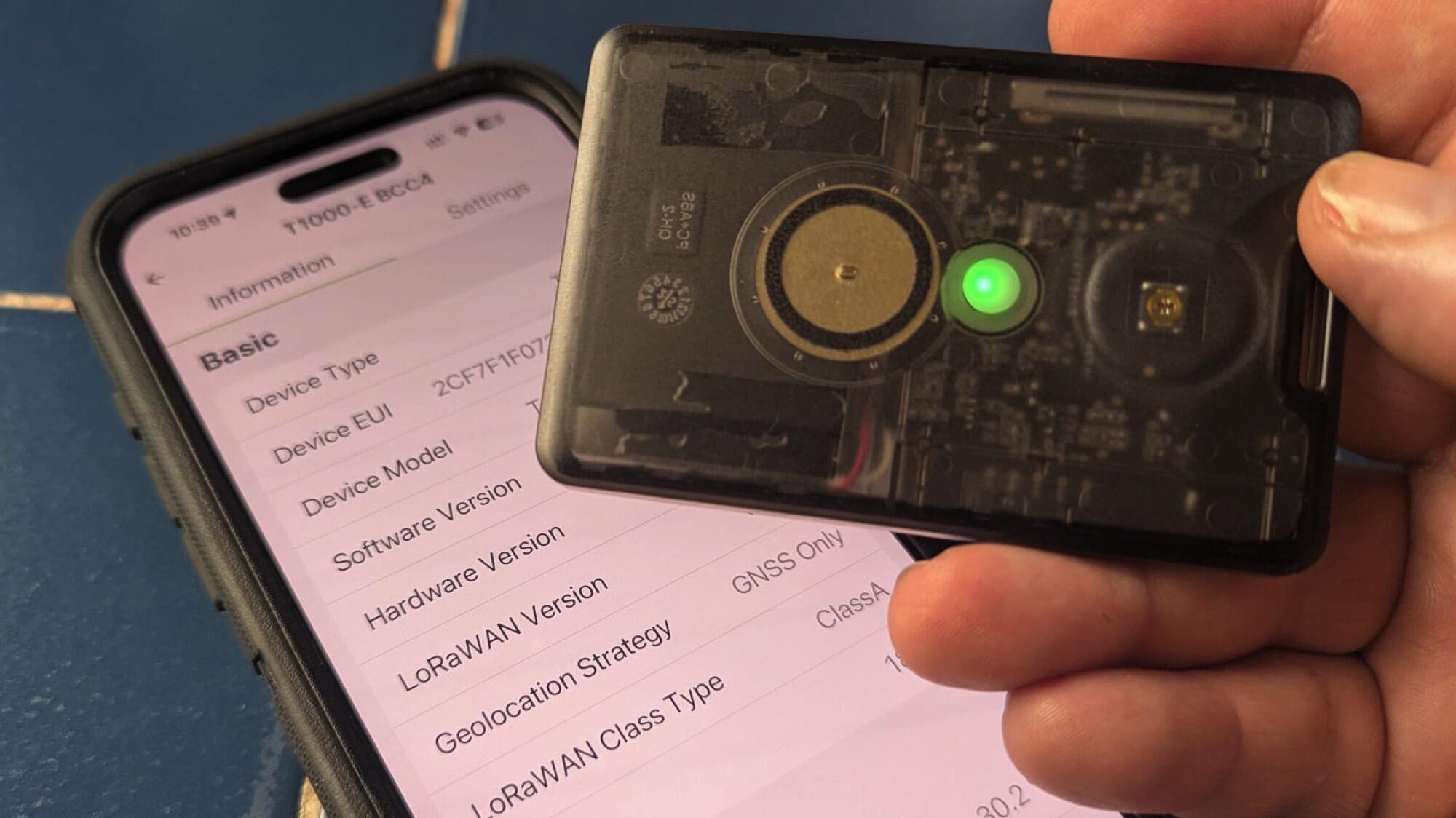
OK, back to the T1000-E. This is a card-sized tracker much like all the others. It’s credit card-sized and as thick as a bunch of cards. Inside is a 700 mAh battery that’s enough to power the card for a couple of days, along with all the tech wizardry for communication and location magic.
Also: I put away my AirTag just minutes after trying this Bluetooth tracker alternative – here’s why
There’s a super-loud buzzer, an LED status light, and a button to turn the unit on and off and control things like Bluetooth.
Built for the apocalypse
The shell is IP65-rated for dust and water intrusion, so it’s fine to be out and about in the great outdoors. I like this a lot, but to achieve this level of dust and waterproofing, the manufacturer has opted for a magnetic charging pad on the back that uses pogo pins.
IP65 means that dirt and water are no problem for the T1000-E.
Adrian Kingsley-Hughes/ZDNET
Not only does this mean that you need a proprietary cable every time you need to charge the device, but the design means that if you try to charge the card while on the move (by, say, using a power bank), there’s a good chance that it’ll come loose and stop charging. I’ve come up with solutions using elastic bands or hot glue, but I wish there were a better way to keep the connector attached.
It’s a great tracker
By default, you’ll need to download the SenseCraft app (iOS/Android) to set up and control the T1000-E.
Setting up a new T1000-E using the SenseCraft app.
Adrian Kingsley-Hughes/ZDNET
The app is OK, but not great. The instructions can be a bit vague; sometimes you’ll stumble across sections in Chinese, and it’s also trying to sell you more stuff (something I hate in an app for a product I’ve bought). My advice is that if you get stuck, hit the extensive support documentation wiki (complete with videos), or head over to the excellent r/meshtastic over on Reddit.
Also: I took apart the new AirTag 2 and found a serious flaw in Apple’s popular tracker
If you just want to use the tracker as a tracker, you’ve pretty much done everything you need to do. The app has a map that shows you the card’s location, or you can use it to beacon your position to others when out and about by sharing your location.
The card will use Bluetooth to connect to the app on the smartphone, but it can also connect to LoRaWAN, Meshtastic, Amazon Sidewalk, and Helium networks.
Also: My new favorite AirTag alternative fits perfectly in my wallet – and is seriously durable
If you live in an area where there are people using mesh, that’s going to be a great option that just works. You might decide to put nodes up for you to use around your home or work, extending the mesh for everyone.
I found that Amazon Sidewalk was also a really good, workable option, especially in built-up areas. After all, there are a lot of Amazon devices and Ring cameras out there, so there’s a pretty big mesh you can leverage.
The app has a lot of features, including tracking.
Adrian Kingsley-Hughes/ZDNET
Loads of options. And yes, this could work in those apocalyptic scenarios where the power goes down, the cellular grids go quiet, and the zombies start to shuffle about.
I’ve carried it in a pocket, bag, and strapped to the outside of my rucksack, and the GPS receiver is excellent even under subpar conditions. There’s a lanyard slot on the card for attaching it to things.
But there’s more … a lot more!
But there’s a lot more to the T1000-E. It’s a lot more than a tracker card. It’s a fully functional mesh transmitter that can be used to send and receive messages between other devices. If you want to get into this, then you’ll need another mesh device (say, another tracker or a mesh transceiver). And this is where you start the slide into mesh obsession.
Also: I slipped this stealthy $15 tracker into my favorite jacket – now it’s an everyday essential
You can also delve deeper into the card. For example, you can dump the firmware that Seeed Studio loaded onto the T1000-E, and install stock Meshtastic firmware onto it using the online flasher tool.
I flashed Meshtastic firmware onto the T1000-E.
Adrian Kingsley-Hughes/ZDNET
Now you can use the Meshtastic app (iOS/Android) to control the card, and I found this to be a whole lot better, especially if you want to go deeper into the card’s capabilities. This is well beyond what I can go into here, but if you want something to get you started, this video will probably kick-start your obsession.
ZDNET’s buying advice
The Seeed Studio’s SenseCAP T1000-E tracker card will set you back around $50. You’ll sometimes see it for a lot more, but avoid those. Usually, if you wait a day or so, the prices will come down.
Also: These are the closest things to AirTags for Android users (and better in some ways)
For a pure tracker card, that’s a pretty hefty price tag, but once you realize it can also serve as a messaging client and you can use it to send and receive messages for free, it starts to feel more reasonable. Mesh is great for off-grid comms and also for places like cruise ships, where the company will charge you an arm and a leg for Wi-Fi.