Meta Limits the Usage of an AI Glasses Feature, Even if You Pay for a $20 Subscription


Meta is putting time limits on one of its newer smart glasses features — one that enhances audio for one-to-one conversations — and asking owners of the devices to pay $20 a month for extra time.

The details of the change appear on a Meta help page describing the management of premium features on the wearable devices. According to the page, users of Meta Smart Glasses’ conversation focus feature are limited to three free hours a month. There’s no way to check time usage, and unspent time doesn’t roll over. Those who have a Meta One Premium subscription, which costs $20 a month, are still capped at 15 hours. 

AI Atlas

It’s unclear from the page what additional fees might be incurred if you exceed those limits. Meta has been testing premium plans for its AI services this year. The help page also mentions a Meta One Plus plan, but that tier is not mentioned regarding conversation focus.

A representative for Meta did not immediately respond to a request for comment.  

Conversation focus was introduced in December as part of a Glasses software update. The feature helps enhance and amplify the voice of a person speaking in view of the glasses, even in a noisy room. In a video for the feature, Meta shows two women at a restaurant using the feature to make it easier for the person wearing Meta Glasses to hear her dinner companion.

Meta Glasses in the crossfire

Recent controversy over facial recognition technology that Meta has been developing for its smart glasses doesn’t appear to have slowed the company’s product line.

In late June, the company announced a partnership with eyewear company EssilorLuxottica, bringing Meta Glasses models to the market for $299 each. Those models incorporate the company’s Muse Spark AI model. One of the new styles of Meta Glasses is a Meta Starfire Kylie Edition endorsed by Kylie Jenner. The new glasses are already available.

In early June, Wired published an investigation that found Meta had developed facial recognition software for Meta Glasses through its Meta AI app. The software was distributed, but not activated, on mobile devices. Meta removed the code shortly after the report and said no facial-recognition feature had been released to consumers.

Later that month, Meta was criticized for holding a software license for tools from Rank One Computing, a provider of software, including facial recognition tools, used by the US government and by law enforcement agencies.


Source link

Leave a Reply

Subscribe to Our Newsletter

Get our latest articles delivered straight to your inbox. No spam, we promise.

Recent Reviews


angry-birds-android-auto

Artie Beaty/ZDNET

Follow ZDNET: Add us as a preferred source on Google.


ZDNET’s key takeaways

  • Several mobile games are compatible with Android Auto.
  • The games all have simple touch-screen controls.
  • These are slow-paced, short-burst games. 

If you spend downtime in your car waiting for school pickup or during a lunch break, there’s a good chance you pass the time with mobile games. Here’s what you probably didn’t know: You could be playing some of those games on your car’s screen instead. A handful of popular mobile games are compatible with Android Auto, meaning you can play them in your car.  

Also: 4 Android Auto developer settings that make driving so much easier – how to enable them

You might have browsed your Android Auto apps and already seen the Gamesnacks app, which hosts several dozen light games that are not unlike early internet flash games. However, these games are more robust; they’re the same games you’d play on your phone, just on a bigger screen.

The catalog of Android Auto-compatible games isn’t huge, but it’s worth a look. None of these titles has complex controls or a steep learning curve, and all are perfect for short sessions. 

How to get started

To play on your car’s screen, you will need to install these games on your phone and have your vehicle in park. The good thing is, though, when you’re connected to your car and open the app on Android Auto, you can still use your phone for other things. This is ideal when you have a child in the car with you and need to pass the time, but don’t want to hand over your phone. 

Also: 4 Android Auto apps I highly recommend for your next road trip – beyond Maps and Spotify

I tried a quick run-through of the available games; while they didn’t run as smoothly as on my phone, they’re enough to play comfortably. Here’s a rundown of my favorites.

angry-birds-android-auto

Artie Beaty/ZDNET

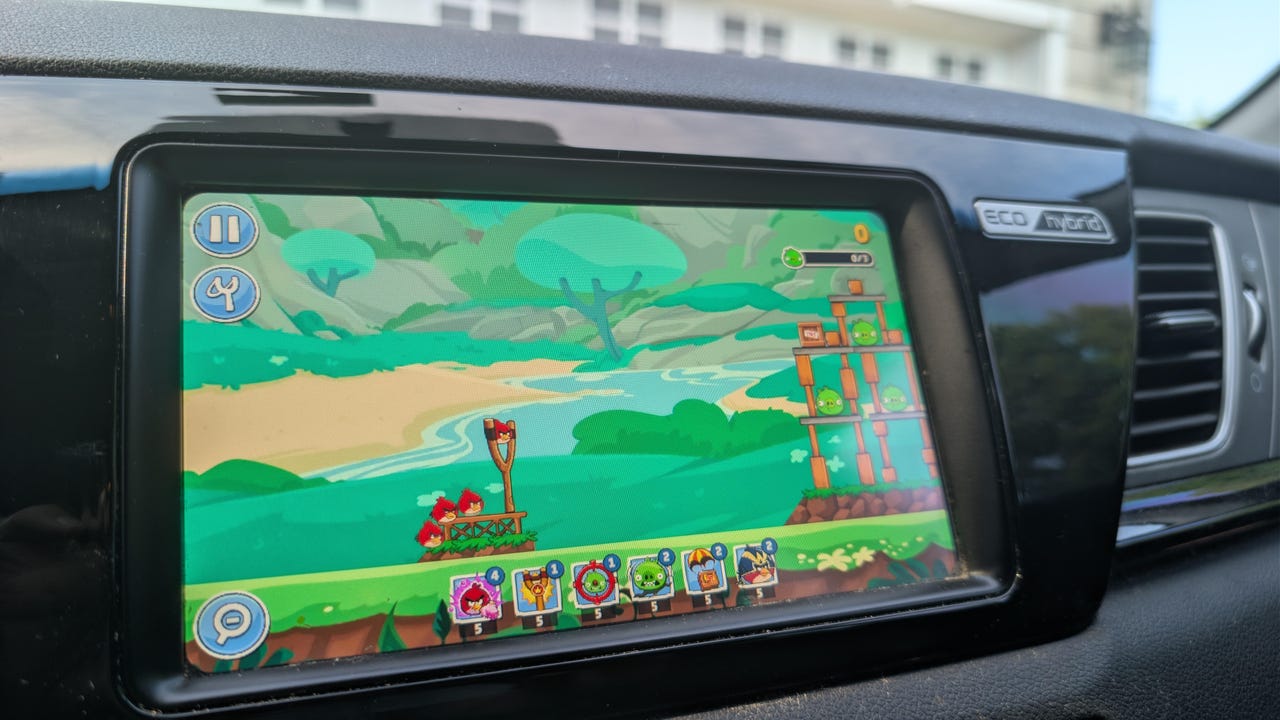
Angry Birds Friends: I hadn’t played Angry Birds in years, but the slingshot-style gameplay was easy to pick back up. It works well on a car touchscreen, and the levels go by quickly. Since the game is actually on your phone, your progress saves, so you can keep going across multiple sessions. I enjoyed not just beating levels, but immediately replaying a level I had just beaten to get a higher score. 

beach-buggy-racing

Artie Beaty/ZDNET

Beach Buggy Racing (1 and 2): Both versions of this cart-racing game feature colorful racers with very simple controls, making them the perfect games to kill 5 or 10 minutes. The tracks are filled with powerups, shortcuts, and other racers to beat (computer players, not online). I feel like this game takes more advantage of the bigger screen than any other on this list, and it’s the one that feels most like a “real” video game.

candy-crush-android-auto

Artie Beaty/ZDNET

Candy Crush Soda Saga: I’ve never been a fan of Candy Crush or its many versions or clones, but this is probably the most popular game available for Android Auto. The match-three gameplay is easy to pick up and play in short bursts, and it is relaxing to just zone out for a few minutes. Since the action is slower, it’s easy to play on a car screen than are games that require more movement.

farm-heroes-android-auto

Artie Beaty/ZDNET

Also: I saw the future of Android Auto, and now Google has me dreading my own car

Farm Heroes Saga: This game is from the same developers as Candy Crush and functions the same way, you’re just matching fruit, vegetables, and water instead of candy. This game goes a bit beyond the standard match-three format, as it sometimes requires you to collect a specific number of a particular piece. I still enjoyed this game, I just gave the more popular name the nod first.


Source link