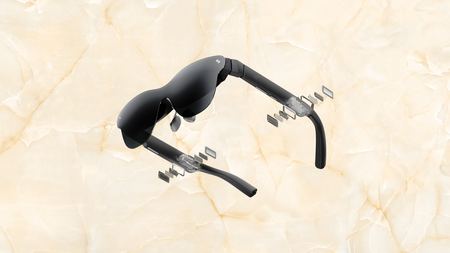
RayNeo Air Pro AR glasses have scored their first discount


What if the biggest screen you have ever watched anything on was not a television bolted to a wall or a projector rigged up for a special occasion, but something sitting on your face that weighs less than a chocolate bar?

The kind of immersive, private cinema experience that used to require a dedicated room, a carefully mounted projector, and a blackout blind can now fold down into something you slip into a jacket pocket without a second thought.

RayNew Air 4 Pro on a yellow stone background

RayNeo Air Pro AR glasses have scored their first major saving, a rare deal for something released just a few months ago

At this price, the RayNeo Air Pro is ideal for anyone who travels regularly, games on a handheld, or just wants a private cinema experience.

View Deal

That reality has a very convincing entry point right now, with the RayNeo Air Pro down from $299 to $254.15, a saving of $44.85 that marks the first meaningful discount on a pair of AR glasses that only launched a few months ago.

The headline feature is a 201-inch virtual display powered by a 5.5th-generation Tandem OLED panel, which RayNeo describes as a portable IMAX screen, and at 1200 nits peak brightness with HDR10 support it has the credentials to back that claim up.

What makes HDR10 worth calling out here is that it is not simply a marketing badge — it means the display renders over ten billion colours with brighter highlights and deeper blacks than a standard LCD screen, which is the difference you actually see when watching anything shot with cinematic intent.

Advertisement

The Vision 4000 chip, co-developed with Pixelworks, handles AI SDR-to-HDR upscaling in real time, so even content that was not originally mastered in HDR gets pulled up to something closer to what the display is capable of showing you.

The Whatsapp Logo

Get Updates Straight to Your WhatsApp

Join Now

For gaming, the 120Hz refresh rate means the RayNeo Air Pro keeps up with a PS5, a Steam Deck, or a Nintendo Switch 2 without motion blur becoming a problem, which is a meaningful distinction from AR glasses that cap out at 60Hz.

Audio comes from four precision speakers tuned by Bang and Olufsen, arranged for 360-degree spatial sound, and a whisper mode is available for situations where keeping the sound to yourself matters, though a Sound Tube accessory for directed audio is sold separately.

Connectivity is entirely cable-based via USB-C with no battery inside, which keeps the weight down to just 76g and means there is nothing to charge before you use it, though it does require a compatible device with USB-C video output to function.

At this price, the RayNeo Air Pro makes the most sense for anyone who travels regularly, games on a handheld, or simply wants a private cinema experience that does not require a dedicated room to set up and pack away every time.

Advertisement

SQUIRREL_PLAYLIST_10148964


Source link

Leave a Reply

Subscribe to Our Newsletter

Get our latest articles delivered straight to your inbox. No spam, we promise.

Recent Reviews


Google is experimenting with a new policy restricting the amount of free storage provided to some accounts. New Google accounts (including new Gmail accounts) created in certain regions will be limited to 5GB of free storage when they’re first set up. That’s only one-third of the amount of storage that has been typically offered. There is a way of increasing the amount of free storage you get when setting up a new account, though: you can unlock it by linking your phone number.

When approached for comment by Android Authority, a Google spokesperson confirmed that the new policy was being tested to “help us continue to provide a high-quality storage service to our users, while encouraging users to improve their account security and data recovery.” The statement didn’t clarify which regions the policy is being tested in, nor for how long the testing period will last.

Notably, a Google One Help support page about account storage has been updated to state that each Google account contains “up to 15 GB of storage”, as noted by 9to5Google. Previously, the page didn’t say “up to”; it simply stated that accounts come with 15 GB of storage. So far, the experiment doesn’t appear to stretch to pre-existing accounts.

Per a screenshot shared by Reddit user Sungusungu on R/DeGoogle (a subreddit dedicated to finding alternatives to Google services and products) Google is collecting phone numbers to make sure that the full 15 GB of storage is only redeemed once per person. Of course, that’s easily evaded by using a burner phone to set up multiple accounts, should you want to. The pop-up directs users to a webpage to learn more about storage management. However, at the time of writing, the link redirects to the help center landing page instead.

How to link your Google account with a phone number

If you’re in the process of setting up a new Google account in an impacted region, then you might be prompted with the option of unlocking an extra 10 GB of storage using your phone number via a simple pop-up menu. If so, you can go ahead and follow those steps. However, if you want to link your phone number with a pre-existing Google account, then here’s what you need to do. Using your computer, you need to:

  1. Open your browser and head to myaccount.google.com, then navigate to “Security and sign in” on the left-hand toolbar. This should open a list of security options.

  2. Select “Use your phone to sign in” and then “Set it up”. 

  3. Add a phone number using the “Recovery phone” option.

  4. Follow the on-screen steps to verify your number and finish linking it to your account.

Your options might look a little different if you already have a recovery number set up with your account.

Alternatively, you can connect a phone number to your Google account from your Android device, iPhone, or iPad. Much like on a computer, you connect your number by adding it as a recovery phone. First, head over to myaccount.google.com. Then select “Personal info”, followed by “Phone”. From there, you should be able to add or edit your phone number by navigating to the “Recovery phone” section.


Source link