The Coffee Stories That Explain a £5 Espresso


One small espresso can tell us six stories.

Six Coffee Stories

1. An origin story:

The year was 1895 and the place, the Milan train station. Responding to rushed commuters’ desire to grab a coffee and run, a resourceful person invented the steam-powered coffee machine. Faster than existing technology, the machine created what (reputedly) was (appropriately) named the espresso.

2. A climate story:

Whether it’s the arabica beans grown in Brazil, Ethiopia, and Kenya, or robusta from Vietnam, the weather has constrained supply. Brazil is still reeling from its 2021 frost while Vietnam had a double whammy from a drought and then a typhoon. Now the threat of a “super” El Niño from a warming Pacific Ocean could again elevate prices.

3. A markets story:

With coffee futures universally available, farmers everywhere check prices. When the future looks rosier than now, they store their beans and create a self-fulfilling prophecy.

4. A trade wars story:

Vietnam and Brazil were two coffee growing countries that were hit hard by tariffs. Close to 50%, the tariffs reduced U.S. bean imports from Brazil (they switched to Germany) and increased what we wanted from Colombia. It was, though lose, lose. More demand for Colombian beans elevated those prices. As a result, all beans cost more.

5. A shipping story:

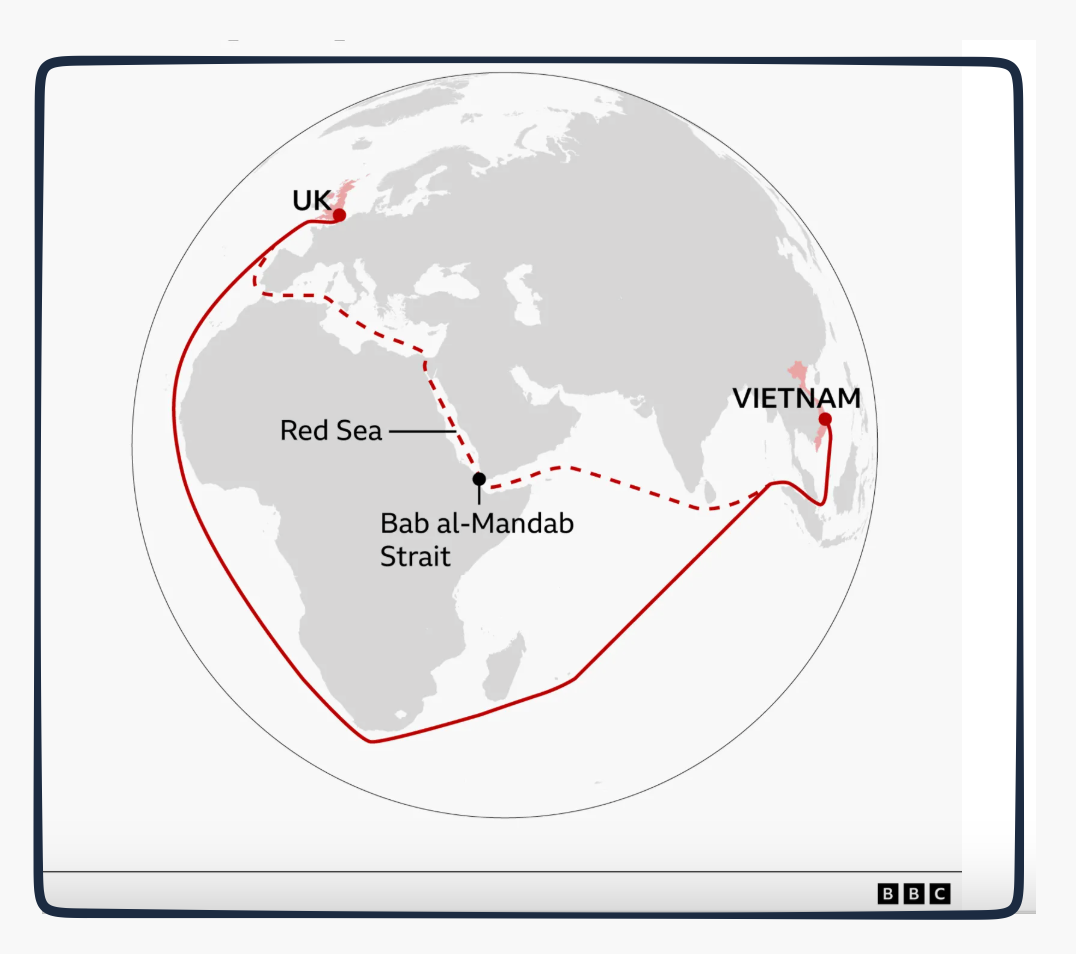
Houthi attacks in the red sea disrupted traditional shipping routes. Predictably, the detour made the trip more expensive.
coffee beans stories

6. A “K” demand story:

Echoing the “K” economy, the £5 espresso reflects the consumers that can pay a premium price for their espresso and the café experience.

Our Bottom Line: Supply and Demand

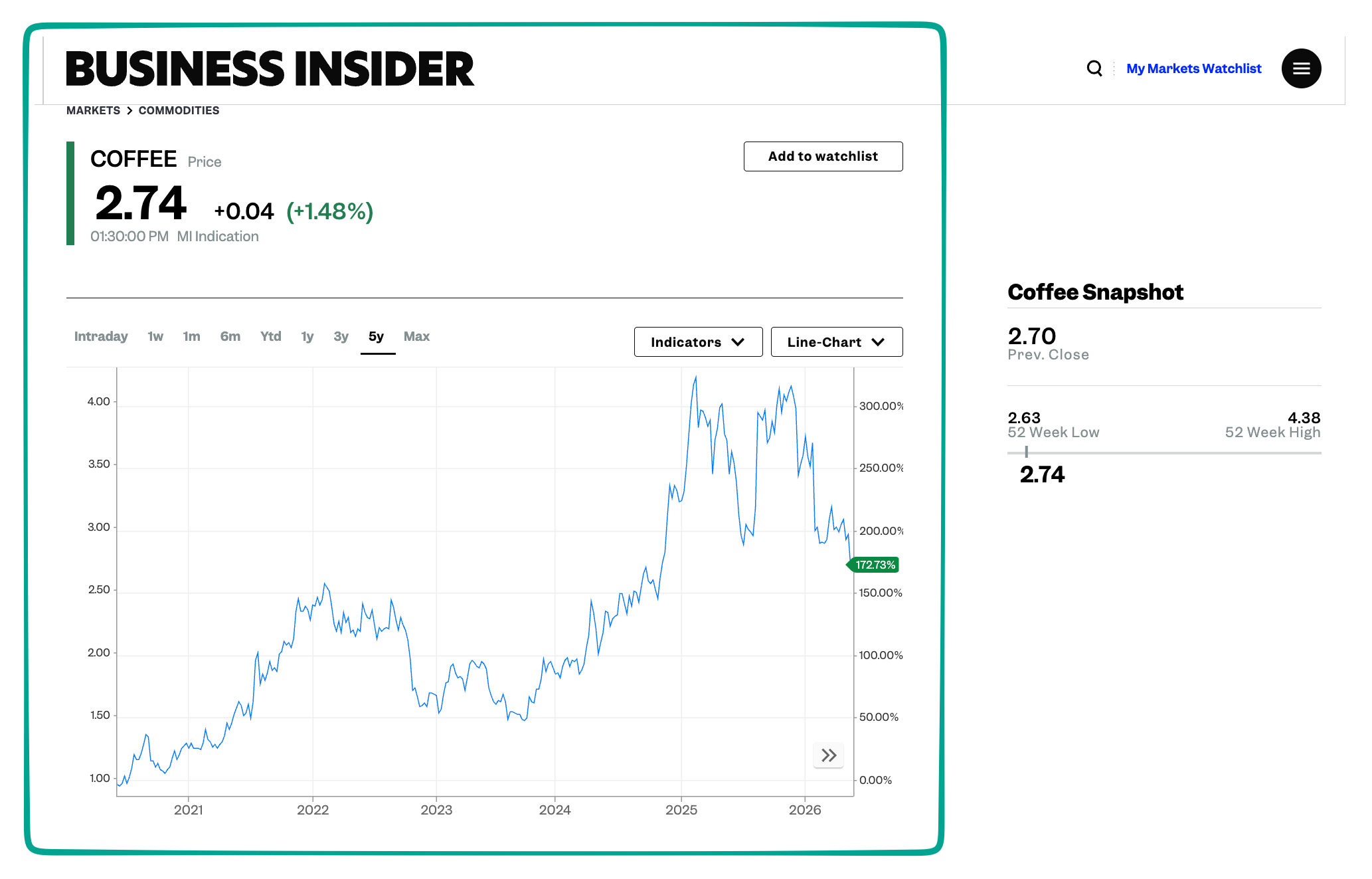
And finally, a graph completes our story. When we combine our supply side stories and consumer demand, equilibrium takes us to a 5-year price ascent.
coffee stories

My sources and more: Thanks again to the BBC’s World Business Report for an interesting story I wanted to share. From there, we went to the BBC article that had much more detail. We also returned to our past coffee posts, here,  here. and here. Do take a look.


Source link

Leave a Reply

Subscribe to Our Newsletter

Get our latest articles delivered straight to your inbox. No spam, we promise.

Recent Reviews


Google is experimenting with a new policy restricting the amount of free storage provided to some accounts. New Google accounts (including new Gmail accounts) created in certain regions will be limited to 5GB of free storage when they’re first set up. That’s only one-third of the amount of storage that has been typically offered. There is a way of increasing the amount of free storage you get when setting up a new account, though: you can unlock it by linking your phone number.

When approached for comment by Android Authority, a Google spokesperson confirmed that the new policy was being tested to “help us continue to provide a high-quality storage service to our users, while encouraging users to improve their account security and data recovery.” The statement didn’t clarify which regions the policy is being tested in, nor for how long the testing period will last.

Notably, a Google One Help support page about account storage has been updated to state that each Google account contains “up to 15 GB of storage”, as noted by 9to5Google. Previously, the page didn’t say “up to”; it simply stated that accounts come with 15 GB of storage. So far, the experiment doesn’t appear to stretch to pre-existing accounts.

Per a screenshot shared by Reddit user Sungusungu on R/DeGoogle (a subreddit dedicated to finding alternatives to Google services and products) Google is collecting phone numbers to make sure that the full 15 GB of storage is only redeemed once per person. Of course, that’s easily evaded by using a burner phone to set up multiple accounts, should you want to. The pop-up directs users to a webpage to learn more about storage management. However, at the time of writing, the link redirects to the help center landing page instead.

How to link your Google account with a phone number

If you’re in the process of setting up a new Google account in an impacted region, then you might be prompted with the option of unlocking an extra 10 GB of storage using your phone number via a simple pop-up menu. If so, you can go ahead and follow those steps. However, if you want to link your phone number with a pre-existing Google account, then here’s what you need to do. Using your computer, you need to:

  1. Open your browser and head to myaccount.google.com, then navigate to “Security and sign in” on the left-hand toolbar. This should open a list of security options.

  2. Select “Use your phone to sign in” and then “Set it up”. 

  3. Add a phone number using the “Recovery phone” option.

  4. Follow the on-screen steps to verify your number and finish linking it to your account.

Your options might look a little different if you already have a recovery number set up with your account.

Alternatively, you can connect a phone number to your Google account from your Android device, iPhone, or iPad. Much like on a computer, you connect your number by adding it as a recovery phone. First, head over to myaccount.google.com. Then select “Personal info”, followed by “Phone”. From there, you should be able to add or edit your phone number by navigating to the “Recovery phone” section.


Source link