This new Android security setting spots bad networks and fake cell towers – enable it ASAP


network notifications

Jack Wallen/ZDNET

ZDNET key takeaways

  • There are networks out there you should not connect to.
  • You could even mistakenly connect to a fake cell tower.
  • Android 17 has a feature that alerts you, so you can stay safe.

When you’re on the go, there may be times when you absolutely have to connect to a network. Maybe you’re in a location where cellular speeds are too slow to transfer a file, or maybe you’re simply concerned about something gobbling up too much of your data plan.

Regardless of the why, the important thing here is this: What network are you connecting to?

Are you connecting to a network at your favorite coffee shop (the one that isn’t protected by a password)? Maybe you’re shopping, and the store you’re currently perusing has a Wi-Fi network. Your gym? A hotel? The list of networks you should not randomly connect to goes on and on.

Also: How to turn on Android’s Private DNS mode – and why you should ASAP

But what if you’re not sure about the security level of a network? Do you just automatically default to “I won’t connect to that network”? That’s the safest bet, but not always the most practical.

Fortunately, Android 17 can help you out because there’s a new addition to network security that can help protect you. Along with the Identity Check and Advanced Protection features added in Android 16, this new feature should help lock down your device.

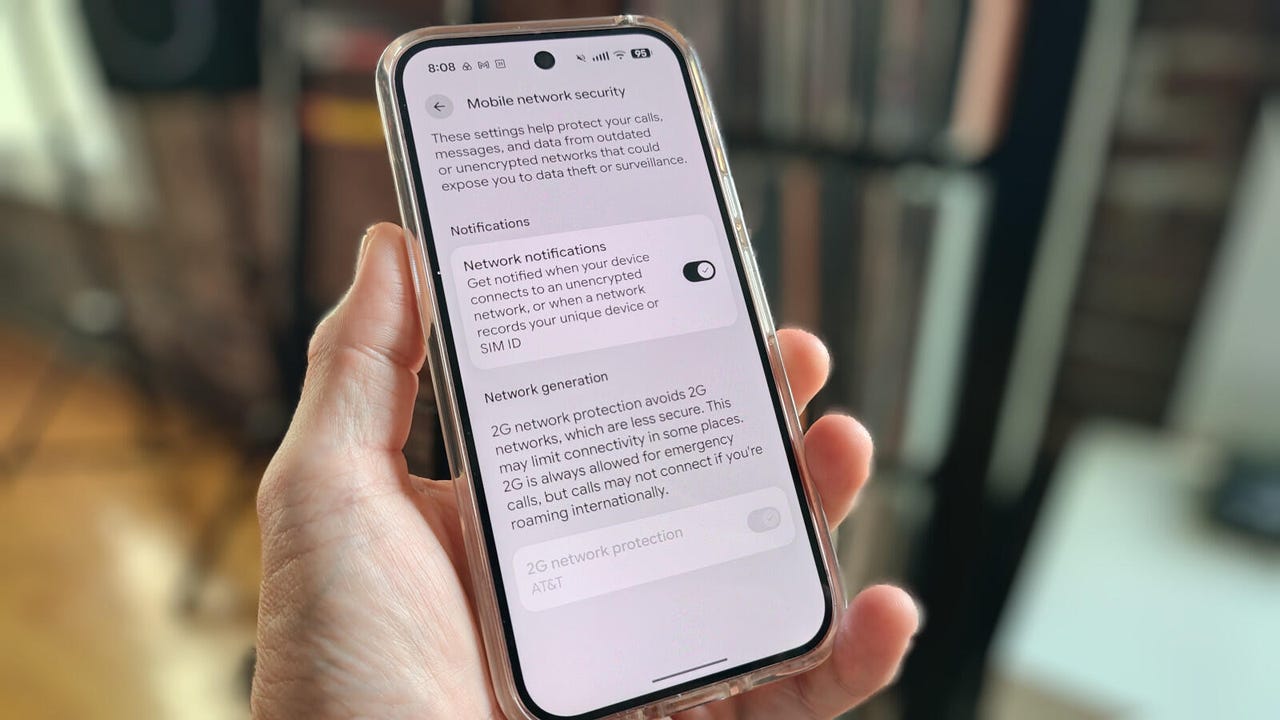
This feature is called “Network notifications.” According to the settings option, you’ll get notified when your device connects to an unencrypted network or when a network records your unique device or SIM ID.

That’s important because you may not know if you’ve connected to an encrypted network. Don’t be fooled. Just because you have to enter a password to join a network doesn’t mean it’s encrypted. A malicious actor could set up a Wi-Fi network, make it seem like it belongs to your favorite coffee shop, keep it open (no password), and wait for you to connect. If that malicious actor sets that network up as unencrypted, they can easily read your data.

And that, my friends, is why it’s important for you to enable Android’s new feature. Because Android is smarter than we are at detecting if a network is unencrypted, this feature is a no-brainer. It’s also very easy to use. I’ll demonstrate on my trusty Pixel 9 Pro.

How to know when you’ve connected to a bad network

Now that you know the “why,” let’s talk about the “how.”

You might think this would be a challenging task, but it’s far easier than you think. All you have to do is tap an on/off slider and, boom, your Android phone will inform you if your phone or tablet connects to an unencrypted (aka “bad”) network. Here’s how.

Also: Your Android phone’s most powerful security feature is off by default and hidden – turn it on now

Open the Settings app and navigate to “Network & internet” > “Mobile network security.”


Show more

Network Notifications

This page should look familiar to anyone who’s ventured into the realm of networking on their Android device.

Jack Wallen/ZDNET

On the Mobile network security page, find the Network notifications entry (it should be at the top). Tap the on/off slider until it’s in the on position.


Show more

Network Notifications

The Network generation option should be enabled and grayed out. If it’s disabled and you can enable it, do so immediately.

Jack Wallen/ZDNET

You’ll also notice there’s an entry labeled “Network generation” that is permanently enabled. This option prevents you from connecting your device to a 2G network, which is often used to spoof cell towers using 3G/2G IMSI catchers. If you were to connect to an IMSI catcher, it could be used for intercepting your mobile phone traffic and tracking you.

Also: Your Android phone just got a powerful anti-theft upgrade. Here’s what’s new

This is a very simple thing that every Android user should enable (if it’s available). If you don’t find the “Network notifications” section in the location as directed above, search for it in your Settings app. If it’s not there, make sure to check and see if the version of Android on your device can be upgraded.




Source link

Leave a Reply

Subscribe to Our Newsletter

Get our latest articles delivered straight to your inbox. No spam, we promise.

Recent Reviews


When to watch Brazil vs. Panama

  • Saturday, May 30, at 5:30 p.m. ET (2:30 p.m. PT).

Where to watch

  • There are no confirmed broadcasters for this match in the US.

73% off with 2yr plan (+4 free months). Now only $3.49/month


See more details

Brazil plays its final World Cup warm-up before heading to the US as it hosts Panama today at the iconic Estadio do Maracanã in Rio.

Having overseen a disappointing five wins, two draws and three defeats since taking over as Brazil boss last year, head coach Carlo Ancelotti will be hoping to improve on that record on home turf today in the penultimate friendly before next month’s tournament. 

Facing the Seleção is a Panama team preparing to step on world football’s biggest stage for only the second time in the nation’s history. Today’s tricky fixture looks set to provide an ideal test for Thomas Christiansen’s men, who face a real battle to come through a tough-looking Group L, which also features England, Croatia and Ghana. 

Brazil takes on Panama at the Estadio do Maracanã in Rio de Janeiro on Sunday, May 30. Kickoff is set for 6:30 p.m. BRT local time. That makes it a 5:30 p.m. ET or 2:30 p.m. PT kickoff in the US and Canada. For football fans in the UK, it’s a 10:30 p.m. BST start, while for viewers in Australia, the game gets underway at 7:30 a.m. AEDT on Sunday morning. 

Carlo Ancelotti, Head Coach of Brazil, looking onwards.

Brazil boss Carlo Ancelotti will have to make do without veteran star Neymar in his World Cup preparations, with the Santos forward set to miss today’s game and next week’s friendly against Egypt with a calf injury.

Maddie Meyer/Getty Images

Can I livestream the Brazil vs. Panama match in the US?

No broadcaster in the US has the rights to show this match live.

That also means that if you’re traveling in the US, you’re unlikely to be able to watch the game as you normally would at home due to geoblocking.     

Livestream the Brazil vs. Panama match in Brazil

This World Cup warm-up will be broadcast on free-to-air Globo Brazil, which means it will also be available to stream online via the network’s Globoplay streaming service.

Globo

Globo’s streaming service Globoplay is free to use for viewers in Brazil, with dedicated apps for Android and Apple devices, as well as Amazon Fire and other smart TVs.

Can I livestream the Brazil vs. Panama match in the UK, Canada or Australia? 

It’s the same story as the US, with no broadcaster currently scheduled to show this World Cup warm-up match live in any of these three regions.

How to watch the Brazil vs. Panama match online from anywhere using a VPN

If you’re traveling abroad and want to keep up with all the international soccer action while away from home, a VPN can help enhance your privacy and security when streaming.  

It encrypts your traffic and prevents your internet service provider from throttling your speeds. Additionally, it can be helpful when connecting to public Wi-Fi networks while traveling, providing an extra layer of protection for your devices and logins. VPNs are legal in many countries, including the US and Canada, and can be used for legitimate purposes such as improving online privacy and security.  

However, some streaming services may have policies restricting VPN use to access region-specific content. If you’re considering a VPN for streaming, check the platform’s terms of service to ensure compliance.

If you choose to use a VPN, follow the provider’s installation instructions to ensure you’re connected securely and in compliance with applicable laws and service agreements. Some streaming platforms may block access when a VPN is detected, so verify whether your streaming subscription allows VPN use.

James Martin/CNET

Price $78 for two yearsLatest Tests No DNS leaks detected, 18% speed loss in 2025 testsJurisdiction British Virgin IslandsNetwork 3,000 plus servers in 105 countries

ExpressVPN is our current best VPN pick for people who want a reliable and safe VPN, and it works on a variety of devices. Prices start at $3.49 a month on a two-year plan for the service’s Basic tier.

Note that ExpressVPN offers a 30-day money-back guarantee.

73% off with 2yr plan (+4 free months). Now only $3.49/month


Source link