Trump rule will force more Medicaid patients to work for benefits


It may sound like semantics for policy wonks, but the definition of a term will deeply impact Minnesota’s race to conform with federal Medicaid mandates.

The phrase in question is “medical frailty.” As part of changes brought on by the One Big Beautiful Bill, the Centers for Medicare and Medicaid Services was tasked with defining it before a June 1 deadline.

This determination impacts who will be exempt from new Medicaid work requirements. Minnesota and other state leaders, needing the information to start implementing the policy, were closely watching the agency’s decision.

This month they learned the definition will be far stricter than expected. Here’s what changed and why it matters for Minnesotans.

How did the definition differ from expectations?  

Most states, including Minnesota, expanded or partially expanded Medicaid access under the Affordable Care Act. Last year’s bill caused sweeping changes to the health insurance program, including imposing eligibility conditions on people who accessed care through the expansion.

Starting next year, they’ll need to work or engage in activities like community service 80 hours per month, or attend school at a half-time clip, to qualify for Medicaid coverage. There are supposed to be exemptions, however, including for those considered medically frail. 

Examples of medical frailty range from cancer to heart disease to HIV to a mental health disorder. States expected these populations to be exempt as a matter of course, according to a KFF analysis.

But simply being medically frail won’t be enough to maintain eligibility under the new definition, said Amaya Diana, a policy analyst with KFF’s Program on Medicaid and the Uninsured.

“It’s now not just ‘Do you have cancer?’” she said of the change. “It’s “Do you have cancer, and does your condition impair your ability to work?’”

Adopting this two-pronged approach is likely to cause administrative headaches. A KFF survey from earlier this year found states were all over the board on which definitions they used for medical frailty.

Whether they aligned with the federal government’s ultimate determination was a crapshoot. Most state definitions weren’t adopted with work requirements in mind. 

“That’s the difficult thing that states have to grapple with now is how do they pivot and set up systems in a way to identify acuity and ability to work,” Diana said. “The rule isn’t actually super clear on what states should do to make that decision.”

The June ruling was a marked departure from what Minnesota anticipated, according to a statement from the Department of Human Services.

“The Interim Final Rule released earlier this month delineates a definition of medical frailty that is a fundamental change to previous preliminary guidance,” the agency stated. “At this time, it is unclear how this new restricted definition would work in practice.”

How many Minnesotans will be impacted by this?

About 212,000 Minnesotans are in the expansion group, representing 18% of the state’s overall Medicaid population. Nationwide, about 19.8 million are expansion group enrollees. 

Within that sub-group, anyone meeting the medical frailty condition would be subject to the new rule application. The Minnesota Budget Project advocacy group condemned the change, arguing that it will reduce access to care for up to 128,000 Minnesotans. 

“The guidance is restrictive and ignores the reality of serious and complex medical conditions by reducing the number of people who can qualify for an exemption to work requirements because they are medically frail,” the organization stated in a release. “Narrowing this exemption and subjecting these folks to work reporting requirements could lead to adverse health effects caused by disruptions to their health care.”

Greater Minnesota, where access to care is already lower, could be hit hardest. The 21 counties with the highest Medicaid participation rates are outside the Twin Cities metro, according to a Georgetown University report

Mahnomen, Beltrami and Nobles counties have more than a quarter of residents on Medicaid. The lowest Medicaid participation counties come in at around 15%. 

What makes these new Medicaid work requirements difficult to implement?

In practice, people who need Medicaid to stay alive will need to do a whole lot more paper pushing to maintain coverage, said Dana Bacon, senior director for state government affairs at Blood Cancer United. The organization was formerly known as the Leukemia & Lymphoma Society.

Prior to this month’s announcement, medical frailty was never viewed through the context of whether someone could work, Bacon said.

“We’ve never wanted Medicaid connected directly to work because at the end of the day, for patients, it’s health care, not work rehabilitation,” he said. “How is a doctor who’s there to practice medicine supposed to become some kind of work counselor?”

To emphasize how complicated the new rule would be, he used the example of a multiple myeloma patient. Medications keeping them in remission can reduce bone density.

How much reduction makes them unable to work? Who makes that call? How well can state coding systems take into account changes to their condition over time? All these questions came to Bacon’s mind. 

For the state’s part, DHS is seeking clarity on how to move forward. Once more details arrive, the state will put forth a proposed state plan on implementation for public comments before final submission to the federal government. 

Based on what the agency knows so far, it has great concerns that the change will contribute to “significant coverage losses among Minnesotans.” 

“As previous attempts to implement Medicaid work requirements have demonstrated, tying medical frailty to the ability to work will burden people with serious medical needs, the health care system, and state and county staff,” the agency stated.


Source link

Leave a Reply

Subscribe to Our Newsletter

Get our latest articles delivered straight to your inbox. No spam, we promise.

Recent Reviews


Google Drive Organize My Files

Elyse Betters Picaro / ZDNET

Follow ZDNET: Add us as a preferred source on Google.


ZDNET’s key takeaways

  • Gemini can suggest Drive file moves and new folders.
  • Organize My Files requires Workspace or Google AI access.
  • The tool is useful but still feels limited and unfinished.

I’m an Apple person. I’ve owned an iPhone since 2007 and a Mac since before that, so of course I’m also a longtime user of iCloud Photos and iCloud Drive. I pay $10 a month for the 2TB iCloud+ plan because I have 488GB of data sitting there, including nearly 40,000 photos. Don’t judge me. The real problem is that I’m also a heavy Google user, specifically Workspace apps.

Also: I tested ChatGPT Plus vs. Gemini Pro to see which is better

After 14 years of using Google Drive, I have 340GB of data stored there from all the Google Docs, Sheets, Slides, and Gmail messages I’ve created, not to mention file uploads. So I pay $20 a month for Google AI Pro, which gives me 5TB of storage and access to Gemini AI. And because, apparently, I need all the subscriptions, I also pay $20 a month for ChatGPT Plus.

I need to cut subscriptions

I know… I need to cut subscription costs somewhere. I’ve wondered whether I should cancel ChatGPT or somehow, some way, reduce my Google usage enough to stop paying for extra Drive storage. Realistically, I do not think I could ever get my data down to the 15GB Google gives me for free. My Drive has become so daunting that I’ve mostly stopped trying to manage it.

The funny part is that I am hyper-organized. My pantry has coordinated glass jars with labels. My daughter’s toy room has a place for everything. My Google Drive, though? A dumping ground. What can I say? Pre-parenthood Elyse was not so organized.

Also: Tired of AI Overviews? I found 9 Google Search alternatives

Because my Drive has never been in a good place, I have let files, photos, screenshots, PDFs, tax documents, drafts, downloads, and random digital debris accumulate with no real oversight for years. I keep putting off cleaning it.

Recently, I had the idea that some AI service could connect to my Drive and help me quickly organize it with a few clicks. Then I remembered my Drive includes things like my house deed, a copy of my will, and my LLC business details, and suddenly giving a random third-party company broad access to my personal data felt like too much to bear.

So here we are. My Drive is still messy, and my subscriptions are still multiplying. Joy. I sure do love that in this economy.

Can ‘Organize My Files’ declutter my Drive?

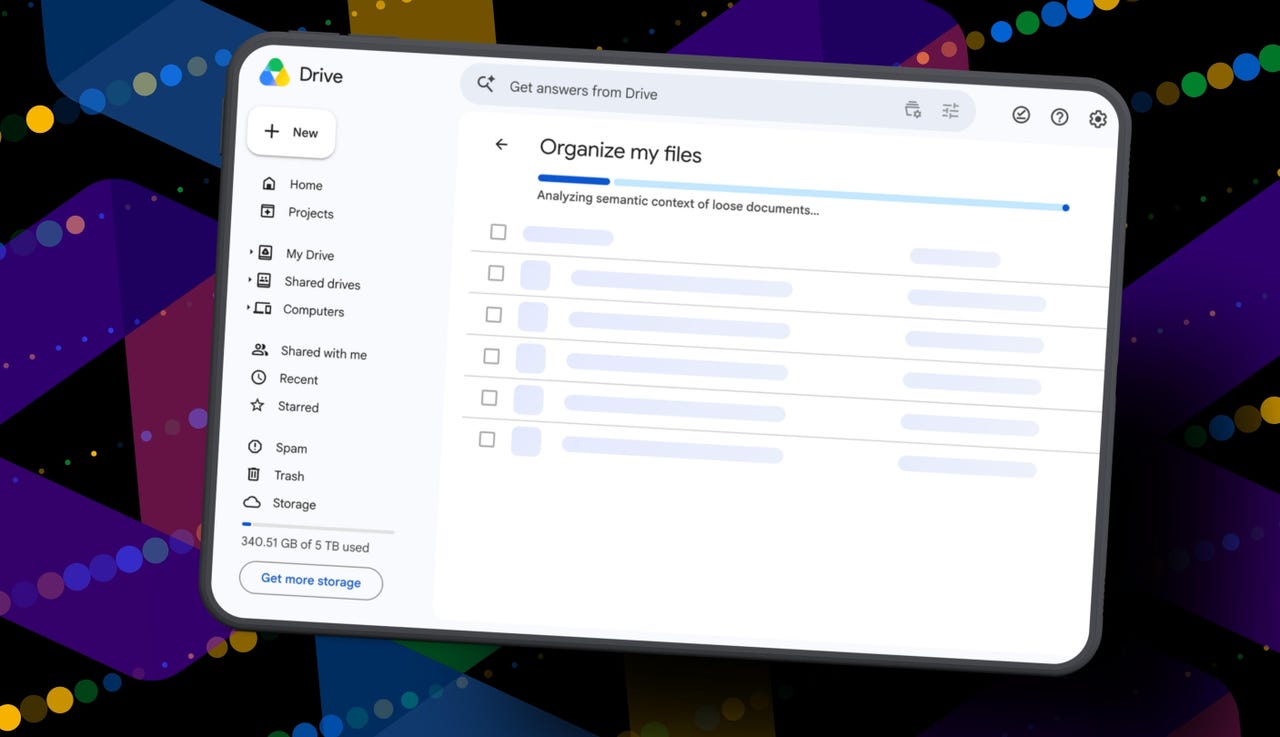
But today I spotted a quiet little launch from Google: its “Organize My Files” feature is now available. Can Gemini actually, truly help me declutter, organize, and simplify my Drive now? Apparently, it uses Gemini AI to suggest moving loose files in Drive into existing folders or creating new folders for related files. And I get to review everything before anything moves.

Also: I tried Gmail’s new Gemini AI features, and I want to unsubscribe

If this works, maybe one day I can move my data out of Drive and cancel my Google AI Pro plan for good. Maybe. One day.

How Organize My Files works

What you’ll need: A Google account with a messy-as-hell Drive. Oh, and Google’s “Organize My Files” feature is currently limited to Google Workspace and Google AI subscribers. Workspace smart features must also be enabled for it to appear in Drive.

Open Google Drive

Elyse Betters Picaro / ZDNET

Look toward the top of the file and folder list in My Drive for a new button called “Suggest File Moves.” Google said it will appear in My Drive as well as in parent folders in Drive. 

Clicking Suggest File Moves opens a new Organize My Files window, where Gemini will begin analyzing loose files and suggesting ways to clean them up.

Also: This Gemini setting made my AI results way more personal


Show more

Click Suggest File Moves

Elyse Betters Picaro / ZDNET

After a minute or so, Gemini serves up recommendations to review. They’re divided into two main types:

  • Gemini may suggest moving files into existing folders in Drive.
  • Gemini may suggest creating new folders for related groups of files.

All files and folders can be previewed through hovercards or opened in a new tab for a closer look.

Also: Is Google’s AI Ultra plan worth $100/month?


Show more

Review Gemini's suggestions

Elyse Betters Picaro / ZDNET

It’s time to use the checkboxes to select or deselect any file or folder that Gemini served up. 

Also, if a suggested folder name is weird, just rename it. Check destinations for folders, too. If they aren’t right, change the target. Once the suggestions do look right and you’re happy, approve the changes.

Gemini will then perform the file or folder moves in one batch and return to My Drive.

Also: I used Nano Banana 2 to make perfect sketchnotes: 5 lessons


Show more

Approve the changes

Elyse Betters Picaro / ZDNET

My result

After all that, Gemini suggested 19 moves for me. Nineteen. And it mostly surfaced recent files I had created or uploaded.

Some of the suggestions made sense. Gemini wanted to move my resume and a couple of resumes I had helped family members create into an existing resume folder. It also suggested creating a new Family and Real Estate folder for house deed documents, plus a Travel Planning folder for upcoming summer trip itineraries I have stored in Drive. But one of the files it grouped under Travel Planning was literally called “Delete,” because it’s a doc I want to delete. Gemini did not realize that, nor did it suggest deleting it.

To be clear, I have hundreds of gigabytes of data and years of clutter sitting in Google Drive.

Also: How I unlocked another 15GB of Gmail storage for free

Still, I approved the changes Gemini recommended. For the heck of it, I ran the tool again. In about 30 seconds, it suggested the same thing: the same file moves, the same new folders, and the same changes it had just made. This feels half-baked.

It’s not at all the sweeping cleanup assistant for Drive that I was hoping for and need. Maybe it will get better over time. It did just come out of beta, and it’s possible Google will improve how Gemini scans Drive, prioritizes older files, recognizes obvious trash, and surfaces deeper organization suggestions. I just don’t want to have to click it 500 times, hoping it finds something new each time.

Looks like I’m still stuck with a messy Drive and a $20 AI Pro subscription… for now.


Source link