
Utah’s VPN Law Is A Declaration Of Tech Illiteracy


Ostensibly spurred on by concerns around online child safety, nations around the world have started implementing ID and age verification requirements to restrict minors’ access to social media and supposed adult content. Some platforms, like Discord, also imposed their own verification processes preemptively. But the internet does not respect borders, and savvy users have found that bypassing these barriers is as easy as using a VPN. VPNs route a user’s traffic through remote servers, making it appear as though the traffic originates from someplace other than the user’s physical location.

One U.S. state that has implemented age verification and ID laws is Utah, which passed a law (Senate Bill 73) requiring adult platforms to verify a user’s age if that user is in Utah. The outcome was as obvious as stepping on a rake: many porn sites blocked users from the state, and residents looking for some steamy action had to use a VPN.

Now, Utah has decided to target the VPNs themselves. A new amendment took effect on May 6, imposing penalties on websites found to provide access to users who are geo-spoofing. If you know even the bare minimum about VPNs, you’ll know this makes no sense, since the entire function of a VPN is to hide a user’s location from the websites they visit. It is an unworkable and burdensome law that will only cause headaches for everyone involved, whether or not they live in Utah. The question then becomes whether Utah’s legislators are malicious or merely tech-illiterate. Here’s what you need to know.

A geofenced ban on VPN traffic is technically unenforceable

Utah’s new amendments to Section 14 of SB 73 do not ban VPNs outright, nor do they target users. Instead, they target the websites users visit while using a VPN. The problem here is that a website won’t know that a Utah resident is using a VPN. It will simply see a user in, say, Denver requesting access; since there are no such restrictions in Colorado, the website will load normally. Even so, that website could now be in violation of Utah law, despite no fault of its own. Equally concerning is another portion of the amendments that prohibits websites from publishing instructions on using a VPN, which the Electronic Frontier Foundation (EFF) points out may violate the First Amendment.

Websites are being put between a rock and a hard place, which is why NordVPN, a popular provider, referred to the amendment as a “liability trap” (via TechRadar). Blocking VPN service to Utah entirely won’t work for the reasons outlined above, but expanding the blocked service region to include neighboring states is equally useless, as a user can use a VPN server further afield. Websites could block traffic from IP addresses commonly associated with VPNs to stay safe, but that would affect users outside of Utah, too, and it would only work for static VPN IPs — leaving dynamic IPs as a loophole.

There’s only one obviously bulletproof fix: universal age verification. In other words, the easiest way to comply with this Utah law is for websites to apply the law globally. Meanwhile, mainstream devices, including Apple products, already have features to protect children online, throwing that entire effort into question.

Critics say Utah’s VPN ban appears designed for chaos

Utah’s SB 73 seems set to prove that the only way to restrict internet traffic is to uproot the fiber-optic cables it runs through. In the meantime, though, the new amendment will likely sow chaos  — and that might be by design. While you may think the law, however badly written it may be, will only affect adult websites, the changes were introduced alongside a broadening of the law’s scope.

Previously, it only affected websites with explicit sexual content based on a three-pronged obscenity standard taken from precedent in constitutional law. But now, a website must only fulfill one of the three criteria, one of which is merely material that, in the bill’s wording, “taken as a whole lacks serious literary, artistic, political, or scientific value for minors.” In other words, any website that does not focus almost exclusively on providing educational content could be at risk. As the privacy advocate group State of Surveillance points out, this law is likely to disproportionately impact vulnerable groups, such as domestic abuse survivors and LGBTQIA+ youth in hostile households, by outing their identities when they seek resources and support online.

The most vocal critics, such as the EFF, also point out that even a VPN ban with a sensible framework wouldn’t stop motivated users. These users may simply switch to VPN alternatives like proxies and tunnels, which can also dodge IP-based geolocation. Meanwhile, websites worried that they’ll run afoul of the law may move to collect age verification from every user, regardless of location, doing immense damage to the ability of journalists, political dissidents, targets of oppressive regimes, and ordinary citizens to protect their online privacy. Utah lawmakers have weaponized tech illiteracy.


Source link

Leave a Reply

Subscribe to Our Newsletter

Get our latest articles delivered straight to your inbox. No spam, we promise.

Recent Reviews


The Windows Insider Program is about to get much easier

Ed Bott / Elyse Betters Picaro / ZDNET

Follow ZDNET: Add us as a preferred source on Google.


ZDNET’s key takeaways

  • Microsoft is making the Insider Program less complicated.
  • Beta channel will be a more reliable preview of the next retail release.
  • Other changes will allow testers to quickly enable/disable new features.

Last month, Microsoft took official notice of its customers’ many complaints about Windows 11. Pavan Davaluri, the executive vice president who runs the Windows and Devices group, promised sweeping changes to Windows 11. Today, the company announced the first of those changes in a post authored by Alec Oot, who’s been the principal group product manager for the Windows Insider Program since January 2024.

Those changes will streamline the Insider program, which has lost sight of its original goals in the past few years. (For a brief history of the program and what had gone wrong, see my post from last November: “The Windows Insider Program is a confusing mess.”)

Also: If Microsoft really wants to fix Windows 11, it should do these four things ASAP

If you’re currently participating in the Windows Insider Program, these are meaningful changes. Here’s what you can expect.

Simplifying the Insider channel lineup

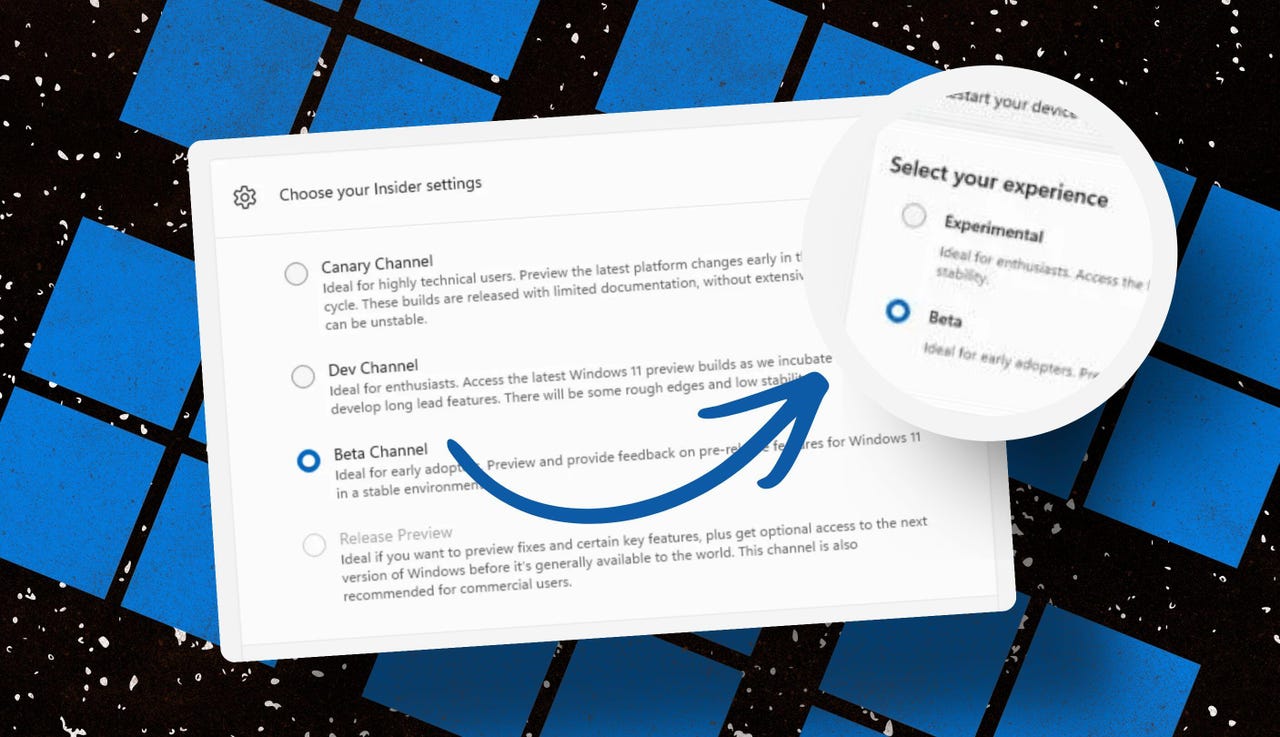
Throughout the Windows 11 era, signing up for the Insider program has required choosing one of four channels using a dialog in Windows Settings. Here’s what those options look like today on one of my test PCs.

insider-program-channels-lineup-old

The current Insider channel lineup is confusing, to say the least.

Screenshot by Ed Bott/ZDNET

Which channel should you choose? As the company admitted in today’s post, “the channel structure became confusing. It was not clear what channel to pick based on what you wanted to get out of the program.”

The new lineup consists of two primary channels: Experimental and Beta. The Release Preview channel will still be available, primarily for the benefit of corporate customers who want early access to production builds a few days before their official release. That option will be available under the Advanced Options section.

windows-insider-channel-lineup-new

This simplified lineup is easier to follow. Beta is the upcoming retail release, Experimental is for the adventurous.

Screenshot courtesy of Microsoft

Here’s Microsoft’s official description of what’s in each channel now, with the company’s emphasis retained:

  • Experimental replaces what were previously the Dev and Canary channels. The name is deliberate: you’re getting early access to features under active development, with the understanding that what you see may change, get delayed, or not ship at all. We’ve heard your feedback that you want to access and contribute to features early in development and this is the channel to do that.
  • Beta is a refresh of the previous Beta Channel and previews what we plan to ship in the coming weeks. The big change: we’re ending gradual feature rollouts in Beta. When we announce a feature in a Beta update and you take that update, you will have that feature. You may occasionally see small differences within a feature as we test variations, but the feature itself will always be on your device.

These changes will apply to the Windows Insider Program for Business as well.

Offering a choice of platforms

For those testers who want to tinker with the bleeding edge of Windows development, a few additional options will be available in the Experimental channel. These advanced options will allow you to choose from a platform that’s aligned to a currently supported retail build. Currently, that’s Windows 11 version 25H2 or 26H1, with the latter being exclusively for new hardware arriving soon with Snapdragon X2 Arm chips.

Also: Microsoft account vs. local account: How to choose

There will also be a Future Platforms option, which represents a preview build that is not aligned to a retail version of Windows. According to today’s announcement, this option is “aimed at users who are looking to be at the forefront of platform development. Insiders looking for the earliest access to features should remain on a version aligned to a retail build.”

windows-insider-advanced-options-new

The Future Platforms option is the equivalent of the current Canary channel

Screenshot courtesy of Microsoft

Minimizing the chaos of Controlled Feature Rollout

Last month, I urged Microsoft to stop using its Controlled Feature Rollout technology, especially for builds in the Beta channel. Apparently, someone in Redmond was listening.

One of the most common questions we receive from Insiders is “why don’t I have access to a feature that’s been announced in a WIP blog?” This is usually due to a technology called Controlled Feature Rollout (CFR), a gradual process of rolling out new features to ensure quality before releasing to wider audiences. These gradual rollouts are an industry standard that help us measure impact before releasing more broadly. But they also make your experience unpredictable and often mean you don’t get the new features that motivated many of you to join the Insider program to begin with.

Moving forward, Insider builds in the Beta channel will no longer suffer from this gradual rollout of features. Meanwhile, the company says, “Insiders in the Experimental channel will have a new ability to enable or disable specific features via the new Feature Flags page on the Windows Insider Program settings page.”

windows-insider-feature-flags

Builds in the Experimental channel will include the option to turn new features on or off.

Screenshot courtesy of Microsoft

Not every feature will be available from this list, but the intent is to add those flags for “visible new features” that are announced as part of a new Insider build.

Making it easier to change channels

The final change announced today is one I didn’t see coming. Historically, leaving the Windows Insider Program or downgrading a channel (from Dev to Beta, for example) has required a full wipe and reinstall. That’s a major hurdle and a big impediment to anyone who doesn’t have the time or technical skills to do that sort of migration.

Also: Why Microsoft is forcing Windows 11 25H2 update on all eligible PCs

Beginning with the new channel lineup, it should be easier to change channels or leave the program without jumping through a bunch of hoops.

To make this a more streamlined and consistent experience, we’re making some behind the scenes changes to enable Insider builds to use an in-place upgrade (IPU) to hop between versions. This will allow in most cases Insiders to move between Experimental, Beta, and Release Preview on the same Windows core version, or leave the program without a clean install. An IPU takes a bit more time than your normal update but migrates your apps, settings, and data in-place.

If you’ve chosen one of the future platforms from the Experimental channel, those options don’t apply. To move back to a supported retail platform, you’ll need to do a clean install.

Also: Apple, Google, and Microsoft join Anthropic’s Project Glasswing to defend world’s most critical software

The upshot of all these changes should make things a lot clearer for anyone trying to figure out what’s coming in the next big feature update. Beta channel updates, for example, should offer a more accurate preview of what’s coming in the next big feature update, so over the next month or two we should get a better picture of what’s coming in the 26H2 release, due in October.

When can we start to see those changes rolling out to the general public? Stay tuned.


Source link