Trying to stay well, we let physicians decide what to monitor. As a result, we might have an EKG, a cholesterol test, the new colon cancer blood test. Some feel though that different criteria would be more appropriate.
Similarly, trying to keep our economy healthy, we emphasize a GDP focus that some disagree with.
Through a new UN report, we can consider an alternative.
Beyond GDP
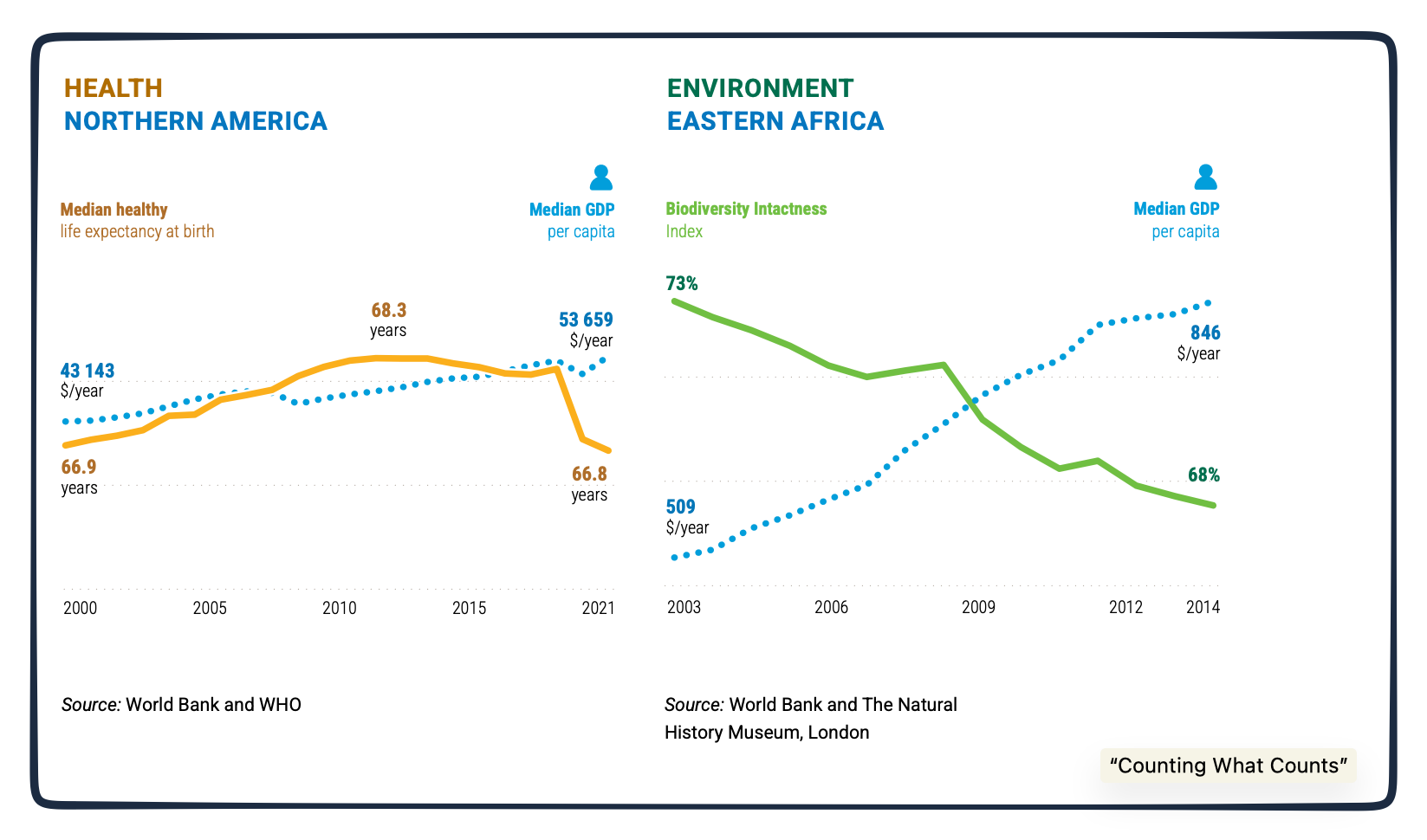
Repeating what economists have told us for years, a UN commission believes that “key dimensions of progress sit outside the GDP.” Consequently, they tried to make “visible what GDP overlooks.”
Perfectly shown by these graphs, the GDP can obscure what we need to see:
The Dashboard
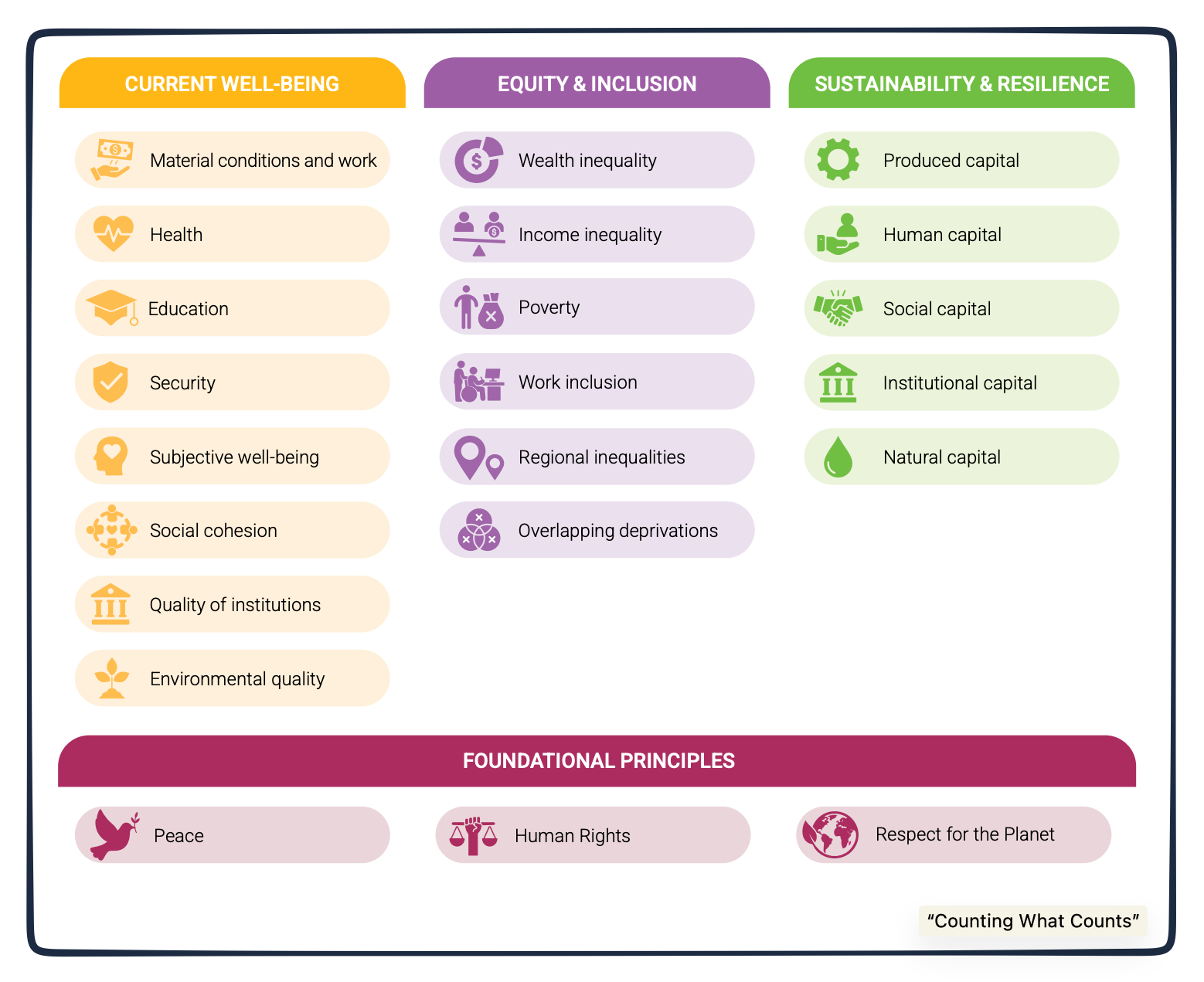
The new report’s remedy is a “Beyond GDP” dashboard. with four buckets that contain 31 metrics.
Peace, Human Rights, and Respect for the Planet
Current Well-Being
Equity and Inclusion
Sustainability and Resilience
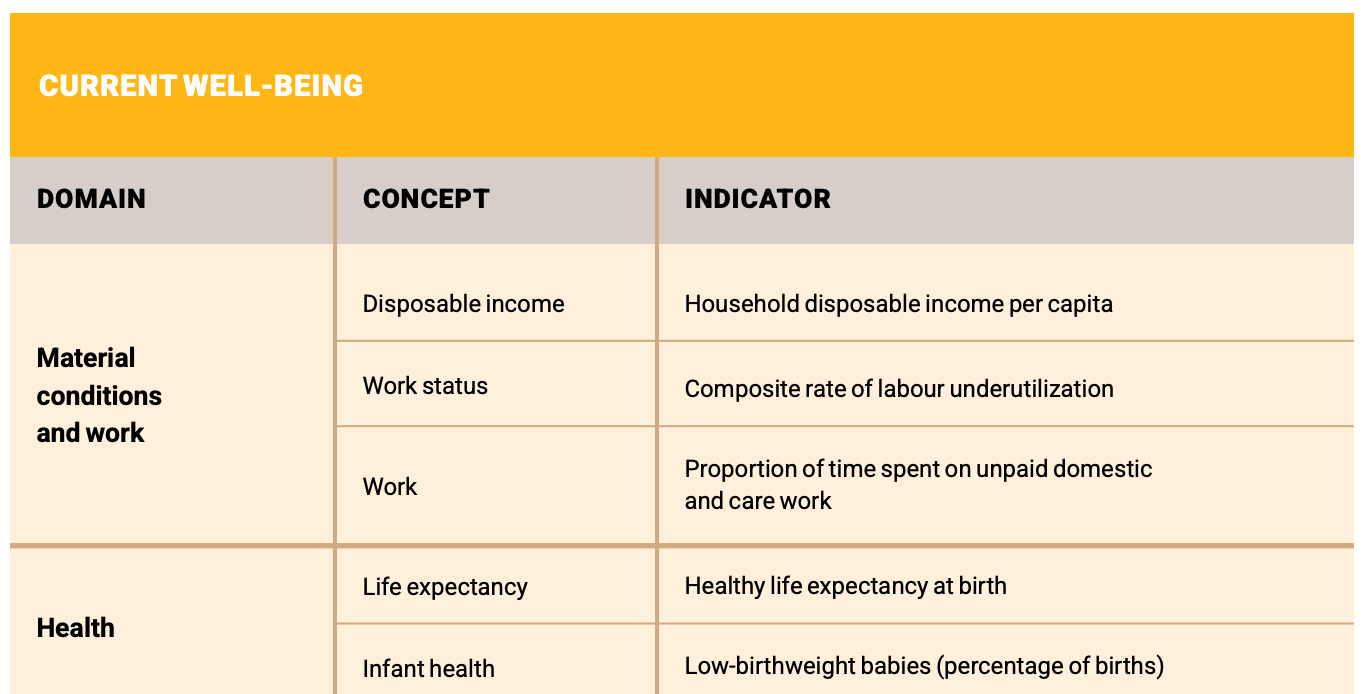
Examples of the metrics:
Then, taking us to computation, I’ve copied several of their indicators:
An Opinion
The report generated concern. Many said it was “well-meaning but undisciplined.” Some pointed out that developing nations don’t have the collection capability. Others disagreed about how it could be used.
The report’s defenders reminded us that it was a compromise among individuals from many disciplines.
While some suggested the next step was aggregating it all into a composite, Nobel laureate Joseph Stiglitz said the components would be useful for nations to select what was most important.
Our Bottom Line: the GDP
When Nobel Laureate Simon Kuznets first created the GDP concept during the 1930s, he decided that only market-based legal paid work could be included. Since there was no market metric for work done at home, it was not counted. Neither was the underground economy.
Building from Kuznets’s work, the U.S. GDP details our consumption, investment, government, and net export spending. Then, it lets policy makers identify underperforming components. And, after that, they use fiscal and monetary tools to diagnose and cure our economic maladies.
Meanwhile, as a directive GDP, China’s policy makers choose a target. Then, tasked with a goal, local officials feel the pressure to meet it with the statistics they report. From the local level to the top, by meeting targets, China guarantees what the state can achieve. Correspondingly, they convey their economic power.
So, where are we? We can respect even more what Simon Kuznets accomplished.
My sources and more: Thanks to Slate Money for alerting me to the new UN GDP proposal. From there, we took a look at the report, here and here, and this NY Times commentary. And finally, to decide your GDP preferences, you might enjoy visiting the OECD’s interactive Better Life Index.
Please note that several of today’s sentences were in a past econlife post.
There are places in the world where everything feels accounted for. The roads are smooth, the signs are clear, and the experience has been carefully arranged long before you arrive. Adventure exists, technically, but only within boundaries that make it predictable. Nothing unexpected happens. Nothing pushes back.
And then there are places that still feel wild.
Not reckless. Not uncomfortable. Just untamed enough that you feel like a guest rather than a consumer. Places where the land doesn’t bend to human schedules, where weather sets the tone for the day, and where nature isn’t something you observe from a distance — it’s something you move through, adapt to, and occasionally surrender to. Traveling somewhere that still feels wild changes you in quiet, persistent ways. It slows your thinking. Sharpens your senses. Reminds you how small you are — and how good that can feel.
Alaska is the clearest example we know. But the feeling itself, the pull toward the wild, extends far beyond one place on the map.
The Absence of Predictability Is the Point
Photo Credit: Jenn Coleman.
When you travel somewhere wild, certainty disappears almost immediately. Plans turn into loose outlines. Timelines soften. The assumption that you’re fully in control starts to fade — and that’s exactly where the experience opens up.
In Alaska, weather doesn’t politely cooperate. Flights wait. Boats adjust for tides. Trails change overnight. Wildlife appears on its own terms, not when you’re ready with a camera in hand. At first, this unsettles people. We’re trained to optimize travel, to squeeze value from every hour, to move efficiently from one highlight to the next.
Wild places resist that mindset. They force you to slow down and pay attention instead.
Instead of rushing, you find yourself watching clouds crawl across a mountain range or listening for the distant crack of shifting ice. You wait because someone has spotted a bear across the river, and suddenly waiting doesn’t feel like lost time — it feels like the entire point. In wild places, patience isn’t a virtue. It’s a requirement.
Nature Isn’t a Backdrop — It’s the Main Character
Photo Credit: Jenn Coleman.
In many destinations, nature plays a supporting role. It’s something you admire between meals and museum visits, a scenic pause before moving on to the next activity.
In wild places, nature is the storyline.
In Alaska, the scale alone recalibrates your perspective. Mountains don’t rise politely in the distance; they loom. Glaciers don’t shimmer passively; they groan, fracture, and move. Rivers aren’t decorative — they’re powerful, cold, and very much alive. Wildlife isn’t something you visit. It’s something you encounter, often unexpectedly, and always on its own terms.
That reality changes how you move through the world. You speak more quietly. You scan the horizon. You learn to read the land not just for beauty, but for meaning — wind direction, cloud movement, water levels. You stop expecting nature to perform for you and start allowing it to lead.
Comfort Looks Different in the Wild
Photo Credit: Jenn Coleman.
Traveling somewhere wild doesn’t mean giving up comfort, but it does redefine what comfort actually means. Luxury here isn’t about excess or polish. It’s about warmth after cold. Shelter after exposure. A solid meal after a long day outside.
Some of our most memorable places to stay in Alaska weren’t remarkable because of opulence, but because of where they were. Remote enough that silence felt complete. Close enough to the land that stepping outside meant being fully immersed — weather, wildlife, and all. Comfort in wild places is practical and intentional, and because of that, it feels deeply satisfying.
You notice and appreciate the basics more. Dry socks. Hot coffee. A sturdy roof during a storm. These aren’t assumed; they’re earned. And because you’re more present, they land differently. They feel grounding in a way that polished luxury sometimes doesn’t.
Your Senses Wake Up
Photo Credit: Deposit Photos.
One of the quieter gifts of wild travel is how it reactivates your senses. In daily life, we filter relentlessly just to get through the day — noise, movement, light, information. Wild places strip that filter away.
You smell rain before it arrives. You hear ice shifting miles off. You notice how light changes minute by minute. In Alaska, even the air feels sharper, cleaner, alive. You become aware of your body in space — where you step, how fast you move, what’s happening around you.
This heightened awareness isn’t stressful. It’s calming. It pulls you into the present without effort or instruction. It’s mindfulness without the app, presence without performance.
You Remember What Adventure Actually Means
Photo Credit: Jenn Coleman.
Somewhere along the way, adventure became a marketing word. But real adventure, especially in wild places, isn’t about adrenaline or bragging rights. It’s about curiosity, humility, and uncertainty.
Adventure means not knowing exactly how the day will unfold. It means trusting guides and locals. It means adapting instead of controlling. In Alaska, that might look like hiking through mist, unsure if the clouds will lift. Kayaking through ice-dotted water where seals surface nearby. Boarding a small plane knowing weather could change everything.
And when things don’t go according to plan, that doesn’t diminish the experience — it becomes the story. Wild places remind you that the goal isn’t perfection. It’s participation.
Time Feels Different Out Here
Photo Credit: Jenn Coleman.
Wild destinations stretch time in ways that are hard to explain until you experience them. Days feel full without feeling rushed. Hours pass unnoticed when you’re fully engaged. Evenings arrive gently, not abruptly.
Without constant stimulation or packed schedules, your nervous system settles. You sleep more deeply. Wake earlier. Feel less urgency to check your phone. In Alaska, the light itself reshapes time, lingering late into the evening in summer, quietly reminding you that clocks are human inventions, not natural laws.
That shift doesn’t disappear when you leave. You return home more aware of how often urgency is manufactured — and more protective of your time because of it.
You Feel Like You’ve Earned the Experience
Photo Credit: Jenn Coleman.
There’s a quiet satisfaction that comes from traveling somewhere that isn’t effortless. Wild places often require extra steps — small planes, ferries, long drives, patience. But effort creates investment.
When you arrive, you don’t feel like you stumbled into the experience. You chose it. And that choice creates respect — for the land, for the people who live there, and for the experience itself. In Alaska, simply reaching some destinations comes with stories before the stay even begins.
Wild travel doesn’t hand itself to you. It asks something in return.
Why We’re Drawn to the Wild Now More Than Ever
Photo Credit: Jenn Coleman.
The pull toward wild places isn’t accidental. After years of constant connectivity, crowded destinations, and carefully curated experiences, many travelers are craving something real. Something grounding. Something that doesn’t ask them to perform.
Wild places offer perspective. They remind us that the world is bigger than our inboxes, that discomfort isn’t dangerous, and that awe still exists — no explanation required. Alaska sits at the heart of this longing, but it isn’t alone. You feel it in remote coastlines, high deserts, northern forests, and far-flung mountain towns around the world.
What unites them isn’t geography. It’s restraint. These places haven’t been overly softened or simplified. They still ask you to meet them where they are.
What You Take Home From a Wild Place
Photo Credit: Deposit Photos.
You don’t return with just photos. You come back quieter, more observant, and more comfortable with uncertainty. You gain a clearer sense of what you actually need — and what you don’t.
Traveling somewhere that still feels wild recalibrates your sense of scale and self. It reminds you that not everything needs improvement, explanation, or monetization. Some things are powerful simply because they exist.
And once you’ve felt that — once you’ve stood somewhere that didn’t care whether you were there or not — it changes how you travel going forward. You start seeking places that ask something of you. Places that feel alive. Places that leave room for surprise.
Because wildness, in the end, isn’t something you conquer.
It’s something you experience — and carry with you long after you’ve left.
Hi! We are Jenn and Ed Coleman aka Coleman Concierge. In a nutshell, we are a Huntsville-based Gen X couple sharing our stories of amazing adventures through activity-driven transformational and experiential travel.
To provide the best experiences, we use technologies like cookies to store and/or access device information. Consenting to these technologies will allow us to process data such as browsing behavior or unique IDs on this site. Not consenting or withdrawing consent, may adversely affect certain features and functions.
Functional
Always active
The technical storage or access is strictly necessary for the legitimate purpose of enabling the use of a specific service explicitly requested by the subscriber or user, or for the sole purpose of carrying out the transmission of a communication over an electronic communications network.
Preferences
The technical storage or access is necessary for the legitimate purpose of storing preferences that are not requested by the subscriber or user.
Statistics
The technical storage or access that is used exclusively for statistical purposes.The technical storage or access that is used exclusively for anonymous statistical purposes. Without a subpoena, voluntary compliance on the part of your Internet Service Provider, or additional records from a third party, information stored or retrieved for this purpose alone cannot usually be used to identify you.
Marketing
The technical storage or access is required to create user profiles to send advertising, or to track the user on a website or across several websites for similar marketing purposes.