
As a Spanish worker, you can expect 14 public holidays and a minimum of 22 paid vacation days annually. Also, you are entitled to another 15 as a newlywed and extra days for a birth, death, or hospitalization. In addition, new moms and dads have a 17-week paid leave for each parent, and 18 paid consecutive months for an illness.
If we were to continue with other social welfare state benefits, the list would include universal healthcare, old age pensions, and other “transfers” from the payers to the recipients.
Looking through an economic lens, we see redistribution.
The Welfare State: Paying and Receiving
Considerably less than Spain, U.S. redistribution also transfers dollars from those that pay to the recipients.
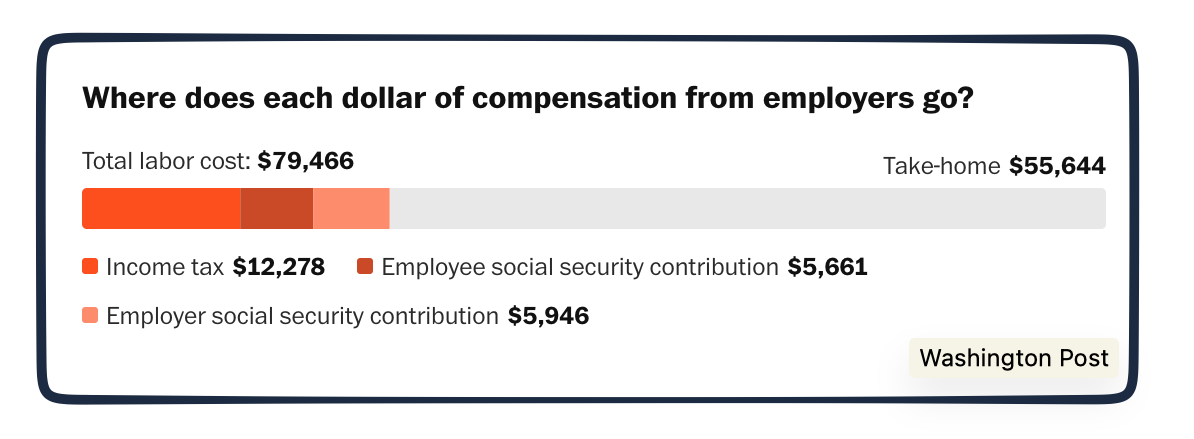
On the paying side, a single U.S. worker earning an average $79,000 wage pays their 6.2% half of Social Security, Medicare, and income taxes. Those federal amounts bring take-home pay down to $56,000 (but there also could be a state tax bite, depending on where you live).
$79,466 quickly shrinks to $55,644:
Compared to 2024, the trend in OECD countries is higher taxes on workers’ earnings. 24 countries raised taxes, 11, including the U.S., lowered them, and 2 held them steady. But even with the U.S. on the low end, still, a vast amount is for social welfare. As a proportion of the U.S. federal budget, more than half of government spending goes to Social Security pensions and Medicare and Medicaid healthcare spending.
Hoping to echo the European social welfare state, some suggest the best solution is raising taxes from the most affluent. A look at a Tax Foundation study reveals it is much more complicated.
Our Bottom Line: Redistribution
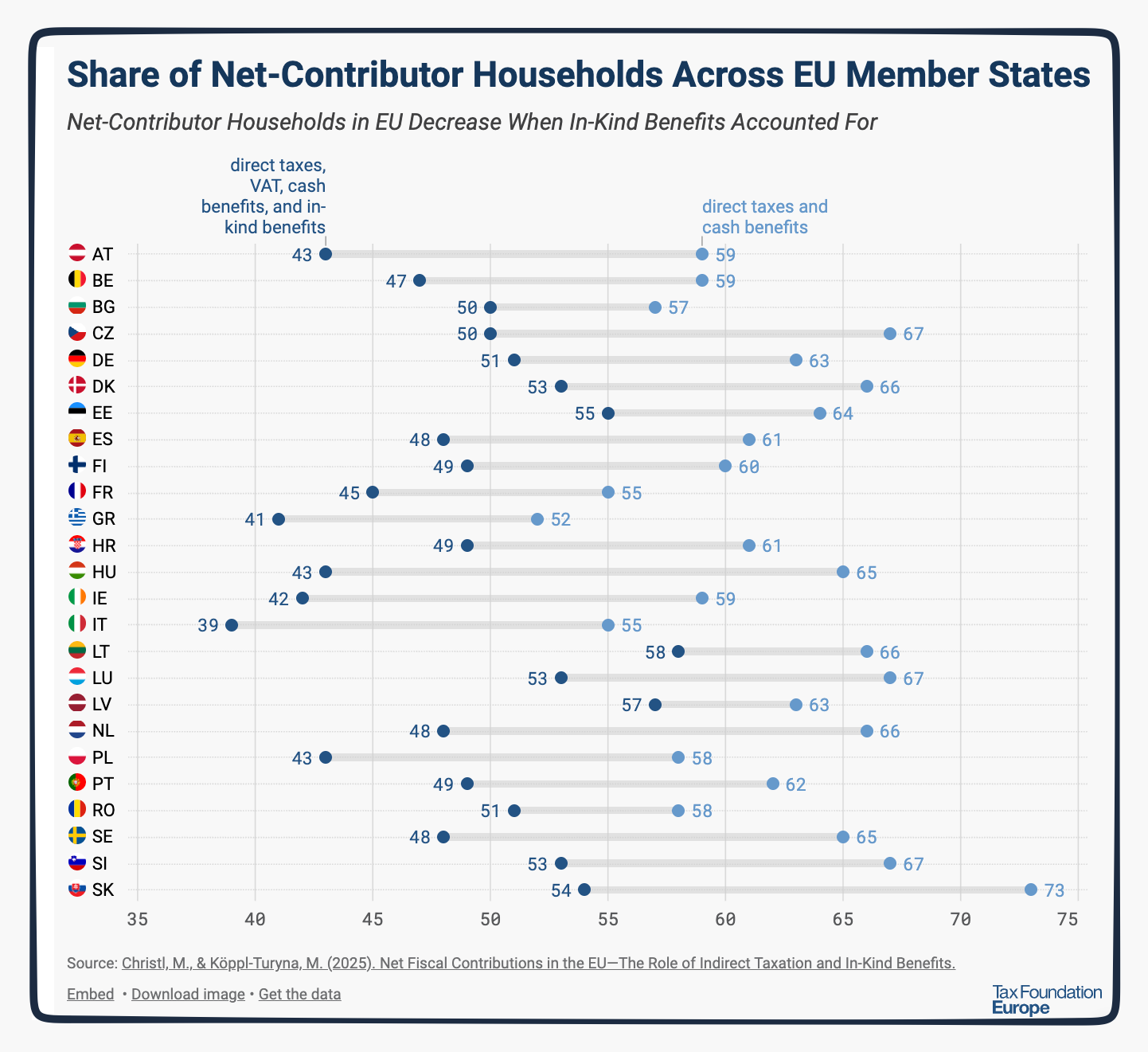
Funding the social welfare state requires the redistribution that transfers dollars from the people that pay to those that receive benefits. It traditionally begins with the taxes we pay (like Social Security and income). Instead, the Tax Foundation says we should include much more.
On the tax side, they suggest indirect taxes like the Europeans’ VAT.
Similarly, on the recipient side, they take us beyond cash (like unemployment and child benefits) to include in-kind (healthcare and education) benefits.
Explaining, they say they are focusing on fiscal incidence.
With this broader fiscal definition, the affluent pay more. At the same time, those with less get a larger slice of redistribution that offsets what they pay. Together, they create a more progressive economy that has less inequality.
Below, the Tax Foundation shows how redistribution changes when we include more than direct taxes and cash benefits. As a result, the share of net-contributor households diminishes:
Where does this leave us? It gives us a new lens to judge existing welfare state policies and future U.S. policy. It takes us to fiscal incidence as an alternative lens for our policy debates.
Returning to our title, “Who Pays For a Welfare State?” It depends on how you define it.
My sources and more: Thanks to The Washington Post for inspiring today’s post. As my springboard though, the Post took me to the Tax Foundation.
The post Who Pays for a Welfare State? appeared first on Econlife.

Nicole Byers is an entertainment enthusiast! Nicole is an entertainment journalist for the Maple Grove Report.