Back-to-School Tech Costs More This Year. Here’s How to Find Deals Anyway


It’s hard to believe that back-to-school season is upon us. 

Kids will return to the classroom in many parts of the US in a few short weeks, some as early as August 3. School supply lists are already available, so you can start shopping. In addition to notebooks and paper, parents are learning that many lessons and projects are expected to be completed using technology, such as laptops and tablets. Some schools, like my son’s elementary school, provide devices such as Chromebooks. But many school-aged and college students will be expected to have a separate device at home, which puts parents in the market for laptops or tablets. 

But today’s educational tech doesn’t come cheap. The evolution of AI led to a memory chip shortage. Those chips are vital to most devices, including phones, gaming consoles, computers and tablets. And that shortage means you can expect higher prices. One workaround could be refurbished or secondhand models. 

In April 2026, CNET found that nearly half (48%) of US adults have considered secondhand devices within the past year. Several factors influenced their decision, including cost-effectiveness (31%) and newer models being too expensive (25%). 

However, refurbished tech isn’t exempt from those price hikes. So what should you do if you have to buy a laptop or tablet for school but don’t want to break the bank? I’ll explain. 

2-refurbished-tech-cnet.png

Cole Kan/CNET/Getty Images

How is the RAM shortage impacting refurbished tech? 

Older devices bypass new chip costs, making them a potentially more cost-effective option. But the RAM shortage is increasing demand and prices for refurbished products. 

Apple is the latest tech company to raise prices on its new and refurbished products. Its Certified Refurbished store saw price increases of 6% to 15% in June. A refurbished 14-inch MacBook Pro M5 with 16GB of memory and 1TB of storage cost $1,699, but a discount brought it down to $1,439 on June 14 after looking at Internet Archive’s Wayback Machine. It now costs $1,999, but a discount brings it down to $1,699. 

Other companies, including Samsung and Microsoft, have also been affected by chip shortages. Microsoft will increase the prices of its Xbox Series X/S on Aug. 1, and its new Surface laptop models will cost more. The chip shortage isn’t expected to end until 2028, so more companies may continue to raise prices on new and refurbished devices. 

Refurbished back-to-school tech may still cost less than new devices, but there are a few shopping tips to keep in mind if you need to buy a laptop or tablet soon. 

School supplies including a laptop, ruller, pen, stack of colorful papers and tape

Apple recently increased prices on new and refurbished tech by up to 15% for some devices.

MirageC/Getty Images/J. Hazelwood/CNET

Compare policies and prices from refurbished retailers 

You may find good deals when buying secondhand tech online, including discounts and accessories. Buying and selling on online platforms such as Facebook Marketplace and OfferUp can offer good deals, including accessories or a better price than major retailers. However, you won’t have a warranty, return policy or professional assessment of the device. That could mean you’re stuck with tech you’re dissatisfied with. 

Certified refurbished retailers, such as Back Market, have limited-time warranties, money-back guarantees and inspections to help you feel comfortable buying a used device online. Compare prices, warranties and policies and specifications across major retailers, such as Amazon’s Renewed Store and Best Buy Outlet, for the best deal. And tech brands have refurbished stores, too, like Apple’s Certified Refurbished, Dell Refurbished and HP Refurbished Certified. You may even find limited-time back-to-school savings on secondhand tech, but it’s worth making sure you have the right protections if you’re unhappy or the device isn’t what you expected when it arrives. 

Once you’ve settled on a device you’re comfortable with, pay with a credit card with purchase protection in case the device is stolen, damaged or lost within a certain timeframe (usually three to six months). Keep all of your receipts and tracking information, and make sure the device is in the expected condition when you receive it. 

Trade in your old device for savings 

Major retailers have trade-in programs that can lower the cost of a new device. Apple’s Trade-In program gives you an Apple gift card based on the value of your old device. You can use it toward a new or refurbished Apple product or accessory. And Amazon’s trade-in program similarly lets you trade-in your old device for an Amazon gift card that can be used toward buying refurbished tech on Amazon. 

Another way to save money on refurbished tech during back-to-school season is to sell your old device on a buy-and-sell platform — such as Swappa, ItsWorthMore or ecoATM — and trade it in for cash to put more toward a refurbished device you’re considering. You may get more or less depending on your device’s age and condition. Newer models in good to excellent condition typically sell for more. It’s worth comparing offers across sites to get the most money for your device, which can mean paying less for your new one.

Don’t count out new laptop and tablet models yet 

Buying refurbished tech may seem like an easy way to cut costs on a laptop or tablet for the upcoming school year, but back-to-school deals and student discounts can sometimes bring the price of a new device down to the cost of a refurbished one.

As enticing as refurbished tech may be, pay attention to software upgrades, the device’s battery health and the device’s overall condition. Some devices, such as Intel MacBooks, aren’t eligible for software upgrades anymore, which isn’t ideal when you plan on using it for some time. In that case, a new device may be best. 


Source link

Leave a Reply

Subscribe to Our Newsletter

Get our latest articles delivered straight to your inbox. No spam, we promise.

Recent Reviews


Google Pixel 10a

Kerry Wan/ZDNET

Follow ZDNET: Add us as a preferred source on Google.


ZDNET’s key takeaways

  • Android 17 is here, along with the June Pixel Drop.
  • The OS is rolling out to Pixel devices first.
  • Users are getting upgraded productivity, security, and more.

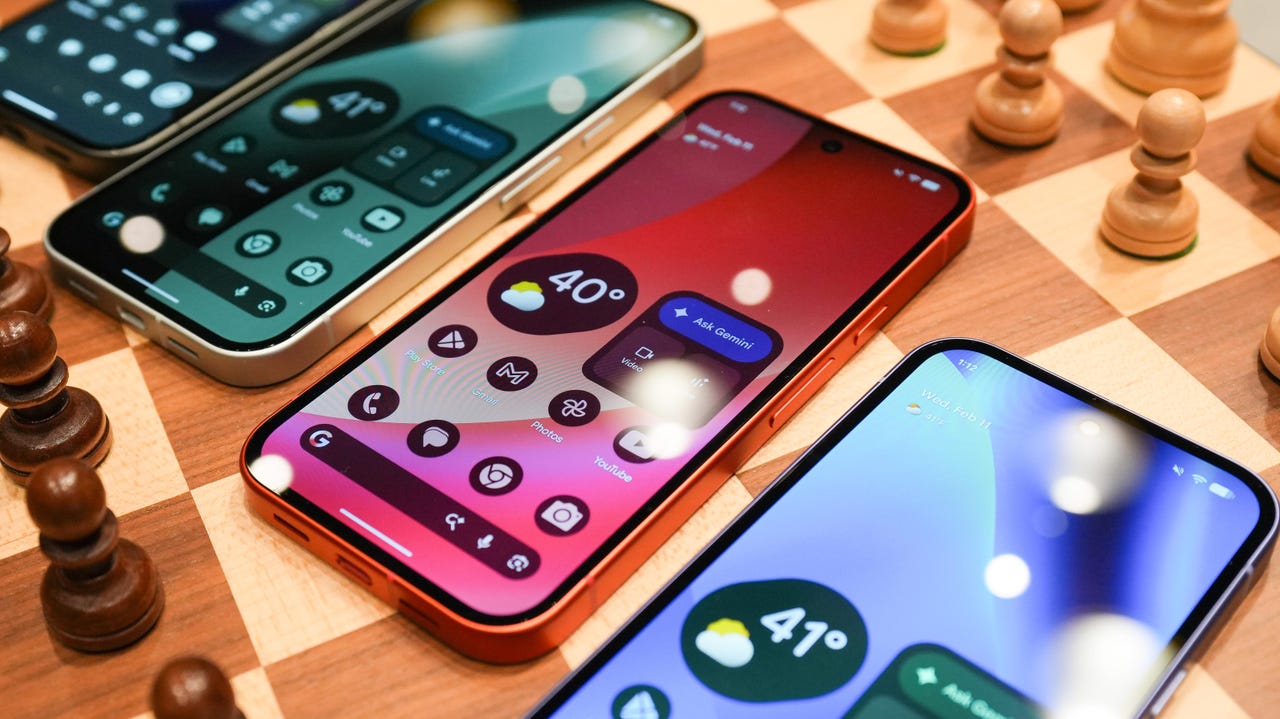
Android 17 is officially here, and it’s a doubly good day for Pixel users, as it’s bringing the June Pixel Drop with it.

Google has rolled out its annual OS update and its latest collection of Pixel-exclusive features at the same time, and the updates pack not only some practical features that will make an impact on how you use your phone daily, but also security protections, some new translation tricks, and more. Pixel Watches — the 2 and later — are included, too, with a potentially life-saving feature addition.

Also: I’m a devoted iPhone user but Android 17 is tempting me with its new video and social features

Here’s a look at what’s new in Android 17, which starts rolling out today to Pixel phones first and then to other devices “throughout 2026,” along with what’s new in the June 2026 Pixel Drop.

What’s new in Android 17?

Since many manufacturers now offer longer update windows, usually 4 to 7 years, a wide range of devices are eligible. The updated OS starts rolling out today to Pixel 6 phones and newer. Samsung’s Galaxy S23 series and newer will get it as One UI 9, along with the Flip 5 and newer, Galaxy A24 and newer, and Tab S9 series. OnePlus will bring Android 17 to the OnePlus 11 and newer.

1. App Bubbles

Perhaps the most useful feature is Bubbles, which lets you turn any app into a floating bubble on your main screen. All you have to do is long-press an app, and it becomes an easy-to-access bubble. If you consistently switch back and forth between apps or need to access a certain app often, like a map or airline app while you’re on a trip, you can now find what you need more quickly.

Pixel Folds are getting a special Bubble Bar at the bottom of the screen that lets you organize, move, and access your recent bubbles from one dedicated space.

2. Additional security

Android 17 is also bringing boosted security. 

To start, you can now grant an app temporary access to your exact location and share only specific contacts. 

Additionally, an enhanced “Mark as lost” feature, located in Find Hub, lets you lock a missing phone with your biometrics, so even if a thief has your passcode, they can’t access anything on your device or turn off tracking. 

Improvements to Live Threat Detection block more suspicious apps and scams, Google explained, and enhanced Advanced Protection mode helps keep you safe from sophisticated threats. Lastly, Google is reducing the number of times someone can attempt to guess your PIN and adding longer wait times between failed attempts.

Also: How to clear your Android phone cache – the 30-second routine every user should be doing

3. Screen reactions and more

Also new is Screen Reactions, which lets you take a selfie video overlaid on a screen recording in lieu of a green screen; a 50/50 gaming mode with a dynamic pad for foldables; and built-in parental controls beyond Pixel devices, so you can set screen time limits and content filtering with a PIN, even if you don’t link your Google Account.

What’s in the June Pixel Drop?

Beyond Android 17, Pixel users are getting several Pixel-specific upgrades in the June Pixel Drop.

1. Custom greetings for Take a Message

Introduced in 2025, Take a Message expands on the Pixel call screening feature and gives you a real-time transcript of what the caller is saying, along with AI-generated follow-up steps. Now, Take a Message has custom greetings, letting you record a personalized outgoing message instead of the default voice.

2. New AI models

Two new AI models are making their way to Android phones. The first is Gemini Omni, a new way to create and edit videos. Gemini Omni lets you type in a prompt and get a custom, high-quality video. This is available on all devices with the Gemini app for Gemini Pro users only.

Also: Everything we saw at Google I/O: Gemini 3.5, Android XR glasses, Spark, and more

Also on the way is Lyria 3, which lets you create original tracks using text prompts or images as inspiration. You can prompt Gemini with the style, vocals, and tempo you want. This is coming to all Android 17 Pixel phones and Folds.

3. Voice Translate for the Pixel 10a

One of the Pixel 10 series’ exclusive features is Voice Translate, which provides a real-time translation on phone calls in the speaker’s voice. ZDNET’s Sabrina Ortiz tried the feature last fall, noting how quickly the feature worked and how well it copied her voice. Voice Translate is getting a small expansion, coming to the Pixel 10a.

Also: iOS 27 envy? 4 features you can already use on an Android phone (including Samsung models)

4. Android Quick Share expansion and more

Pixel users are also getting an expansion of Android Quick Share compatibility with AirDrop, coming to the Pixel 9a and Pixel 8a, and an expansion of Magic Cue to more apps, coming to the Pixel 10 series.

What’s new for Pixel Watches?

Pixel Watches are only getting one new feature, but it’s a potentially big one. Core detection features, including Car Crash Detection, Fall Detection, and Loss of Pulse Detection, are getting emergency sharing. If a severe event is detected, Google explains, your Pixel will call emergency services and notify your chosen contacts. You can toggle emergency contacts on or off for each type of event.

Also: This silent Android feature scans your photos for ‘sensitive content’ – how to uninstall it

Fall Detection is coming to the Pixel Watch, plus the 2, 3, and 4, while Car Crash Detection is coming to the Pixel Watch 2, 3, and 4. Loss of Pulse Detection is only coming to the last two generations, the Pixel Watch 3 and 4.


Source link