5 Devices That Work Just Fine On 2.4 GHz Wi-Fi


We may receive a commission on purchases made from links.

It’s now common for routers to run two separate 2.4 GHz and 5 GHz SSIDs on a single network — and in some cases, a 6 GHz network. We could go into a lot of detail about what the difference between 2.4 GHz and 5 GHz is, but suffice it to say that 2.4 GHz has a longer reach and slower speeds, while 5 GHz has more limited reach and faster speeds. Don’t get this confused with Wi-Fi 6E or Wi-Fi 7, as that’s a whole different can of worms. The point here is, 2.4 GHz still has some very valid use cases in the average home, despite its inferior speeds.

Normally, you’ll want to connect your phone, computer, or smart TV to the 5 GHz network since they often use a lot of bandwidth and rely on snappier responsiveness, but we want to look at devices in your home (or anywhere else) that will work well on the 2.4 GHz band. Since 2.4 GHz can reach through walls across a large area, it’s well suited to secondary devices throughout a building that only need basic connectivity to work. If you have one of these five devices, connect it to your 2.4 GHz network with peace of mind that it will work flawlessly.

Most smart home devices

You probably have at least one or two smart home devices in your home. Most of them — lightbulbs, door locks, smart plugs, air filters, smart thermostats, and fans — use minimal bandwidth and only require local network access, so the 2.4 GHz band is ideal. Often, smart home devices can only use the 2.4 GHz band and nothing else.

Depending on which router and internet service provider you have, you may already have separate 5 GHz and 2.4 GHz networks ready to go. If you don’t, it’ll only take a few minutes in your router’s settings to set them up. Usually you’ll do this on a computer, though some routers support mobile apps. If you can’t use the app, flip over your router and look for a sticker that shows its login information. It may also be in the manual, or you can likely check RouterPasswords.com. If you’ve set a password that you can’t remember, you may have to reset your router to log back in.

Connect to the router’s network and then enter the router’s IP address into your browser. wikiHow has a helpful guide on how to track down your router’s IP address on most platforms. We recommend setting a strong password for your router and saving it to a password manager for future use. Once you’re in, the process will vary depending on which router you have, but set a distinct name for the 2.4 GHz network (adding “2.4 GHz” to the end is a good choice) and set a strong password. You may also have a unified-band router where the 2.4 GHz and 5 GHz bands share the same SSID and password; if so, you can connect your smart home devices to this unified band without issue. 

Smart CCTV cameras

On the topic of smart home devices, they’ve made it painlessly easy for people to set up a DIY home security system on a budget, especially if, rather than wiring up your home with CAT cables and power lines, you’d rather just use simple, easy, drill-free Wi-Fi-connected CCTV cameras. A perfect example is this TP-Link Tapo 1080P Indoor Security Camera. You can basically set it up anywhere that has a plug, and it works over the 2.4 GHz network exclusively. That’s usually also the case with brands like Roku, Google Nest, Blink, and eufy.

This may seem odd, since one of the reasons people choose 5 GHz is for streaming high-definition video, which generally takes up quite a bit of bandwidth. Unless you’re running security cameras with 4K output, though, 2.4 GHz will be enough. I say this from personal experience. I’m running multiple wireless CCTV cameras myself that output 1080p HD video. I’m able to get a strong live connection both on my local network and when connecting away from home. The long range of the 2.4 GHz band really shows its worth here since some of these cameras are located in far corners where my 5 GHz band starts to drop off and get spotty. This is one of those situations where you may wish to consider Wi-Fi extenders or a mesh network to reach those cameras at the extreme outer edges of a property.

Printers

Wi-Fi connectivity for printers is old hat in this day and age. Some people (myself included) don’t even have their printer in the same room as their computer. It’s also common for some printer models to only support the 2.4 GHz frequency band, similar to other smart home devices. This isn’t always the case, though. The best basic printer we recommend for frequent printer users supports both 2.4 GHz and 5 GHz bands.

Since the information being sent from a computer to a printer is peanuts compared to a live 1080p stream from your CCTV camera, you likely wouldn’t notice a difference by connecting to the 5 GHz band even if your printer supports it. Printers have never been known for being fast anyway. The point is, your printer doesn’t always need to be in your home office, right next to your computer. You can basically put the printer anywhere within the more expansive 2.4 GHz Wi-Fi range and still be able to send pages to it from your computer or phone — or easily scan from the printer and save the file as an image or PDF.

Smart appliances

Smart devices are gradually working their way into your appliances too. We’re already starting to see smart microwaves, air fryers, coffee makers, and even mixers in your kitchen. Again, we have a similar situation to everything we’ve mentioned previously: Some devices will only connect over 2.4 GHz, such as this Panasonic microwave that supports Alexa commands. That’s obviously only sensible, since a microwave won’t ever need high bandwidth unless it can someday stream while heating your lunch.

In an effort to keep everything organized and give appliances maximum reach and connectivity to the far corners of your home, we would recommend just connecting them over 2.4 GHz as a matter of course. If you don’t want to upgrade all your appliances, though, a solid choice is pairing existing appliances with a smart plug. That way you can turn them on or off over the 2.4 GHz network and monitor their energy usage.

E-readers

Avid book readers will debate until the sun burns out whether physical books or e-readers are better. But if you want to hold your entire book library in the palm of your hand — plus a backlight, dictionary, vocabulary builder, note-taking tools, and so much more — even the cheapest Amazon Kindle is all it takes to revolutionize your reading experience. One of the big strikes against them is that e-readers do rely heavily on a consistent, stable internet connection to automatically download new books that you’ve bought on another device, sync your reading progress, and the like. The 2.4 GHz band should be more than enough for those purposes.

Some older Kindles released before 2021 are limited to the 2.4 GHz band. Modern ones support 5 GHz Wi-Fi and WPA3 security. However, we’d recommend just sticking with the 2.4 GHz band for a couple of reasons.

One, you can read anywhere in the house, including outside in your backyard, porch, or patio, far away from your router. Two, it’s usually easier and faster to connect to the 2.4 GHz band; anecdotally speaking, the 2.4 GHz band is usually the first option that pops up, while the 5 GHz band takes a few seconds to scan and register. On an e-ink screen that’s as slow as molasses, it’s kind of a pain in the neck to deal with a shifting list of Wi-Fi SSIDs, so you can choose the 2.4 GHz band without worrying that you’re losing out on anything; an e-reader is dealing with tiny ebook files that don’t require much bandwidth to download or update.


Source link

Leave a Reply

Subscribe to Our Newsletter

Get our latest articles delivered straight to your inbox. No spam, we promise.

Recent Reviews


Alaska doesn’t reward rushing. It rewards curiosity, patience, and a willingness to follow the wild where it leads. That’s why an Alaska UnCruise feels less like a vacation and more like an immersion. These small-ship journeys trade crowds and fixed itineraries for quiet coves, misty fjords, and days shaped by tides, weather, and wildlife instead of a clock.

We recently sailed with UnCruise from Juneau on one of their most iconic itineraries, and we can’t wait to share our firsthand experience. One morning we were kayaking beneath hanging glaciers; the next we were bushwhacking through old-growth forest or skiffing toward a shoreline that rarely sees footprints. With Uncruise we discovered Alaska at human scale: intimate, flexible, and deeply connected to the place itself.

Read on to see whether an Alaska UnCruise belongs on your bucket list.

Wild, Woolly, and Wow: The Glacier Bay Loop

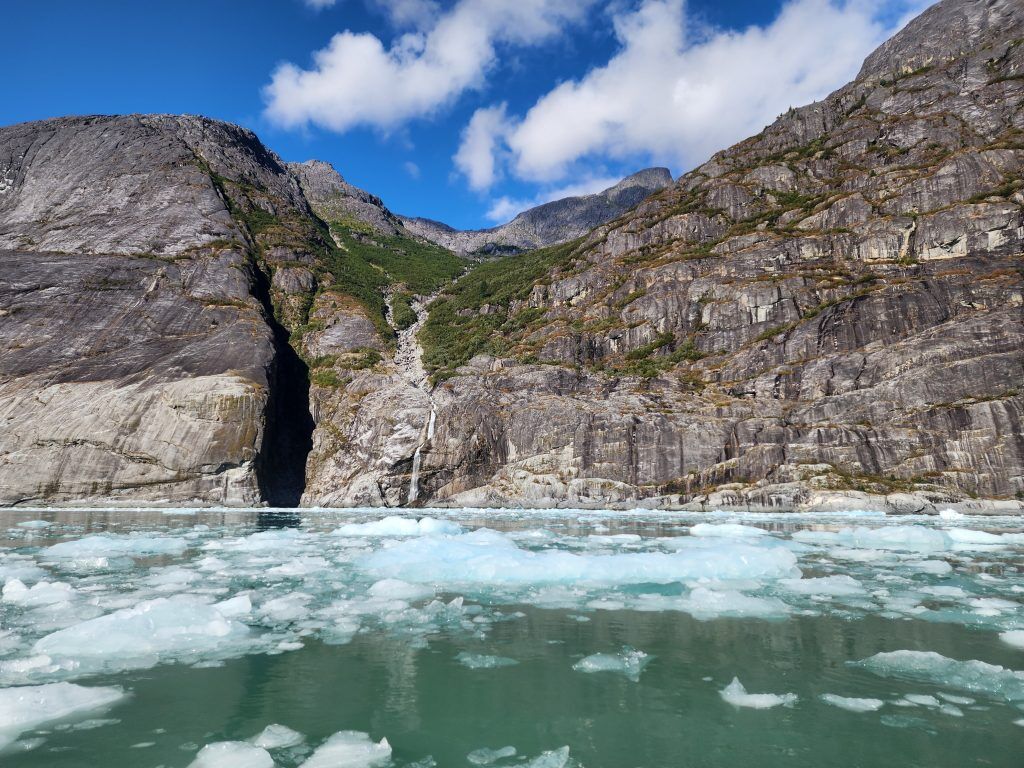
LeConte Bay Alaska
Photo Credit: Jenn Coleman.

UnCruise operates trips in four of Alaska’s five regions, Southeast, Southcentral, Interior, and Southwest, but Juneau is the heart of the operation. It’s their most popular port, offering round-trip voyages through the Inside Passage as well as one-way itineraries connecting to Sitka, Ketchikan, Seattle, and Seward.

We sailed the Wild, Woolly, and Wow with Glacier Bay itinerary: a week-long, round-trip voyage from Juneau that includes one full day in Glacier Bay. Some sailings offer two days in the park, but for us, one was plenty. We woke at the base of a tidewater glacier deep in the bay and sailed out at sunset—hard to imagine a better bookend.

What really surprised us was how much we enjoyed the glaciers outside Glacier Bay. Many UnCruise itineraries explore additional tidewater glaciers that mega-ships can’t access. These areas came with fewer people, more time ashore, fewer restrictions, and, often, better weather. Glacier Bay’s massive icefields can generate their own conditions, which means sunshine elsewhere while the park sits under clouds.

Because UnCruise captains have the freedom to choose anchorages based on real-time conditions, no two trips are identical. Still, the geography naturally creates a rhythm: a loose loop around Admiralty Island, Glacier Bay to the northwest, quieter glacier systems to the southeast, and countless bays and backwaters in between for kayaking, bushwhacking, and skiff exploration.

UnCruising vs. Traditional Cruising

Kayaks on UnCruise Waterfall Cove Alaska
Photo Credit: Jenn Coleman.

Traditional cruising runs on a dual-revenue model. Competitive ticket prices, often low-margin or even loss leaders, are offset by onboard spending like drinks, specialty dining, spa treatments, internet, and retail. Scale is the strategy: 3,000 to 6,000+ passengers spread operational costs thin.

UnCruise flips that model on its head. With all-inclusive pricing and fewer than 90 passengers, the experience feels more like an adult summer camp than a floating resort. Instead of pulling into ports for pre-packaged shore excursions, the ships anchor in remote bays and rely on an in-house guide team. You’re not herded; you’re invited.

The payoff is connection, both to the place and the people. With such a small guest count, you quickly learn names, swap stories, and share the day’s highlights over genuinely excellent food and drinks that reflect the region you’re sailing through.

Alaska UnCruise vs. Other UnCruises

Kayaking Glacier Bay Alaska
Photo Credit: Jenn Coleman.

This was our third UnCruise, following trips to the Sea of Cortez and Hawaii. Alaska felt different, a good way. UnCruise started here, and it shows. The Alaska program leans heavily into wilderness exploration led by the onboard team, rather than outsourced excursions.

In Hawaii and Mexico, proximity to towns meant more third-party activities, bike rides, cultural tours, and the like. Alaska, by contrast, felt raw and remote, with days shaped almost entirely by weather, wildlife, and opportunity.

It was also colder. Hawaii and Mexico invited snorkeling and free swimming; Alaska required more gear, better tides, and a stronger sense of humor to enter the water. We did the polar plunge more for the bragging rights than the pleasure, and we’d do it again.

Life Aboard the Wilderness Legacy

Sam is delivering an after-dinner program
Photo Credit: Jenn Coleman.

The Wilderness Legacy is UnCruise’s largest ship, carrying up to 90 guests. Interestingly, similar Glacier Bay itineraries are also offered on much smaller vessels, down to just 22 passengers, depending on how intimate you want the experience to be.

We appreciated the comforts onboard: reliable Wi-Fi and hot tubs, which make glacier watching from bubbling water feel downright legendary. Cabins were compact but comfortable, no Instagram-perfect balconies here, but if your goal is to spend the day outdoors, that’s a fair trade.

Two spacious common areas brought everyone together for meals, happy hour, and nightly programming. From naturalist talks to talent shows and the always-anticipated end-of-voyage slideshow, every evening felt communal and relaxed.

The Real Reason You UnCruise: Activities

Skiff Tour LeConte Bay Alaska
Photo Credit: Jenn Coleman.

You don’t UnCruise to stay onboard. You UnCruise to get out into it.

Most days offered three core options, bushwhacking, kayaking, and skiff tours, both morning and afternoon. Plans shifted with weather and conditions, which is part of the magic. Southeast Alaska is a temperate rainforest, after all.

Our loose strategy: kayak on clear days, bushwhack in the rain, and choose skiff tours when there was something extraordinary to see, like bears feeding at Pavlov Creek. It wasn’t scientific, but it worked.

Some moments were non-negotiable: skiffing up to tidewater glaciers, the mandatory kayak orientation, or simply staying aboard when wildlife appeared unexpectedly, like the pod of roughly 30 orcas that surfaced as we exited Glacier Bay.

One of the biggest advantages of small-ship cruising is how well the guides get to know you. By midweek, excursions were subtly tailored to guests’ interests and abilities, making everyone feel both supported and challenged.

Food Worth Planning Your Day Around

UnCruise Crab Leg dinner
Photo Credit: Jenn Coleman.

Forget buffet lines. Every meal onboard was cooked to order, with meat, seafood, and vegetarian options. Everything was so good that ordering a “partial of all three” became a habit. Ordering ahead also helped reduce food waste, which we appreciated.

Dietary restrictions were handled seamlessly, and the menus reflected a strong sense of place like crab boils, butter-poached halibut, and other Alaska-forward dishes. Morning meal announcements became a highlight, and we learned to choose our breakfast seat strategically so we’d have time to contemplate dinner choices before they took our order.

An onboard pastry chef kept desserts dialed in, while talented bartenders handled everything from classics to the cocktail of the day. Happy hour quickly became a ritual: swapping stories, snacking on charcuterie and baked brie, and trying not to ruin our appetite for dinner.

Cabins: Functional, Thoughtful, and Surprisingly Cozy

Cabin-Navigator Cabin UnCruise Wilderness Legacy
Photo Credit: UnCruise Adventures.

Cabins aren’t luxurious, but they are smartly designed. Full bathrooms, potable tap water, comfortable beds, and enough storage, assuming you don’t overpack.

Our favorite feature? Hooks. Lots of them. Perfect for drying wet gear after a day outside. By the end of the voyage, the hallways looked like an REI sidewalk sale caught in a rainstorm, but our cabin always felt clean, dry, and warm.

It’s also worth noting how skilled our captain was at selecting sheltered anchorages. Even when a strong storm rolled through, we slept soundly each night, tucked behind towering cliffs that blocked the wind. Every morning delivered a new view, complete with freshly fed waterfalls spilling down the rock walls.

What to Pack (and What Not To)

Neka Bay Alaska
Photo Credit: Jenn Coleman.

UnCruise provides excellent packing lists, but the guiding principles are simple: dress in layers and expect to get wet. Waterproof pants and a solid rain jacket are non-negotiable.

Footwear is more forgiving. You’re issued gum boots, the unofficial uniform of Alaska, and we wore them every time we left the ship, including for kayaking.

One pro tip: bring soft luggage. We packed everything into soft-sided bags that folded away easily during the voyage. It kept us from overpacking and made cabin life much simpler.

Bonus Time in Juneau

Tahku whale sculpture Juneau Alaska
Photo Credit: Jenn Coleman.

As immersive as the UnCruise experience is, we would’ve felt shortchanged if we hadn’t added time in Juneau for classic Alaska adventures.

The good news: Juneau makes it easy. Seaplane tours depart right from the dock, and Mendenhall Glacier is just 20 miles away. Depending on your budget and appetite for adventure, you can reach it by bus, helicopter, or something in between and choose from ice climbing, paddling, dog sledding, or a simple walkabout.

And since you missed-out on onboard shopping during the cruise, Juneau Harbor has you covered.

The Takeaway: Who Alaska UnCruise Is (and Isn’t) For

2 bears with a salmon Pavlovs Bay Alaska
Photo Credit: Jenn Coleman.

An Alaska UnCruise isn’t about checking boxes or lounging poolside. It’s about slowing down, leaning into uncertainty, and letting the landscape set the agenda. You trade predictability for possibility, and that’s exactly the point.

If you’re curious, flexible, and happiest when your days are shaped by weather reports and wildlife sightings instead of reservations and alarms, this style of travel will feel like coming home. Alaska is vast and wild, but UnCruise has a way of making it feel personal.

For us, it wasn’t just a trip, it was a reminder of how powerful travel can be when you let a place lead.

Disclosure: A big thank you to Uncruise Adventures for hosting us! For more Uncruise travel inspiration, check out their InstagramFacebook, and YouTube accounts.

As always, the views and opinions expressed are entirely our own, and we only recommend brands and destinations that we 100% stand behind.

Ready to Book Your Trip? These Links Will Make It Easy:

Airfare:

Insurance:

  • Protect your trip and yourself with Squaremouth and Medjet
  • Safeguard your digital information by using a VPN. We love NordVPN as it is superfast for streaming Netflix
  • Stay safe on the go and stay connected with an eSim card through AloSIM

Our Packing Favs:

  • We LOVE Matador Equipment for their innovative products and sustainability focus. Their SEG45 is a game changer when you need large capacity while packing light.
  • Travel in style with a suitcase, carry-on, backpack, or handbag from Knack Bags
  • Packing cubes make organized packing a breeze! We love these from Eagle Creek

Like it? Pin it for later on Pinterest!

Hi! We are Jenn and Ed Coleman aka Coleman Concierge. In a nutshell, we are a Huntsville-based Gen X couple sharing our stories of amazing adventures through activity-driven transformational and experiential travel.


Source link