Best Ultraportable Bluetooth Speakers for 2026: Top Supersmall Waterproof Wireless Speakers


Soundcore by Anker Select 4 Go: The Soundcore by Anker Select 4 Go doesn’t have quite the build quality as JBL’s Go 4 micro Bluetooth speaker (it has a budget feel to it), but it offers comparable sound quality and costs half the price. Like the JBL Go 4, the similarly named Select 4 Go sounds decent for its tiny size and is able to output just enough bass to avoid sounding tinny. Also, it’s fully waterproof and even floats. Battery life is rated for an impressive 20 hours at moderate volumes, and you can pair two of these speakers together for stereo sound. It’s definitely a good value.

Marshall Willen 2: Marshall’s little mono Willen 2 speaker (around $90) is similar to Bose’s SoundLink Micro 2 and other micro speakers like the Tribit StormBox Micro 3, but doesn’t sound quite as good. Like those speakers, it has an integrated strap on its base so you can clip it onto a backpack or even to your bike’s handlebars. Its 2-inch full range driver and two passive radiators put out more sound than you’d think it would for its tiny size, and it offers decent clarity as well just enough bass to avoid sounding tinny.

Tribit Stormbox Micro 2: Now that Tribit has released the StormBox Micro 3, a budget version of Bose’s excellent SoundLink Micro 2 speaker, the second-gen StormBox Micro 2 is on sale for less than $50. The new Micro 3 offers improved acoustics and double the battery life, but the Micro 2 remains a good palm-sized wireless speaker that you can strap to the handlebars of your bike. Read our full review.

JBL Go 4: While JBL has released the newer Go 5 with boosted battery life (10 hours vs. 7 hours) and a lighting element, the fourth-generation of JBL’s smallest Bluetooth speaker remains a good tiny speaker option, especially when it’s discounted. Despite its size, it does sound better than anticipated, though don’t get your hopes up — keep in mind that this speaker is truly pocket-size, so it can only deliver so much sound. However, it does manage to output just enough bass to avoid sounding tinny. This tiny speaker is also durable and has an IP67 water-resistance rating, which means it can survive being fully submerged in water and is dust-proof. The Go 4 is available in multiple color options.

Sony LinkBuds Bluetooth speaker: Sony made some mistakes with its LinkBuds Bluetooth speaker. First, it launched it in its LinkBuds line with a couple of new LinkBuds, so it kind of got lost in the shuffle. Second, it’s a little too expensive at its list price. But ignoring all that, I was surprised how good it sounded for its tiny size. It’s easily among the best-sounding micro Bluetooth speakers out there and is equipped with a two-way speaker system featuring a dedicated tweeter and Sony’s X-Balanced Speaker unit (woofer), giving it much fuller sound than you’d expect, with punchy bass and good clarity. It’s still a mono speaker, though you can pair two of them together for stereo sound.

Sonos Roam 2: Sonos’s original Roam speaker sounded very good for its compact size, but many users complained that it was tricky to go from Wi-Fi mode at home and Bluetooth mode on the go. With the release of the new Roam 2, which comes in five color options, those connectivity issues go away. The reality is the Roam 2 ($180) isn’t much of an upgrade. It has the same acoustic architecture (and the same impressive sound for its size), but now it has two buttons — one for power and the other for Bluetooth — instead of a single power button. That Bluetooth button lets you pair the speaker with any Bluetooth-enabled audio device right out of the box. Previously, the setup was more convoluted and required you to connect to your Sonos home Wi-Fi network first.

Anker Soundcore Boom 3i: In some ways, Anker’s new Soundcore Boom 3i is the spiritual successor of the company’s popular Soundcore Motion Plus speaker that was released in 2020. It’s similarly shaped but has more of an outdoor adventure slant with Anker calling it “built for the wild” and billing it as the first Bluetooth speaker with playback in water, as it floats and “auto-corrects” to keep the speaker drivers facing upward just above the surface. As you’d expect from a speaker that promotional photos show strapped onto a kayak (it does have a detachable carrying strap), the Soundcore Boom 3i is fully waterproof and dust-resistant, with an IP68 rating. Anker takes things a step further, touting the Boom 3i as “5X” saltwater-resistant. Read our full review.

Anker Soundcore Motion 300: Bose makes its excellent SoundLink Flex Bluetooth speaker that sells for about $150 and sometimes goes on sale for less. The Soundcore Motion 300 is Anker’s answer to that Bose speaker. Around the same size as the Bose, it doesn’t sound quite as good but it sounds impressive for its compact size and lists for only $80. Like the SoundLink Flex, it can be laid down flat with its speaker firing up toward the ceiling or propped up as shown in the photo above. It’s IPX7 waterproof and delivers up to 13 hours of audio at moderate volume levels. There’s also support for Sony’s LDAC audio codec for Android and other devices that support Bluetooth wireless streaming with LDAC. 


Source link

Leave a Reply

Subscribe to Our Newsletter

Get our latest articles delivered straight to your inbox. No spam, we promise.

Recent Reviews


The Windows Insider Program is about to get much easier

Ed Bott / Elyse Betters Picaro / ZDNET

Follow ZDNET: Add us as a preferred source on Google.


ZDNET’s key takeaways

  • Microsoft is making the Insider Program less complicated.
  • Beta channel will be a more reliable preview of the next retail release.
  • Other changes will allow testers to quickly enable/disable new features.

Last month, Microsoft took official notice of its customers’ many complaints about Windows 11. Pavan Davaluri, the executive vice president who runs the Windows and Devices group, promised sweeping changes to Windows 11. Today, the company announced the first of those changes in a post authored by Alec Oot, who’s been the principal group product manager for the Windows Insider Program since January 2024.

Those changes will streamline the Insider program, which has lost sight of its original goals in the past few years. (For a brief history of the program and what had gone wrong, see my post from last November: “The Windows Insider Program is a confusing mess.”)

Also: If Microsoft really wants to fix Windows 11, it should do these four things ASAP

If you’re currently participating in the Windows Insider Program, these are meaningful changes. Here’s what you can expect.

Simplifying the Insider channel lineup

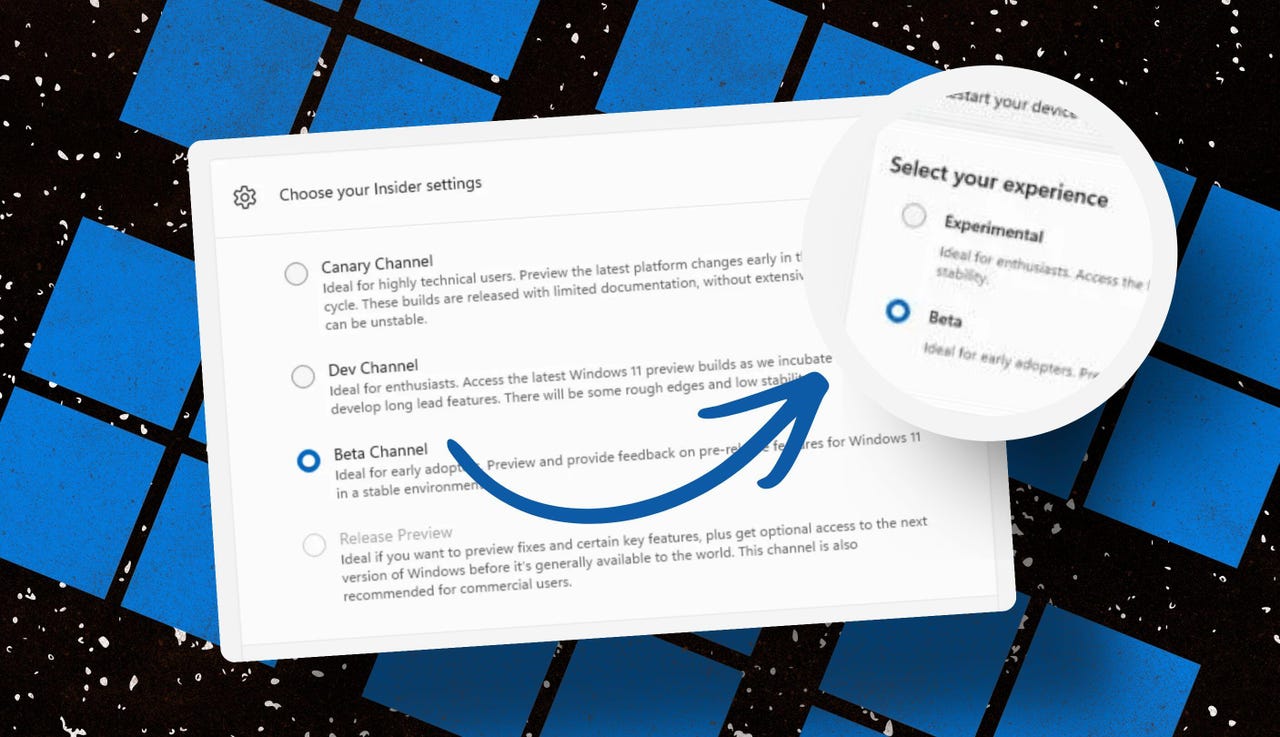
Throughout the Windows 11 era, signing up for the Insider program has required choosing one of four channels using a dialog in Windows Settings. Here’s what those options look like today on one of my test PCs.

insider-program-channels-lineup-old

The current Insider channel lineup is confusing, to say the least.

Screenshot by Ed Bott/ZDNET

Which channel should you choose? As the company admitted in today’s post, “the channel structure became confusing. It was not clear what channel to pick based on what you wanted to get out of the program.”

The new lineup consists of two primary channels: Experimental and Beta. The Release Preview channel will still be available, primarily for the benefit of corporate customers who want early access to production builds a few days before their official release. That option will be available under the Advanced Options section.

windows-insider-channel-lineup-new

This simplified lineup is easier to follow. Beta is the upcoming retail release, Experimental is for the adventurous.

Screenshot courtesy of Microsoft

Here’s Microsoft’s official description of what’s in each channel now, with the company’s emphasis retained:

  • Experimental replaces what were previously the Dev and Canary channels. The name is deliberate: you’re getting early access to features under active development, with the understanding that what you see may change, get delayed, or not ship at all. We’ve heard your feedback that you want to access and contribute to features early in development and this is the channel to do that.
  • Beta is a refresh of the previous Beta Channel and previews what we plan to ship in the coming weeks. The big change: we’re ending gradual feature rollouts in Beta. When we announce a feature in a Beta update and you take that update, you will have that feature. You may occasionally see small differences within a feature as we test variations, but the feature itself will always be on your device.

These changes will apply to the Windows Insider Program for Business as well.

Offering a choice of platforms

For those testers who want to tinker with the bleeding edge of Windows development, a few additional options will be available in the Experimental channel. These advanced options will allow you to choose from a platform that’s aligned to a currently supported retail build. Currently, that’s Windows 11 version 25H2 or 26H1, with the latter being exclusively for new hardware arriving soon with Snapdragon X2 Arm chips.

Also: Microsoft account vs. local account: How to choose

There will also be a Future Platforms option, which represents a preview build that is not aligned to a retail version of Windows. According to today’s announcement, this option is “aimed at users who are looking to be at the forefront of platform development. Insiders looking for the earliest access to features should remain on a version aligned to a retail build.”

windows-insider-advanced-options-new

The Future Platforms option is the equivalent of the current Canary channel

Screenshot courtesy of Microsoft

Minimizing the chaos of Controlled Feature Rollout

Last month, I urged Microsoft to stop using its Controlled Feature Rollout technology, especially for builds in the Beta channel. Apparently, someone in Redmond was listening.

One of the most common questions we receive from Insiders is “why don’t I have access to a feature that’s been announced in a WIP blog?” This is usually due to a technology called Controlled Feature Rollout (CFR), a gradual process of rolling out new features to ensure quality before releasing to wider audiences. These gradual rollouts are an industry standard that help us measure impact before releasing more broadly. But they also make your experience unpredictable and often mean you don’t get the new features that motivated many of you to join the Insider program to begin with.

Moving forward, Insider builds in the Beta channel will no longer suffer from this gradual rollout of features. Meanwhile, the company says, “Insiders in the Experimental channel will have a new ability to enable or disable specific features via the new Feature Flags page on the Windows Insider Program settings page.”

windows-insider-feature-flags

Builds in the Experimental channel will include the option to turn new features on or off.

Screenshot courtesy of Microsoft

Not every feature will be available from this list, but the intent is to add those flags for “visible new features” that are announced as part of a new Insider build.

Making it easier to change channels

The final change announced today is one I didn’t see coming. Historically, leaving the Windows Insider Program or downgrading a channel (from Dev to Beta, for example) has required a full wipe and reinstall. That’s a major hurdle and a big impediment to anyone who doesn’t have the time or technical skills to do that sort of migration.

Also: Why Microsoft is forcing Windows 11 25H2 update on all eligible PCs

Beginning with the new channel lineup, it should be easier to change channels or leave the program without jumping through a bunch of hoops.

To make this a more streamlined and consistent experience, we’re making some behind the scenes changes to enable Insider builds to use an in-place upgrade (IPU) to hop between versions. This will allow in most cases Insiders to move between Experimental, Beta, and Release Preview on the same Windows core version, or leave the program without a clean install. An IPU takes a bit more time than your normal update but migrates your apps, settings, and data in-place.

If you’ve chosen one of the future platforms from the Experimental channel, those options don’t apply. To move back to a supported retail platform, you’ll need to do a clean install.

Also: Apple, Google, and Microsoft join Anthropic’s Project Glasswing to defend world’s most critical software

The upshot of all these changes should make things a lot clearer for anyone trying to figure out what’s coming in the next big feature update. Beta channel updates, for example, should offer a more accurate preview of what’s coming in the next big feature update, so over the next month or two we should get a better picture of what’s coming in the 26H2 release, due in October.

When can we start to see those changes rolling out to the general public? Stay tuned.


Source link