I tested my USB-C cables with this free Mac app – some weren’t what they claimed


WhatCable

Adrian Kingsley-Hughes/ZDNET

Follow ZDNET: Add us as a preferred source on Google.


ZDNET’s key takeaways

  • USB-C cables look identical, but their specs can vary wildly.
  • WhatCable reads cable specs for free on Apple Silicon Macs.
  • My testing found several cables lying about their specs.

USB-C’s biggest flaw is that every cable looks the same, whether it’s a free charge-only cord that came in the box, or a $159 cable you bought specifically because it was rated for 100W and 40Gbps. You just can’t tell which is which by looking at it, and until now, the only way to find out was to use a dedicated hardware tester, or trial and error.

Also: Why leaving extension cords plugged in permanently is riskier than you realize

Now there’s an app for your Mac that can do all that. And it’s free (unless you want to unlock the advanced features).

What is WhatCable?

It’s a free, open-source Mac app that solves the problem I just mentioned: it identifies what a USB-C cable’s true specs are. To use it, you’ll need a Mac running macOS 14 (Sonoma) or later that’s powered by any Apple Silicon chip (so anything from the M1 all the way to the latest M5 chips).

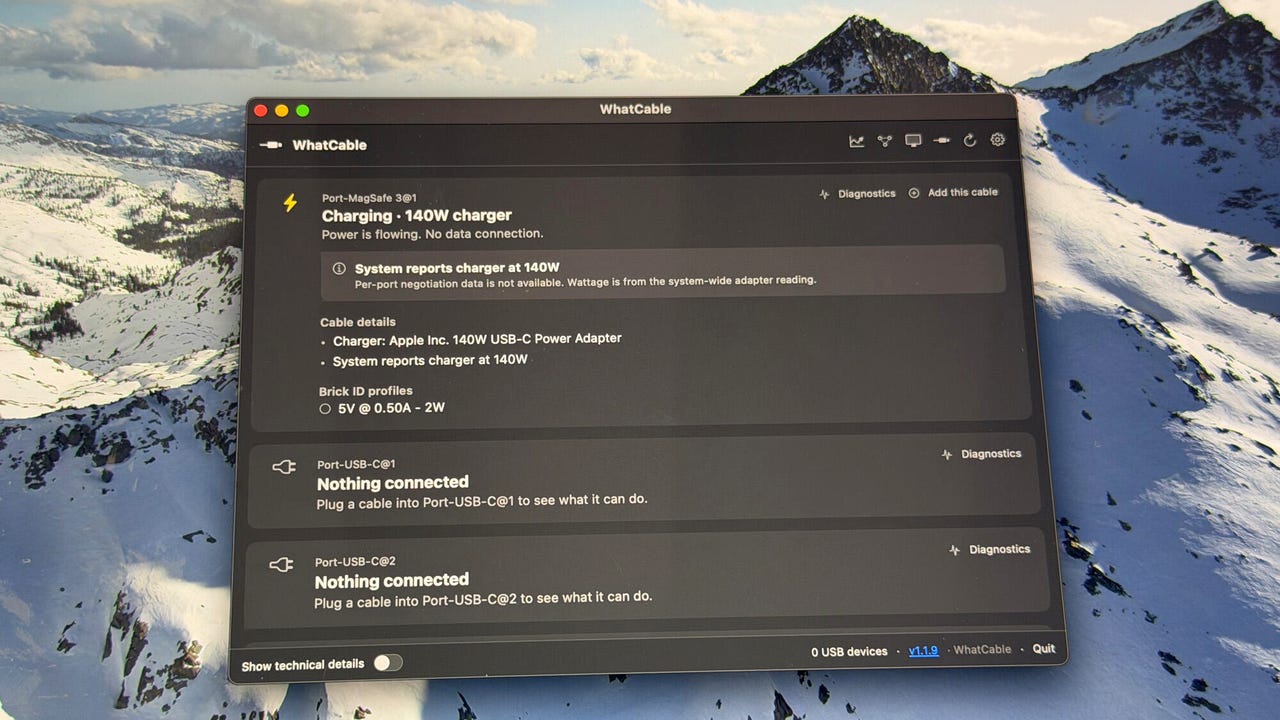
WhatCable can do a lot for a free app.

WhatCable can do a lot for a free app.

Adrian Kingsley-Hughes/ZDNET

It’s also privacy-focused, which is rare these days. No analytics, no tracking, and nothing about your cables leaves your Mac. Yes, it does a periodic GitHub version check to make sure it’s up to date, and there is the option to contribute diagnostic data to the WhatCable community, but the developer has taken steps to protect user privacy.

To get started, download it directly from the developer’s website at whatcable.uk, unzip it, and run it.

An alternative way to install it is to use the following Homebrew line in your Mac’s Terminal screen:

brew install –cask darrylmorley/whatcable/whatcable

Once it’s installed, it’ll show you what each USB-C cable plugged into your Mac can actually do, and let you diagnose things like why your Mac is charging slowly or why a connected storage drive is slow or a dock keeps cutting out. Just plug a cable into a port on your Mac, and the app will recognize it — even if it’s not connected to anything. However, accessing the full specs requires an active device on the other end, like a charger or dock. 

What can WhatCable do?

The app seems simple enough, but there’s a lot to it, and it’s had me reaching for the online documentation a lot. For example, want to check for things like charging speedbumps or a cable having problems once plugged in? WhatCable can do that.  

WhatCable can take a pretty deep dive into all things USB!

WhatCable can take a pretty deep dive into all things USB!

Adrian Kingsley-Hughes/ZDNET

And it’s not just USB cables; it can also figure out what’s going on with the MagSafe port on a MacBook, something I haven’t seen mentioned anywhere in the app’s documentation.

There’s also a pro version which costs £9.99 (the developer is in the UK, hence the currency, but this is about $14). This unlocks 16 pro features, from protocol-level event history, negotiation diagnostics and display diagnostics, and a neat live power meter.

The pro upgrade.

Adrian Kingsley-Hughes/ZDNET

One handy feature is that it can interrogate the liquid detection sensor on the ports so you can check to see if the liquid contact indicator has been triggered on any port. If a port is having an issue, this is definitely something to check.

WhatCable Pro is a very powerful tool.

WhatCable Pro is a very powerful tool.

Adrian Kingsley-Hughes/ZDNET

Activating a license also allows you to run the pro features on two Macs.

Some considerations

WhatCable is not perfect. I’ve had issues with some parts of the app not working, like the live power feature won’t work (and yes, I did wait a lot more than the requested minute for it to kick in), and sometimes I’ve had to disconnect and reconnect a cable to get the app to read it.

WhatCable is good, but it's not perfect.

WhatCable is good, but it’s not perfect.

Adrian Kingsley-Hughes/ZDNET

But for a free app, it’s powerful. And I’m also more than happy to pay for a license to support the developer and get access to more features.

Is WhatCable better than a hardware-based cable tester?

It depends. As for capability differences between the app and hardware testers, it’s a huge field. At one end of the spectrum, you have a $13 tester like the ChargerLAB Power-Z CT001, while at the other end you have the $100 Power-Z KM003C. These standalone testers do a lot, and they’re not reliant on you having a Mac to test cables.  

Another thing to bear in mind about standalone testers is that they test cables in isolation, without relying on other hardware. Technically a tester like the KM003C is a passthrough power meter, and isn’t standalone because you connect it to a charger, but it uses that for power, and all testing is synthetic. 

Also: The best HDMI cables of 2026: Expert reviewed

Also, as someone who owns over a dozen such cable testing dongles, I can tell you from experience that it’s a lot easier to lose and misplace all of them than it is to lose my MacBook. I love that I don’t have to go scrabbling through a toolbox to try to find one of my testers, I can just plug the cable into my MacBook that I’m already working on. 

For the home user, the free version of WhatCable is enough for them to sort out their cable chaos and sort the wheat from the chaff. I used WhatCable to go through a whole pile of cables I’d collected on and around my desk, and I found the process to be quick, easy, and quite therapeutic.

ZDNET’s buying advice

I found a couple of cables that were either damaged or defective because they were massively underperforming, and put them straight into the recycling bin. Also, there was one other that I’d been sent to test that was being deceitful in terms of its spec sheet. It claimed to be able to handle 240W of power, but never went above 100W. It was a no-name brand that I’d never heard of before, so I wasn’t surprised it was a dud.

WhatCable is free, so my suggestion is to give it a go. If nothing else, you might find it entertaining seeing what your cables can and can’t do, and chances are, you’ll find some that don’t live up to their advertised standards. 


Source link

Leave a Reply

Subscribe to Our Newsletter

Get our latest articles delivered straight to your inbox. No spam, we promise.

Recent Reviews


Brown eggs arranged in the air fryer basket

Once you use it enough, your air fryer blossoms into the gadget the rest of your kitchen revolves around.

Pamela Vachon/CNET

I didn’t set out to stop using my oven. It happened gradually, one food at a time, as the air fryer turned out better results with less effort and I stopped seeing a reason to go back. The oven still gets used — for things that genuinely need it, which turns out to be fewer things than I expected. Nine foods in particular made the shift feel permanent. These are the ones that convinced me the air fryer wasn’t a supplementary appliance but a replacement for most of what the oven used to do in my kitchen every week.

When I first hauled in an air fryer many years ago, I was mostly making the classics: wings and fries. However, my air fryer repertoire has expanded to include items I never thought I’d be cooking in a small countertop contraption. I’m talking about fresh salmon, cheeseburgers and even whole roasted chicken. 

The air fryer is fast, forgiving, easy to use and even easier to clean. It’s no wonder the appliance has enjoyed unparalleled popularity over the last decade — a true once-in-a-lifetime kitchen craze.

Ninja Crispi chickens

So what are the most surprising foods I make in the air fryer? I’ve listed nine below, but the list grows longer every year. And if you’re searching for an air fryer or to upgrade your existing oven, we have a new favorite model with a glass cooking chamber that’s easy to clean and doubles as a food storage container. 

9 foods I’ll only make in the air fryer from now on

1. Hard-‘boiled’ eggs

arranged eggs in the air fryer basket

All you need is 10 minutes and an air fryer and you’ll never boil an egg again.

Pamela Vachon/CNET

From runny yolks to jammy to hard-cooked, the air fryer can do it, and there’s no waiting for water to boil or forgetting to set a timer (air fryers have a built-in timer). There’s a lot of internet voodoo about dos and don’ts for boiling eggs in the air fryer, but in my experience, you can disregard most of it and still end up with beautifully cooked eggs with perfectly set yolks every time.

Here’s how to make “hard-boiled eggs” in the air fryer

2. Salmon (and most other fish)

salmon cut into revealing a medium rare center

Just 8 minutes in the air fryer and you have perfectly medium rare salmon.

David Watsky/CNET

Broiled salmon is a simple, healthy weeknight dinner staple. It’s not difficult to make in the oven, but if you’re only cooking for one or two people, the preheating time is a pain, and you’ll waste a lot of energy for a small amount of food. Pan-seared salmon is excellent and quick, but there’s almost no way to cook salmon on the stove without creating an oily and odorous mess. 

CNET Home Tips logo

I tried cooking roasted salmon in the air fryer, and it came out perfectly in about 10 minutes, including preheating time. The closed cooking chamber captures all the grease and even helps hide some of the fishy smell from taking over the space. 

OK, so you might catch me throwing the occasional filet of salmon on the grill during warmer months, but gone are the days of me wiping fish grease from the backsplash behind my kitchen stove. 

Here’s how to make perfect air fryer salmon.

3. Roasted chicken

air fryer chicken on a cutting board

Air-fryer roasted chicken is a revelation.

David Watsky/CNET

This one surprised me the most because I make roast chicken most Sundays and had grown content with my oven method. I learned quickly that the air fryer does an even better job because it crisps the skin quickly without overcooking the meat. Air-fryer roasted chicken takes about 45 minutes — about 15% quicker than the oven — and it’s nearly impossible to screw up.

Here’s how to make a quick roasted chicken in the air fryer.

4. Bacon cheeseburgers 

a burger cooked to medium cut in half

You can cook a burger to perfect medium or medium rare with an air fryer.

Pamela Vachon/CNET

Air fryer cheeseburgers have become a staple around my home. The exception is during summer when the grill is in full swing but during cooler months, I turn to the air fryer for this American classic. It’s cleaner than pan frying, but the burger doesn’t cook in its own grease, so you get a lighter, healthier meal (if you’re into that sort of thing). You can also add the bun and a couple of slices of bacon to the burger, making it a complete meal with minimal cleanup.

Here’s how to make a cheeseburger from top to bottom in the air fryer.

5. Chicken cutlets 

Chicken cutlet

Air fryers turn out picture-perfect chicken cutlets.

David Watsky/CNET

Before the air fryer, I used to pan-fry breaded chicken cutlets for chicken Parmesan and other recipes but the air fryer does the same job with less mess and produces less oily fried chicken, too. 

Best Air Fryers: Cheap vs. Expensive

I recommend using boneless chicken thighs, which have enough fat to withstand convection heat without drying out. Simply coat the chicken in a beaten egg wash, followed by breadcrumbs mixed with salt, pepper, and other spices. Cook at 375°F for about 15 minutes.

You can spray the cutlets lightly with oil before cooking to achieve an extra-crispy crust, but it’s not necessary. I’ve tried the same method with chicken breasts; it works well, but there is a greater risk of drying out the meat.

Cooked chicken thighs and green onions are presented on a serving platter.

Best Places to Buy Chicken Online

6. Cauliflower steak

cauliflower steak

Cauliflower steak made in the air fryer has become a staple side dish in my kitchen. 

David Watsky/CNET

One of my favorite things to cook in the air fryer is cauliflower. A cauliflower slab makes an excellent, hearty side dish or main course if you’re going plant-based. Simply toss a thick slice or two of cauliflower with olive oil, salt, pepper, or your preferred seasoning, then air-fry at high heat for 10-12 minutes. The air fryer gives it a beautiful caramelized crust and it cooks the dense veggie fast enough so that the inside of the cauliflower doesn’t become mushy.

7. Leftover pizza

slice of pizza on a cutting board

This leftover pizza got a whole new life thanks to a short trip to the air fryer.

David Watsky/CNET

While not every type of food is best reheated in the air fryer, many are. Air fryers are the perfect way to revive leftover pizza, fried chicken, grilled meats and vegetables. A microwave heats food unevenly and tends to impart a rubbery texture. Air fryers give food a second life with convection heat, delivering a crispy crust and even heating. 

Here’s the best way to reheat every type of leftover.

8. Hot dogs and sausage

hot dogs in an air fryer basket

You can cook an entire package of hot dogs in just a few minutes.

David Watsky/CNET

It’s hard to screw up a hot dog but if you want a perfectly charred wiener in less than five minutes with essentially no cleanup, look to the air fryer. Air fryer hot dogs are as simple as they get, and the super convection oven gives them perfect browning in two or three minutes. 

Here’s how to make hot dogs in the air fryer all summer.

9. Baked potatoes

Air fryer baked potatoes

Air fryer baked potatoes have crispy skin and are light and fluffy inside.

Brian Bennett/CNET

OK, so technically, this one starts in the microwave and finishes in the air fryer. The microwave softens the inside in less than 8 minutes, while the air fryer blasts the edges and skin to crispy perfection. It’s a restaurant-quality baked potato in less than 12 minutes. Here’s how to make the best air-fryer baked potato ever. 

And if you’re still not sure what an air fryer is and how it works, check out our complete guide to air fryers.

9. Grilled cheese

grilled cheese with cured meat on a cutting board

This air fryer grilled cheese is as good as it looks.

Pamela Vachon/CNET

For a grilled cheese, the air fryer cooks both the bread surfaces and the cheese at once, resulting in a quicker melt. This adheres the cheese to the bread slices together, making for a much easier flip. (Flipping is still recommended but with far less drama.)

Here’s the secret to perfect air fryer grilled cheese.The air fryer’s ability to crisp, roast and even boil makes it the most versatile appliance on my counter.


Source link