
Follow ZDNET: Add us as a preferred source on Google.
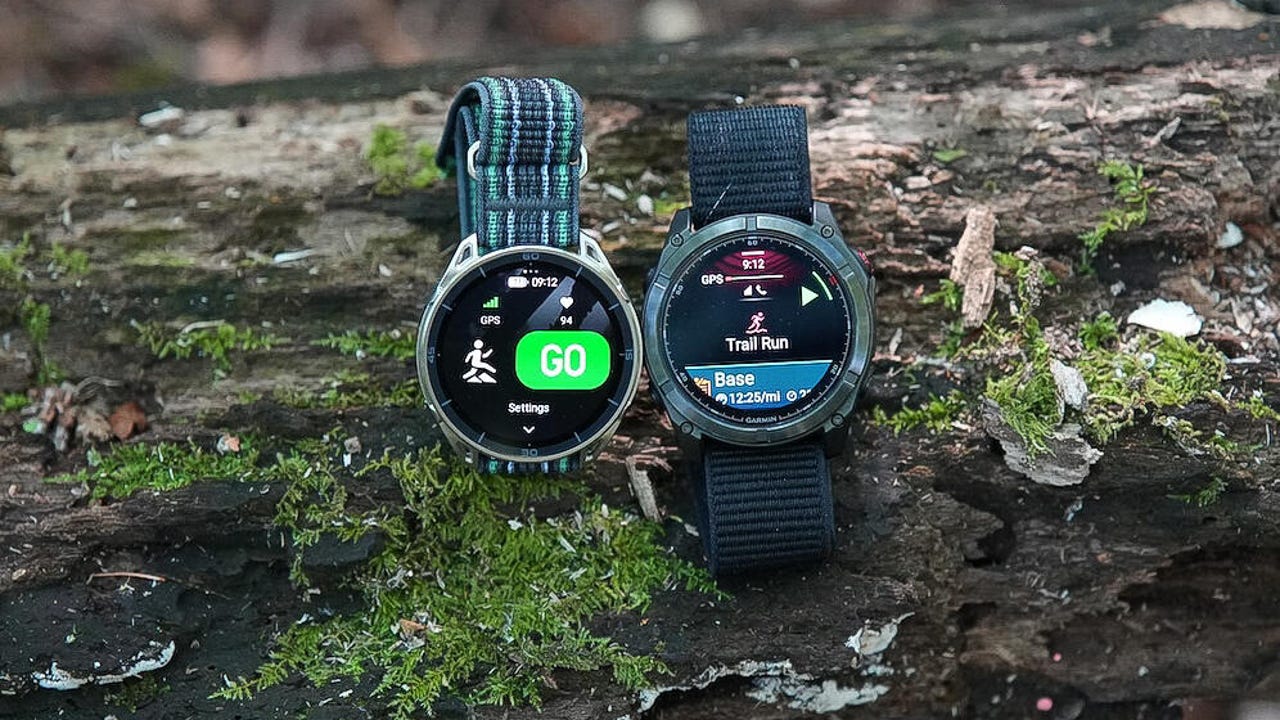
The Garmin Fenix 8 has been one of my favorite sports watches for the past couple of years, and while it is on sale as we anticipate the Fenix 9 release, it is still an expensive watch. Amazfit has been challenging Garmin with affordable watches. The company recently started releasing flagship models priced closer to Garmin’s flagship offerings, but they can still save you a couple of hundred dollars.
For the past month, I have been running, biking, hiking, and living with flagship watches from both companies to see if Amazfit is worth saving some money as the brand continues a steady launch of watches in 2026.
The Amazfit Cheetah 2 Ultra is available for $600, while the 47mm Garmin Fenix 8 AMOLED (similar size) is priced at $850. Amazfit recently announced the Balance Ultra at the same price ($600). Garmin has a more expensive Fenix 8 Pro model with LTE and satellite support.
We’ll focus on two flagship watches with similar features and functionality to see if Amazfit’s most expensive watch is a better bet for you than a Garmin flagship.
Specifications
|
Amazfit Cheetah 2 Ultra |
Garmin Fenix 8 |
|
|
Display |
1.5-inch AMOLED, 480×480 pixels |
1.4-inch AMOLED, 454×454 pixels |
|
Weight (without strap) |
52g |
59g |
|
Dimensions |
47.4 x 47.4 x 15.6 mm |
47 x 47 x 13.8 mm |
| Battery life (GPS) | 33 hours | 35 hours |
| Battery life (smartwatch) | 30 days | 16 days |
| Water resistance | 5 ATM | 10 ATM |
| LED flashlight | Two colors | Two colors |
| Price | $599.99 | $849.99 |
You should buy the Amazfit Cheetah 2 Ultra if…
1. You are a Hyrox athlete
Amazfit is the official wearable partner of Hyrox and recently renewed the partnership for another three years. Hyrox combines running and functional workouts, so if you have an Amazfit wearable, you can train and compete in Hyrox with your device tracking your event. You can choose to compete in single, double, or team relay modes with the watch across eight workout disciplines.
Also: I did not expect this Amazfit watch to match my Garmin in functionality – but it delivered
The Cheetah 2 Ultra boasts a long battery life and a sleek form factor with a large, bright display so you can view your Hyrox status as you compete. The retail package includes both silicone and fabric watch bands, allowing you to wear what works best for your routine. I’m a huge fan of comfortable fabric bands, but the silicone one also has plenty of openings for sweat and comfort.
2. You enjoy trail running and training plans
The Cheetah series of Amazfit watches focuses on runners, while the Cheetah 2 Ultra targets trail runners. There is a unique trail-running mode on the Cheetah 2 Ultra that applies load factor calculations for gradient, terrain resistance, and vertical gain, with slick, color-coded elevation maps to show severe ascents or challenging descents.
While Garmin has a few established training plans, Amazfit takes things further with customized training plans that you can set up through the Zepp smartphone app’s AI-based Zepp Coach, large default training plan library, custom training templates, or third-party training plans.
I’ve enjoyed using the fully customizable Zepp Coach plans, which let you define how much and when you want to train to improve your performance. The plan syncs with the watch, and then customized data pages on the watch help you succeed.
3. You want to save money
Although the Cheetah 2 Ultra is the most expensive Amazfit watch currently available, it still costs less than either the Garmin Fenix 8 or Forerunner 970. The lightweight and durable Cheetah 2 Ultra is made with premium materials, including a titanium body, titanium buttons, fiber-reinforced polymer pieces, and a sapphire glass display. Garmin charges a high premium for these materials.
Also: Whoop vs. Fitbit Air: I used both to track my health and fitness for a month – this one’s better
There is no annual subscription for access to advanced training metrics, Zepp Coach, nutrition and food logging, and other elements in the Zepp app. There is a low subscription fee (often $39.99 per year) that provides advanced sleep analysis and relaxation tools through the Zepp Aura service. I’ve been using Amazfit watches for years, and since I have no issues falling asleep or getting good sleep, I only use Zepp Aura’s free features.
You should buy the Garmin Fenix 8 if…
1. You are a diver or mountain biker
It’s that time of year when people go on vacation and spend time diving to check out the amazing underwater world below the waves. The Garmin Fenix 8 offers high-level water resistance and a 40-meter dive rating, in part thanks to its updated button design. The Fenix 8 also supports scuba and apnea dive activities. Surfline Sessions compatibility means it’s perfect for surfing.
Also: This Garmin beat my Apple Watch Ultra in almost every way (and it’s just as rugged)
The Fenix 8 is optimized for other rugged outdoor adventures, with support for Grit and Flow measurements when you ride your mountain bike, an activity profile for rucking with your pack, and Garmin Outdoor Maps Plus if you need more than the free maps offer.
2. You live in the Garmin ecosystem
Garmin wearables have been around for a long time, and the company has built a fantastic ecosystem. If you like diving into all the data captured by your watch on a large display rather than a smartphone, then you will love logging in to the Garmin Connect website to track trends, run reports, and check your results.
Garmin watches connect with external Garmin sensors, Garmin bike computers, Oakley Meta sunglasses, Engo A/R glasses, bike trainers, and much more, so your watch can serve as just one element of a full fitness regime. You can connect your sleep data with an Index Sleep Monitor, track your weight with an Index Scale, and record your blood pressure in Garmin Connect with an Index Blood Pressure Monitor.
Also: How the Oakley Meta smart glasses beat my Ray-Bans on a 5-mile test walk
3. You use your watch for music, payments, and apps
Since Garmin is a large company, it has established deals with subscription-based music services to provide offline music on its devices. You can set up your compatible credit card and use your watch for wireless payments on the go.
The third-party ecosystem continues to grow in the Garmin store, meaning you can pay for your coffee or snack after a run with the Starbucks app. Google Maps is also available as you walk around a city, with directions showing up on your watch.
Writer’s choice
The presence of a dedicated LED flashlight was once a key feature that would have me pick one watch over another, but now that Amazfit includes this tool on several watches, the light is no longer a distinguishing feature for Garmin. I enjoy using other devices in the Garmin ecosystem, but I currently find the Zepp smartphone application to be a bit more useful for providing key information at a glance.
The Amazfit Cheetah 2 Ultra has lasted a couple of weeks between charges, even with the always-on display activated. That capability means I can leave the charger behind as I travel around this summer. The Garmin Fenix 8 has a longer battery for continuous GPS tracking. However, the Cheetah 2 Ultra doubles battery performance for typical daily use, and that power sways me more than other features.