

Pros
- Very accurate color
- Extremely bright
- Excellent lens shift options
Cons
- Expensive
- Not that much better than cheaper options
- Gimbals still seem unnecessary to me
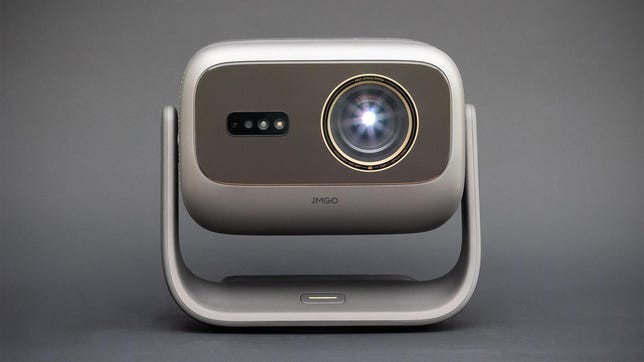
The JMGO N3 Ultimate is an supremely impressive 4K projector, with excellent color accuracy, extreme brightness and enough lens adjustment options to easily accommodate most rooms. These controls include horizontal and vertical lens shift, an impressive zoom range and a motorized gimbal base. While I remain unconvinced about how necessary gimbals are, motorized or otherwise, perhaps I’m in the minority on that one.
That performance, however, comes with a hefty price tag. List price, as of this writing, is $3,000 — though it regularly sells for around $2,400. Basically, if you can afford it, the JMGO N3 Ultimate is one of the best-looking projectors you can buy. But if you’re just shining it on a wall or hauling it out for the occasional movie night, you can save some money with other, cheaper projectors.
Specs
- Resolution: 4K
- Lumens spec: 5,800 (claimed)
- Zoom: Yes (0.88-1.7:1)
- Lens shift: Horizontal: +/-53%, Vertical: +/-130%, also a motorized gimbal
- Light source type: RGB laser
The N3 Ultimate might be the most flexible projector I’ve ever reviewed. Flexible in the sense that you can adjust the image in pretty much every conceivable way to counteract poor placement. To start, as you can see from the photos, it has a gimbal. Unlike most projectors I’ve reviewed, this one’s motorized. If you don’t want to use keystone correction (and you shouldn’t), there’s significant horizontal and vertical lens shift to line up the image on your screen.
There’s also a decent zoom, giving you several feet of distance closer or farther from your screen while maintaining image size. JMGO claims you can create a 100-inch image from as close as 6.4 feet away, or as far as 12.3 feet away.
Using RGB lasers for light, JMGO claims 5,800 ISO lumens of brightness. I measured 4,736 in its greenish, fan-churning Dynamic picture mode. That’s a bit lower than it claims, but in the ballpark given different measurement techniques. That’s still exceptionally bright, and in its most accurate mode, it still achieved 2,454 lumens, which means it’s second only to the Xgimi Horizon 20 Max as the brightest projector I’ve ever measured. That Xgimi projector is going to come up a lot in this review as they’re extremely similar. They have the same list price and nearly the same light output ratings, with Xgimi claiming 5,700 ISO lumens and an as-measured-by-me max of 4,850.
Both of these projectors are so bright that on a 100-inch diagonal 1.0-gain screen, they’re almost hard to watch in a dark room. Fortunately, you can turn down their brightness to match your setup.
Connections
- HDMI inputs: 2
- USB port: 1
- Audio output: eARC
- Internet: Wi-Fi
- Streaming interface: Google TV
- Remote: Not backlit
Like most modern projectors, Google TV is baked inside for all your streaming needs. Ideally, you’ll connect the projector to a soundbar or receiver, and one of the HDMI inputs has eARC to do just that. There are also two, 12.5-watt (25 watts total) speakers. These sound decent, but aren’t particularly loud.
Picture quality comparisons
As I mentioned above, the Horizon 20 Max is roughly the same price and offers similar performance. It’s the brightest projector I’ve ever measured, but honestly, these are both so bright the difference is practically meaningless. One other projector I tested recently is in the same category as these two — the Valerion VisionMaster Pro2 — but since it’s a little dimmer and had significantly less accurate color, it didn’t seem worthwhile to connect, as it undoubtedly would have come in last. The Valerion’s heavily chromed design looks the coolest of these three to my eyes, but that’s not what we’re here for. There’s also the Anker Nebula X1, which costs and performs similarly, but doesn’t have a gimbal. I connected the Xgimi and JMGO to a distribution amplifier and viewed them side-by-side on a 102-inch, 1.0-gain screen.
These projectors look extremely similar, with their images seemingly just a few taps of a picture setting away from each other. If you told me they had the same internals (and to be fair, all DLP projectors share a lot of the same internals), I wouldn’t be surprised.
The most noticeable difference is how they manage deep shadows/blacks. The Xgimi has a slight reddish tint to its blacks. Not enough to be an issue, but the more color-neutral blacks on the JMGO are definitely better. Contrast is similar between the two, with a slight edge to the JMGO. I measured a rough average of 1,859:1 to the Xgimi’s 1,367, but due to some brightness ramping with the N3, this isn’t as accurate a measurement, and therefore comparison, as I’d like. Visually, it looks like the N3 has a slightly better contrast ratio than the 20 Max, but not ~35% better as the numbers suggest. It’s subjectively closer to 10% better, maybe. The N3 crushes shadow detail more with HDR content, but i found this can be adjusted easily in the picture settings.
Color is also very similar between the Xgimi and JMGO. These are both very accurate projectors, with lifelike and vibrant colors no matter the content. I’ll give a slight edge to the JMGO here as well, with slightly better skin tones, but it’s so close that it’s basically a tie.
If you didn’t read the Horizon review, I had to knock a few points off its score because my sample had some lens issue — perhaps dust or something else in the light path — that caused two small-ish circles to appear on-screen. There were no such manufacturing issues with the JMGO.
Then there’s the sound. The JGMO has more bass, but it’s also boomy. The Xgimi sounds better overall and plays noticeably louder. Like all projectors, both of these deserve at least a soundbar, if not a receiver and speakers, but both are acceptable enough on their own, with the Xgimi being the better-sounding option of the two.
So, broadly speaking, both are good but the JMGO is a little better. The darkest parts of the image are more neutrally black, there are no lens/dust issues and there’s a bit more flexibility in the lens shift options. That said, I don’t think these improvements are worth more than a few hundred dollars, so if it’s a question of the JMGO at its list price and the Xgimi at its sale price, go for the latter.
Lastly, a word of warning if you wear glasses. Depending on your prescription and lens material, you may notice chromatic aberration, or color fringing, around bright objects, especially if they’re on a dark background (white credits on a black screen or streetlights on a street at night, for example). It’ll look like the image “splits” with a single-color “ghost” on either side. This is especially noticeable if you’re sitting fairly close, since you’d naturally look at the corners of the screen through the corners of your glasses, exacerbating the optical issue. This is separate from the DLP rainbows some people see with certain DLP projectors. This color issue won’t affect everyone who wears glasses, and it certainly won’t affect those who don’t wear glasses. For what it’s worth, I notice it and find it annoying enough that I personally wouldn’t buy an RGB laser projector. Check out the BenQ W4100i, which uses LEDs and doesn’t have this issue.
Gimballed greatness
The N3 Ultimate lives up to its name. It’s probably the ultimate gimbaled projector. It’s bright, has accurate color, a great lens and an impressive contrast ratio. If money is no issue and you’re specifically looking for a gimbaled projector, this one looks fantastic.
However, those two caveats are important. The gimbal, I think, implies that the N3 isn’t intended for permanent placement, that it’s for temporary viewing in a variety of situations. The gimbal and zoom lens mean it can fit in just about any space quite easily. So to me, $3,000 for something casual like that seems excessive when there are smaller, lighter and cheaper options that still work extremely well. If you’re looking for something permanent — the N3 is available with floor and ceiling mounts — what’s the point and cost of the gimbal? I don’t have an answer for this, and given how many gimbaled projectors are on the market, clearly I’m the one that’s missing something.
Like other JMGO projectors I’ve reviewed, the actual cost drops pretty quickly after launch: As of this writing, it’s going for $2,400-$2,500. That’s right in line with the other projectors I mentioned above, and while their performance is similar, the N3’s lens and motorized gimbal means it’ll fit in even more places — if that’s what you’re going for.

Stephan is the sports journalist for the Maple Grove Report.