
What Is The 3-2-1 Rule For Backing Up Your Data?


Your data is one of your most valuable possessions. In this case, “data” is being used as an umbrella term to include any kind of information that you store digitally. Often, this means work files, but it also includes personal information, photos, personal documents, and more. If that data is ever lost, it can be anywhere from really annoying to absolutely devastating. That’s why it’s essential to back up your data.

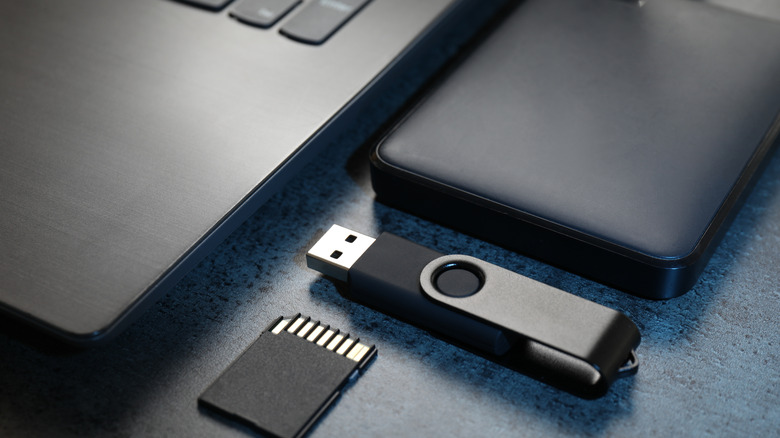
A simple way to make sure you never lose data is by applying the 3-2-1 rule to your data and backups. Put simply, the 3-2-1 rule means you should always have at least three copies of your data, saved to at least two different types of storage media or devices, and at least one of those devices should be stored away from your primary location. The reasoning is fairly simple.

Even two copies of your data can be compromised if they’re both stored at the same place. Imagine you have your data saved to your computer and an external hard drive, but then your house burns down. In that case, having two copies of your data isn’t helpful. Adding a third copy in a remote location prevents all of your eggs from being in the same proverbial basket.

Use the cloud, but not just the cloud

Saving your work to a cloud service, like Google Drive, is a great idea because it fulfills the off-site requirement. You can even add Google Drive to your file explorer so you can save directly to your hard drive and have it sync to the cloud automatically, addressing the 3-2-1 points of saving to an off-site location and keeping two copies of your data.

Most cloud services have apps that you can install on your PC to automatically sync your files. They can be done on the fly as changes are made, or they can be done on a schedule. Either way, saving files to the cloud, or as it’s commonly (with a hefty dose of snark) known as “someone else’s computer,” makes sure that your data is kept away from you physically and recoverable — assuming you have an internet connection. You can take your pick of the best cloud services out there to store your files.

Taking it a step further
Given today’s environment, there is an extra step you can take to make sure your data integrity remains intact regardless of the circumstances. These days, ransomware is very much a concern. Ransomware basically locks down all of your data and denies you access, and that often includes cloud services as well. After all, changes made to files locally sync to the cloud, so they can be infected as well. That’s why security experts actually recommend the 3-2-1-1-0 rule. It’s similar to the 3-2-1 rule, but it adds an extra layer of security.

The extra 1-0 in the rule adds one unchangeable copy of your files and a strict requirement of zero recovery errors. Basically, this rule means that you maintain at least one copy of your files that is air-gapped, or disconnected from any network, so it cannot be infected by any means. Additionally, the extra air-gapped set of files should also be kept off-site so it remains protected against physical destruction, and you should regularly test those backups to ensure they restore with zero errors.

At the end of the day, how you maintain your data backups depends on your priorities and how important your data is to you. Finding the right balance between convenience and security will be key to making sure that, if the worst happens, it won’t take your data, too.


Source link

Leave a Reply

Subscribe to Our Newsletter

Get our latest articles delivered straight to your inbox. No spam, we promise.

Recent Reviews


Google Pixel 10a

Kerry Wan/ZDNET

Follow ZDNET: Add us as a preferred source on Google.


ZDNET’s key takeaways

  • Android 17 is here, along with the June Pixel Drop.
  • The OS is rolling out to Pixel devices first.
  • Users are getting upgraded productivity, security, and more.

Android 17 is officially here, and it’s a doubly good day for Pixel users, as it’s bringing the June Pixel Drop with it.

Google has rolled out its annual OS update and its latest collection of Pixel-exclusive features at the same time, and the updates pack not only some practical features that will make an impact on how you use your phone daily, but also security protections, some new translation tricks, and more. Pixel Watches — the 2 and later — are included, too, with a potentially life-saving feature addition.

Also: I’m a devoted iPhone user but Android 17 is tempting me with its new video and social features

Here’s a look at what’s new in Android 17, which starts rolling out today to Pixel phones first and then to other devices “throughout 2026,” along with what’s new in the June 2026 Pixel Drop.

What’s new in Android 17?

Since many manufacturers now offer longer update windows, usually 4 to 7 years, a wide range of devices are eligible. The updated OS starts rolling out today to Pixel 6 phones and newer. Samsung’s Galaxy S23 series and newer will get it as One UI 9, along with the Flip 5 and newer, Galaxy A24 and newer, and Tab S9 series. OnePlus will bring Android 17 to the OnePlus 11 and newer.

1. App Bubbles

Perhaps the most useful feature is Bubbles, which lets you turn any app into a floating bubble on your main screen. All you have to do is long-press an app, and it becomes an easy-to-access bubble. If you consistently switch back and forth between apps or need to access a certain app often, like a map or airline app while you’re on a trip, you can now find what you need more quickly.

Pixel Folds are getting a special Bubble Bar at the bottom of the screen that lets you organize, move, and access your recent bubbles from one dedicated space.

2. Additional security

Android 17 is also bringing boosted security. 

To start, you can now grant an app temporary access to your exact location and share only specific contacts. 

Additionally, an enhanced “Mark as lost” feature, located in Find Hub, lets you lock a missing phone with your biometrics, so even if a thief has your passcode, they can’t access anything on your device or turn off tracking. 

Improvements to Live Threat Detection block more suspicious apps and scams, Google explained, and enhanced Advanced Protection mode helps keep you safe from sophisticated threats. Lastly, Google is reducing the number of times someone can attempt to guess your PIN and adding longer wait times between failed attempts.

Also: How to clear your Android phone cache – the 30-second routine every user should be doing

3. Screen reactions and more

Also new is Screen Reactions, which lets you take a selfie video overlaid on a screen recording in lieu of a green screen; a 50/50 gaming mode with a dynamic pad for foldables; and built-in parental controls beyond Pixel devices, so you can set screen time limits and content filtering with a PIN, even if you don’t link your Google Account.

What’s in the June Pixel Drop?

Beyond Android 17, Pixel users are getting several Pixel-specific upgrades in the June Pixel Drop.

1. Custom greetings for Take a Message

Introduced in 2025, Take a Message expands on the Pixel call screening feature and gives you a real-time transcript of what the caller is saying, along with AI-generated follow-up steps. Now, Take a Message has custom greetings, letting you record a personalized outgoing message instead of the default voice.

2. New AI models

Two new AI models are making their way to Android phones. The first is Gemini Omni, a new way to create and edit videos. Gemini Omni lets you type in a prompt and get a custom, high-quality video. This is available on all devices with the Gemini app for Gemini Pro users only.

Also: Everything we saw at Google I/O: Gemini 3.5, Android XR glasses, Spark, and more

Also on the way is Lyria 3, which lets you create original tracks using text prompts or images as inspiration. You can prompt Gemini with the style, vocals, and tempo you want. This is coming to all Android 17 Pixel phones and Folds.

3. Voice Translate for the Pixel 10a

One of the Pixel 10 series’ exclusive features is Voice Translate, which provides a real-time translation on phone calls in the speaker’s voice. ZDNET’s Sabrina Ortiz tried the feature last fall, noting how quickly the feature worked and how well it copied her voice. Voice Translate is getting a small expansion, coming to the Pixel 10a.

Also: iOS 27 envy? 4 features you can already use on an Android phone (including Samsung models)

4. Android Quick Share expansion and more

Pixel users are also getting an expansion of Android Quick Share compatibility with AirDrop, coming to the Pixel 9a and Pixel 8a, and an expansion of Magic Cue to more apps, coming to the Pixel 10 series.

What’s new for Pixel Watches?

Pixel Watches are only getting one new feature, but it’s a potentially big one. Core detection features, including Car Crash Detection, Fall Detection, and Loss of Pulse Detection, are getting emergency sharing. If a severe event is detected, Google explains, your Pixel will call emergency services and notify your chosen contacts. You can toggle emergency contacts on or off for each type of event.

Also: This silent Android feature scans your photos for ‘sensitive content’ – how to uninstall it

Fall Detection is coming to the Pixel Watch, plus the 2, 3, and 4, while Car Crash Detection is coming to the Pixel Watch 2, 3, and 4. Loss of Pulse Detection is only coming to the last two generations, the Pixel Watch 3 and 4.


Source link