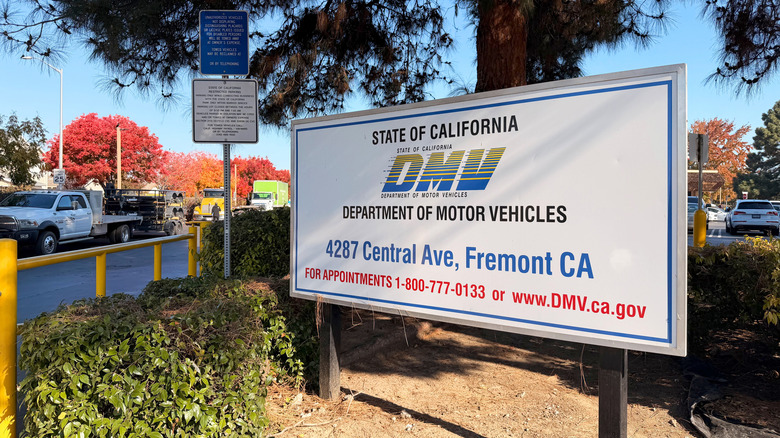
About 11,000 California drivers are at risk of losing their license if they don’t retake the written knowledge exam in the next 30 days. If you get notified by the state and don’t retake the exam within a month (or fail your retest), you’ll have your license revoked. According to the DMV, there were some irregularities detected in thousands of written driver’s license exams between July 2025 and April 2026. The word the agency used was “anomalies,” which they say surfaced through its routine internal monitoring process. It’s not clear if this has anything to do with the 300,000 impacted by a DMV bug earlier in 2026.
The agency hasn’t said whether these “irregularities” came from suspected cheating, some sort of administrative error, or a technical problem with the test software. Nevertheless, drivers who got the notification will need to schedule an appointment using the QR code included in the letter. To make a confusing issue even more so, walk-in appointments won’t be accepted. These 11,000 will have to schedule. On the day of the exam, they’ll also need to bring the notification letter along with their driver’s license.
Drivers are left with more questions than answers
Iv-olga/Shutterstock
Naturally, the lack of explanation from the DMV has left drivers confused and frustrated. A quick look online, you’ll find all sorts of social media posts and Reddit threads from other drivers curious to know what the issue is here. (It’s not like failing the driver’s test, where you know exactly what you did wrong when you’re told to retest.) Per the Los Angeles Times, contacting the California DMV in search of an explanation will get you nowhere. Representatives have acknowledged the letter, but won’t explain what specific issue led to the letter being sent out in the first place.
The mystery surrounding all this is one thing, but actually getting an appointment seems to be another issue entirely. Later in its report, the LA Times found drivers struggling to get a time slot at their local DMVs. Those drivers have had to book in neighboring areas instead, with one man having to spend $100 on an Uber ride to get there. Alas, it seems the DMV has said all it’s going to say on the matter. The agency simply insists the retesting is necessary to preserve the integrity of California’s licensing process. The state recently redesigned their driver’s license back in fall 2025, so that’s the one bright side to all this: You get to upgrade to the new look.
Android 17 is here, along with the June Pixel Drop.
The OS is rolling out to Pixel devices first.
Users are getting upgraded productivity, security, and more.
Android 17 is officially here, and it’s a doubly good day for Pixel users, as it’s bringing the June Pixel Drop with it.
Google has rolled out its annual OS update and its latest collection of Pixel-exclusive features at the same time, and the updates pack not only some practical features that will make an impact on how you use your phone daily, but also security protections, some new translation tricks, and more. Pixel Watches — the 2 and later — are included, too, with a potentially life-saving feature addition.
Here’s a look at what’s new in Android 17, which starts rolling out today to Pixel phones first and then to other devices “throughout 2026,” along with what’s new in the June 2026 Pixel Drop.
What’s new in Android 17?
Since many manufacturers now offer longer update windows, usually 4 to 7 years, a wide range of devices are eligible. The updated OS starts rolling out today to Pixel 6 phones and newer. Samsung’s Galaxy S23 series and newer will get it as One UI 9, along with the Flip 5 and newer, Galaxy A24 and newer, and Tab S9 series. OnePlus will bring Android 17 to the OnePlus 11 and newer.
1. App Bubbles
Perhaps the most useful feature is Bubbles, which lets you turn any app into a floating bubble on your main screen. All you have to do is long-press an app, and it becomes an easy-to-access bubble. If you consistently switch back and forth between apps or need to access a certain app often, like a map or airline app while you’re on a trip, you can now find what you need more quickly.
Pixel Folds are getting a special Bubble Bar at the bottom of the screen that lets you organize, move, and access your recent bubbles from one dedicated space.
2. Additional security
Android 17 is also bringing boosted security.
To start, you can now grant an app temporary access to your exact location and share only specific contacts.
Additionally, an enhanced “Mark as lost” feature, located in Find Hub, lets you lock a missing phone with your biometrics, so even if a thief has your passcode, they can’t access anything on your device or turn off tracking.
Improvements to Live Threat Detection block more suspicious apps and scams, Google explained, and enhanced Advanced Protection mode helps keep you safe from sophisticated threats. Lastly, Google is reducing the number of times someone can attempt to guess your PIN and adding longer wait times between failed attempts.
Also new is Screen Reactions, which lets you take a selfie video overlaid on a screen recording in lieu of a green screen; a 50/50 gaming mode with a dynamic pad for foldables; and built-in parental controls beyond Pixel devices, so you can set screen time limits and content filtering with a PIN, even if you don’t link your Google Account.
What’s in the June Pixel Drop?
Beyond Android 17, Pixel users are getting several Pixel-specific upgrades in the June Pixel Drop.
1. Custom greetings for Take a Message
Introduced in 2025, Take a Message expands on the Pixel call screening feature and gives you a real-time transcript of what the caller is saying, along with AI-generated follow-up steps. Now, Take a Message has custom greetings, letting you record a personalized outgoing message instead of the default voice.
2. New AI models
Two new AI models are making their way to Android phones. The first is Gemini Omni, a new way to create and edit videos. Gemini Omni lets you type in a prompt and get a custom, high-quality video. This is available on all devices with the Gemini app for Gemini Pro users only.
Also on the way is Lyria 3, which lets you create original tracks using text prompts or images as inspiration. You can prompt Gemini with the style, vocals, and tempo you want. This is coming to all Android 17 Pixel phones and Folds.
3. Voice Translate for the Pixel 10a
One of the Pixel 10 series’ exclusive features is Voice Translate, which provides a real-time translation on phone calls in the speaker’s voice. ZDNET’s Sabrina Ortiz tried the feature last fall, noting how quickly the feature worked and how well it copied her voice. Voice Translate is getting a small expansion, coming to the Pixel 10a.
Pixel users are also getting an expansion of Android Quick Share compatibility with AirDrop, coming to the Pixel 9a and Pixel 8a, and an expansion of Magic Cue to more apps, coming to the Pixel 10 series.
What’s new for Pixel Watches?
Pixel Watches are only getting one new feature, but it’s a potentially big one. Core detection features, including Car Crash Detection, Fall Detection, and Loss of Pulse Detection, are getting emergency sharing. If a severe event is detected, Google explains, your Pixel will call emergency services and notify your chosen contacts. You can toggle emergency contacts on or off for each type of event.
Fall Detection is coming to the Pixel Watch, plus the 2, 3, and 4, while Car Crash Detection is coming to the Pixel Watch 2, 3, and 4. Loss of Pulse Detection is only coming to the last two generations, the Pixel Watch 3 and 4.
To provide the best experiences, we use technologies like cookies to store and/or access device information. Consenting to these technologies will allow us to process data such as browsing behavior or unique IDs on this site. Not consenting or withdrawing consent, may adversely affect certain features and functions.
Functional
Always active
The technical storage or access is strictly necessary for the legitimate purpose of enabling the use of a specific service explicitly requested by the subscriber or user, or for the sole purpose of carrying out the transmission of a communication over an electronic communications network.
Preferences
The technical storage or access is necessary for the legitimate purpose of storing preferences that are not requested by the subscriber or user.
Statistics
The technical storage or access that is used exclusively for statistical purposes.The technical storage or access that is used exclusively for anonymous statistical purposes. Without a subpoena, voluntary compliance on the part of your Internet Service Provider, or additional records from a third party, information stored or retrieved for this purpose alone cannot usually be used to identify you.
Marketing
The technical storage or access is required to create user profiles to send advertising, or to track the user on a website or across several websites for similar marketing purposes.