You probably pass by dozens (if not hundreds) of those skinny signs whenver you hit the highway. Like other highway distance signs, they’re easy to overlook. And yet, they can actually be some of the most important things on the road if something goes wrong. We’ve been spoiled by smartphone navigation and in-car GPS systems, but mile marker signs are still one of the fastest and most reliable ways to pinpoint your exact location on the road. Because the signs are placed at regular and precise intervals, they also help travelers know how far they’ve traveled, how much farther they have to go, and where they are in relation to exits or services.
Whether reporting a crash, a disabled vehicle, or calling about some other hazardous road conditions, a mile marker can also tell emergency dispatchers and roadside assistance crews where to go to help. They’re especially useful in rural areas or long stretches of highway where there aren’t many recognizable landmarks and you need to call AAA for service, or other emergency authorities. Whatever the case, mile markers can be an immediate frame of reference that doesn’t rely on any technology whatsoever.
Common uses for mile markers
calliephotography/Shutterstock
Depending on the state, mile markers are placed either every mile or every tenth of a mile. They use large, easy-to-read numbers to indicate your precise position along a specific highway. While their exact appearance will vary between blue and green, the signs are nevertheless a standardized reference point. In other words, motorists, emergency responders, and highway agencies alike can all understand what you’re talking about. There are no confusing traffic signs to decipher.
Emergency dispatchers can use them to direct police officers, firefighters, paramedics, and tow trucks to specific locations. Otherwise, without an accurate reference, responders would have to search miles of roadway before reaching someone in need. That’s not going to work in an emergency situation where every minute matters. Highway departments can also use mile markers to document accidents, road closures, construction projects, and maintenance work. That way, crews can communicate exact locations without relying on arbitrary directions.
For drivers, the best thing to do is to pay attention to mile markers before you need them. If your vehicle breaks down or you’re involved in an accident, look for the nearest marker before calling for help. If you see someone else in an emergency, sharing the highway number, direction of travel, and closest mile marker can give first responders the accurate location they need to roll out.
Things that look “too good to be true” invariable are just that.
This example got dangerously hot in a short period of time before dying.
There’s no legitimate charger that comes close to delivering on the 1,000W promise.
Being a tech reviewer for a living means that I get offered some very interesting things. Not interesting as in Bugatti supercars or jewel-encrusted Fabergé eggs, but interesting as in “this thing could easily be a fire hazard — want to take a look?”
Submissively, I often say yes. And I’m glad I did with the most recent pitch, because it was very interesting indeed.
Meet the “interesting” charger
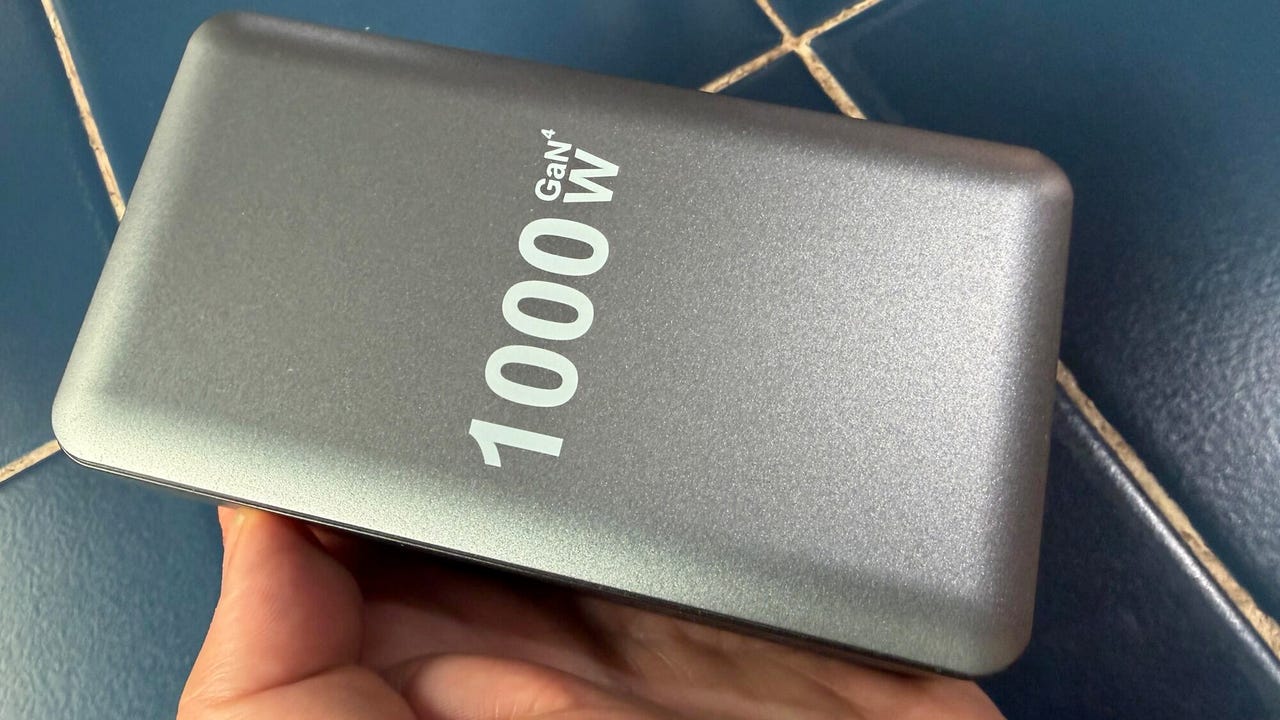
This time around, the thing of interest was a charger that claimed to deliver an incredible 1,000W through its ten ports — four 140W USB-C ports, four 100W USB-C ports, and two 20W USB-A ports.
The person who bought this charger told me that they’d plugged it in, used it to charge their phone for “a few minutes,” got worried when it became “a little hot,” and unplugged it.
That’s a lot of promise… but (spoilers), they don’t deliver!
Adrian Kingsley-Hughes/ZDNET
The unit was suspiciously light and plasticky, especially given its built-in power supply. Compare this to Ugreen’s Nexode 500W charger, which weighs a hair under 5 lb.
There was also a slight whiff of melty plastic, which made me think that this had been a bit more than a little hot.
Color me suspicious, but I had a gut feeling that the only way this charger would be able to push out 1,000W would be if it caught fire.
Turns out I wasn’t far wrong.
How long would it last? Answer: Minutes
Talk is cheap. It was time to test the charger.
So I plugged it in, turned it on, and started using it. Within a couple of minutes of starting to use it, I noticed a few things:
No matter what I tried, I couldn’t persuade the charger to deliver more than about 60W from any of the ports.
As for peak output, I managed to get close to 250W.
The power output was very uneven and noisy, fluctuating wildly. The more ports I used, the worse it got.
The unit got very hot to the touch very quickly, even under light loads.
But… before I could get the thermal camera out to check how hot it got, there was a pop and the unmistakable smell of “Magic Smoke.” The charger had been sent to Silicon Heaven within minutes.
Annnnd… POP! This is the moment the charger gave up the ghost.
Adrian Kingsley-Hughes/ZDNET
Diagnosis time
Time to take it apart and have a look inside. For an item that plugged into the mains power, this unit was shockingly easy to take apart.
A thin sheet of easily removable plastic is a that separates curious hands from live AC power.
Adrian Kingsley-Hughes/ZDNET
And even unplugged and broken, it was capable of delivering zaps! If the case came off while this was plugged into an outlet, it could very easily be deadly.
There’s charge still in some of the capacitors, and these could deliver quite a zap despite the unit being broken and unplugged!
Adrian Kingsley-Hughes/ZDNET
After getting inside, the unit was filled with a grey goo that I’d seen in a previous disappointing charger I’d taken apart. This is a thermal paste that’s used to try to dissipate the heat generated by the components.
It’s not really going to work because it’s sealed in a plastic box with no effective heatsink. It’s a token gesture at best. At worst, it creates a mass that’ll slowly heat up and hold temperature because it’s got no way to get rid of it.
Adrian Kingsley-Hughes/ZDNET
Next to this goo was a bank of capacitors — the black cylinders in the photo — which were the cause of the failure. They’d clearly overheated, with three of them showing signs of bulging.
Adrian Kingsley-Hughes/ZDNET
Well there’s the problem!
I also noticed that two of the components — bridge rectifiers that are used to turn AC mains into DC — have been fixed on an angle to make the touch a metal heatsink. It’s not really an effective way to cool down components.
Moral of the story here is that manufactures are using big number marketing — in this case 1,000W and masses of ports — to scalewash poor quality products.
This might be a half-decent product if it was built to deliver 100W, but there’s no end of competition at that end of the market. Silkscreen “1,000W” on the outside, sprinkle in a few reviews that feel scripted and fake, and all of a sudden it’s interesting and exciting… right up until it blows up.
I know of no 1,000W charger. In fact, the 500W Ugreen Nexode is the highest-power charger that I’ve tested that’s legit. And the price is also legit — $250.
But it’s built to deliver on what it promises and is packed with safety features, including “tip-over protection,” which cuts the output when the unit tips over and prevents it from falling on its side, where it can’t dissipate heat effectively. Now that’s an attention to safety that I like to see in a product that handles that much power.
But if you want 1,000W of output, you’ll have to buy two and duct tape them together.
To provide the best experiences, we use technologies like cookies to store and/or access device information. Consenting to these technologies will allow us to process data such as browsing behavior or unique IDs on this site. Not consenting or withdrawing consent, may adversely affect certain features and functions.
Functional
Always active
The technical storage or access is strictly necessary for the legitimate purpose of enabling the use of a specific service explicitly requested by the subscriber or user, or for the sole purpose of carrying out the transmission of a communication over an electronic communications network.
Preferences
The technical storage or access is necessary for the legitimate purpose of storing preferences that are not requested by the subscriber or user.
Statistics
The technical storage or access that is used exclusively for statistical purposes.The technical storage or access that is used exclusively for anonymous statistical purposes. Without a subpoena, voluntary compliance on the part of your Internet Service Provider, or additional records from a third party, information stored or retrieved for this purpose alone cannot usually be used to identify you.
Marketing
The technical storage or access is required to create user profiles to send advertising, or to track the user on a website or across several websites for similar marketing purposes.