Red Hat will support your RHEL forever now – for a price


foeverclockscreenshot-2026-07-10-140540

DigiPub/Moment via Getty Images

Follow ZDNET: Add us as a preferred source on Google.


ZDNET’s key takeaways

  • You can run RHEL now for as long as you’re willing to sign up for annual contracts.
  • This plan provides critical security patches, urgent bug fixes, and 24×7 technical support.
  • There is no standard price. You’ll need to negotiate with Red Hat for your specific case. 

Once upon a time, and it wasn’t that long ago, enterprise Linux distributors offered 3 to 5 years of support. Then, starting in the 2020s, Red Hat, SUSE, and Canonical, the top Linux companies, started offering up to a decade or more of support. Now, Red Hat is offering Red Hat Enterprise Linux (RHEL) Long-Life Add-On, aka “RHEL Forever.” It does exactly what it says: it offers support for any particular version of RHEL so long as you’re willing to pay the bill.

Also: ‘I’m not a programmer’ anymore: Linus Torvalds on the only two tools he uses now

RHEL Forever isn’t for everyone. Red Hat is pitching the new offering as a way to align software lifecycles with the multi‑decade horizons common in highly regulated and capital‑intensive industries, such as finance, telecommunications, healthcare, and government. That said, many companies are extremely reluctant to upgrade their servers, which is one reason why the long-out-of-support CentOS still has many users. I expect many of these businesses will be more than willing to pay for this new subscription level. 

New add-on promises multi-decade RHEL

This new offering comes only months after Red Hat introduced the RHEL 14‑year Extended Life Cycle, Long-Life Add-On at the 2026 Red Hat Summit. It seems this wasn’t long enough for some customers, so the RHEL Forever, which sits on top of the company’s existing RHEL Premium subscription, will now let you run RHEL for forever and a day. 

Positioned as the “ultimate tier” of the RHEL lifecycle, RHEL Forever offers customers a continuous annual renewal path to keep a specific RHEL release running with vendor support as long as they are willing to pay for it. 

Also: IBM and Red Hat launch Lightwell to defend open-source code from AI attacks

By decoupling support from the calendar, Red Hat argues that RHEL Forever enables IT teams to synchronize modernization with business milestones rather than vendor end‑of‑life dates. The company says this can reduce operational friction by eliminating repeated large‑scale migrations solely triggered by lifecycle deadlines.

What the Long-Life Add-On provides

The Long-Life Add-On is available for any specific RHEL release, but requires an active Red Hat Enterprise Linux Extended Life Cycle, Premium subscription as a prerequisite. RHEL Forever is sold as a yearly extension.

Under the new tier, Red Hat will deliver critical security patches for vulnerabilities rated Critical by Red Hat Product Security, selected urgent bug fixes, and 24×7 technical support. As with previous long‑tail offerings, fixes are backported to preserve API/ABI stability rather than introducing disruptive upgrades.

This also follows in the wake of IBM and Red Hat’s Lightwell Network and Lightwell Clearinghouse Premier. These plans offer support for numerous open-source projects. 

Extending an already long lifecycle for a price

Long-Life builds on Red Hat’s existing extended support story, which already includes a 10‑year standard lifecycle plus Extended Life Phase and the newer Extended Life Cycle Premium, which can extend support to 14 years for major releases. Earlier ELS Long-Life options for RHEL 6 showed Red Hat experimenting with year‑by‑year extensions beyond traditional end‑of‑maintenance dates.

Also: Open-source security is a mess – IBM and Red Hat bet $5 billion and 20,000 engineers can fix it

Red Hat isn’t the only one offering seriously long-term support. Canonical now offers up to 15 years of support for Ubuntu Linux, while SUSE will support its distro for 19 years. I expect the other enterprise distros will soon follow Red Hat’s path. 

So, how much will it cost? Good question. Red Hat hasn’t publicly disclosed its pricing. The company positions it as a negotiated, account‑specific extension on top of existing Premium subscriptions rather than a simple price‑sheet SKU. I  suspect it won’t be cheap. 


Source link

Leave a Reply

Subscribe to Our Newsletter

Get our latest articles delivered straight to your inbox. No spam, we promise.

Recent Reviews


How to get Siri AI - join the waitlist today

Apple / Elyse Betters Picaro / ZDNET

Follow ZDNET: Add us as a preferred source on Google.


ZDNET’s key takeaways

  • Siri AI requires the iOS 27 developer beta and a waitlist.
  • A free Apple Developer account is enough to install the beta.
  • Apple says Siri AI will launch in beta later this year.

Apple finally gave Siri the major update everyone has wanted for years, moving it from the voice assistant era to the intelligent AI era.

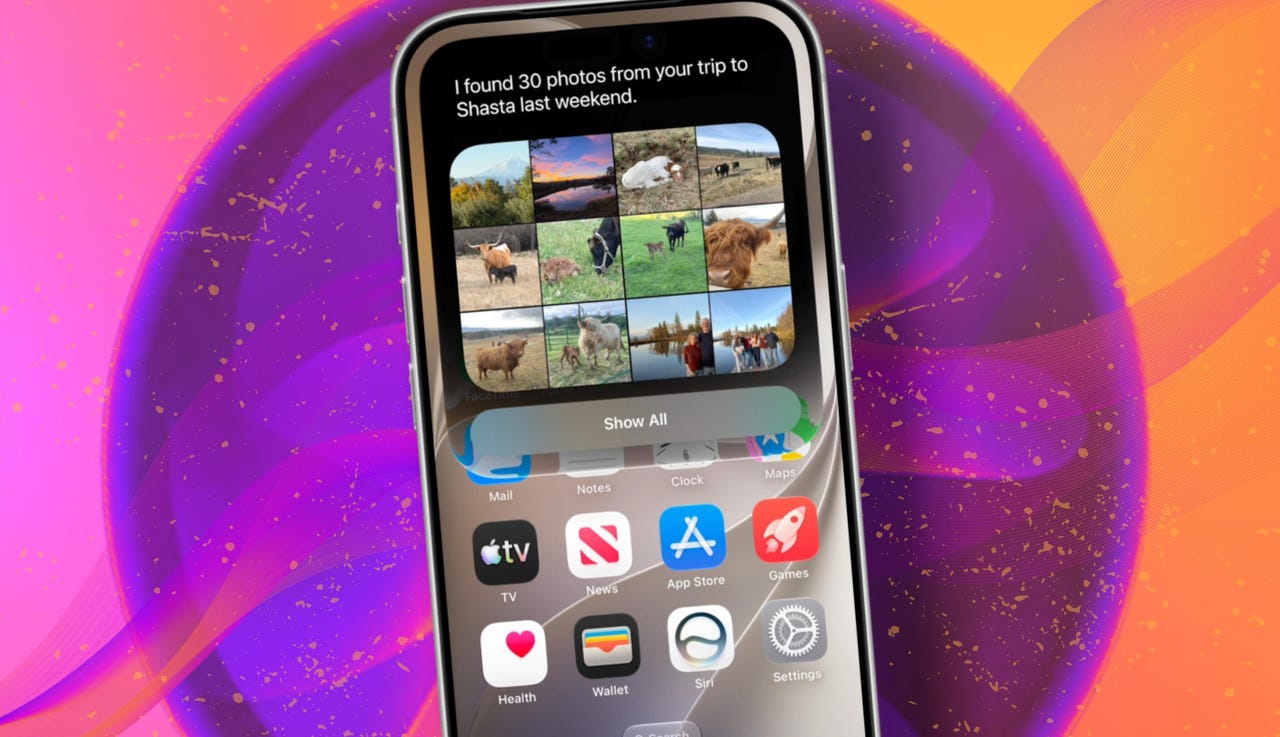
At WWDC 2026 in June, the company introduced Siri AI, a new version of Siri “powered by Apple Intelligence.” Apple said Siri AI is more conversational, understands personal context, can answer broader questions, and can take action across apps. It can also use my information from messages, emails, photos, notes, and the screen itself to get more done on my behalf.

Also: The two biggest iOS 27 features at WWDC for me had nothing to do with Siri AI

The catch? (There’s always one, right?) The iOS 27 developer beta needs to be installed first, and even then, there is a waitlist.

How to get Siri AI

What you’ll need: An iPhone 15 Pro or Pro Max, any iPhone 16 model, or any iPhone 17 model running the iOS 27 developer beta.

Install the iOS 27 developer beta on a secondary device, but be sure to back it up first. Remember, developer betas are unfinished software. Apps can crash or glitch, battery life can drain, and features can disappear.

The good news is Apple no longer requires a $99-a-year Apple Developer Program membership just to get access to beta software. A free Apple Developer account is enough. To join, if you haven’t before, simply go to Apple’s Developer website or use the Apple Developer app, sign in, and agree to the developer terms.

Also: 3 new MacOS 27 features make it worth upgrading right away for me – Siri included

Once that’s done, any new developer beta will automatically appear for the iPhone associated with that Apple Account. To check for iOS 27 and install it now, open Settings > General > Software Update > Beta Updates. From there, select iOS 27 Developer Beta, go back to the Software Update screen, and install the update.

Need help? Check out ZDNET’s guide on installing the iOS 27 developer beta.


Show more

Install the iOS 27 developer beta

Elyse Betters Picaro / ZDNET

After the iOS 27 developer beta is installed, the iPhone will reboot, but Siri AI will not automatically be available to try. Apple is using a waitlist. To join it, open the Settings app, go to Apple Intelligence and Siri, and select “Try New Siri.” Follow the prompts to opt in. Once a spot opens, a notification will appear saying New Siri is available.

Also: Getting real about WWDC and Siri AI – Video

Apple has not confirmed how long the wait will take, but it has said Siri AI will be available in beta “later this year.”


Show more

Join the Siri AI waitlist

Elyse Betters Picaro / ZDNET

Should you wait to try Siri AI?

Maybe. The iOS 27 developer beta is the only route to Siri AI right now. But it’s meant for developers testing apps and APIs, not for most people who need a stable daily phone. Only install it on an iPhone that’s not used every day, or wait for the iOS 27 public beta. That’s expected in July and is easy for anyone to try. An official release for the general public isn’t expected until this fall.

Also: How Data Can Improve Your Health and Wellness

As for me? I joined. I have a spare iPhone running the iOS 27 developer beta right now, and the first thing I did was get on the waitlist to try Siri AI. But that’s because I’m usually excited to try AI tools, and I want to play with the new Siri and be able to write about it. 

Should you join Siri Ai waitlist?

Elyse Betters Picaro / ZDNET

What can Siri AI do?

Apple said the new Siri AI is “a dramatically more capable and conversational assistant” that can help you “find information and get things done throughout the day.” That’s nice, but what, specifically, can it do? According to Apple, the new Siri AI can:

Also: Will your iPhone support Siri AI? The answer is complicated

  • Access “broad world knowledge for up-to-date answers” on any topic.
  • Provide “detailed responses” and “natural back-and-forth conversation.”
  • Use “personal context” in messages, emails, and photos to help find what you need.
  • Find details like restaurant tips, hotel confirmations, and trip photos.
  • Understand what’s on screen and answer questions about it.
  • Use “Visual Intelligence” in Camera and screenshots.
  • Take actions across apps, including drafting emails and editing or sharing photos.
  • Let you ask about images, files, and text from context menus.
  • Generate, rewrite, and proofread text systemwide.
  • Match punctuation and tone in Mail and Messages based on how you usually write.
  • Save “conversation history” in a dedicated Siri app.
  • Offer more expressive voices and better dictation.
  • Help split bills with Apple Cash.
  • Run across iPhone, iPad, Mac, Apple Watch, CarPlay, AirPods, and Vision Pro.
  • Work from Spotlight on iPad and Mac.

When will Siri AI be available?

Apple said it will be available in beta “later this year,” starting in English.

Which iPhone models support Siri AI?

The answer is complicated, but here’s my best guess:

  • iPhone 15 Pro and iPhone 15 Pro Max
  • All iPhone 16 models
  • Any later iPhone models

Apple hasn’t provided a supported device list, but its iOS 27 page shows Siri AI requires “an Apple Intelligence-enabled device.” Apple’s support page for Apple Intelligence also lists “iPhone 15 Pro models, and iPhone 16 models or later.” Apple’s iOS page uses similar wording for Apple Intelligence in iOS 27, as well: “all iPhone 16 models and later, iPhone 15 Pro, iPhone 15 Pro Max.”

There are also regional limits. Apple said Siri AI will “not initially” be available in the EU on iPhone and iPad.


Show more


Source link